
Usage
Usage
Overview
The Usage page shows the resource consumption of a workspace, helping administrators monitor usage trends and member consumption distribution.
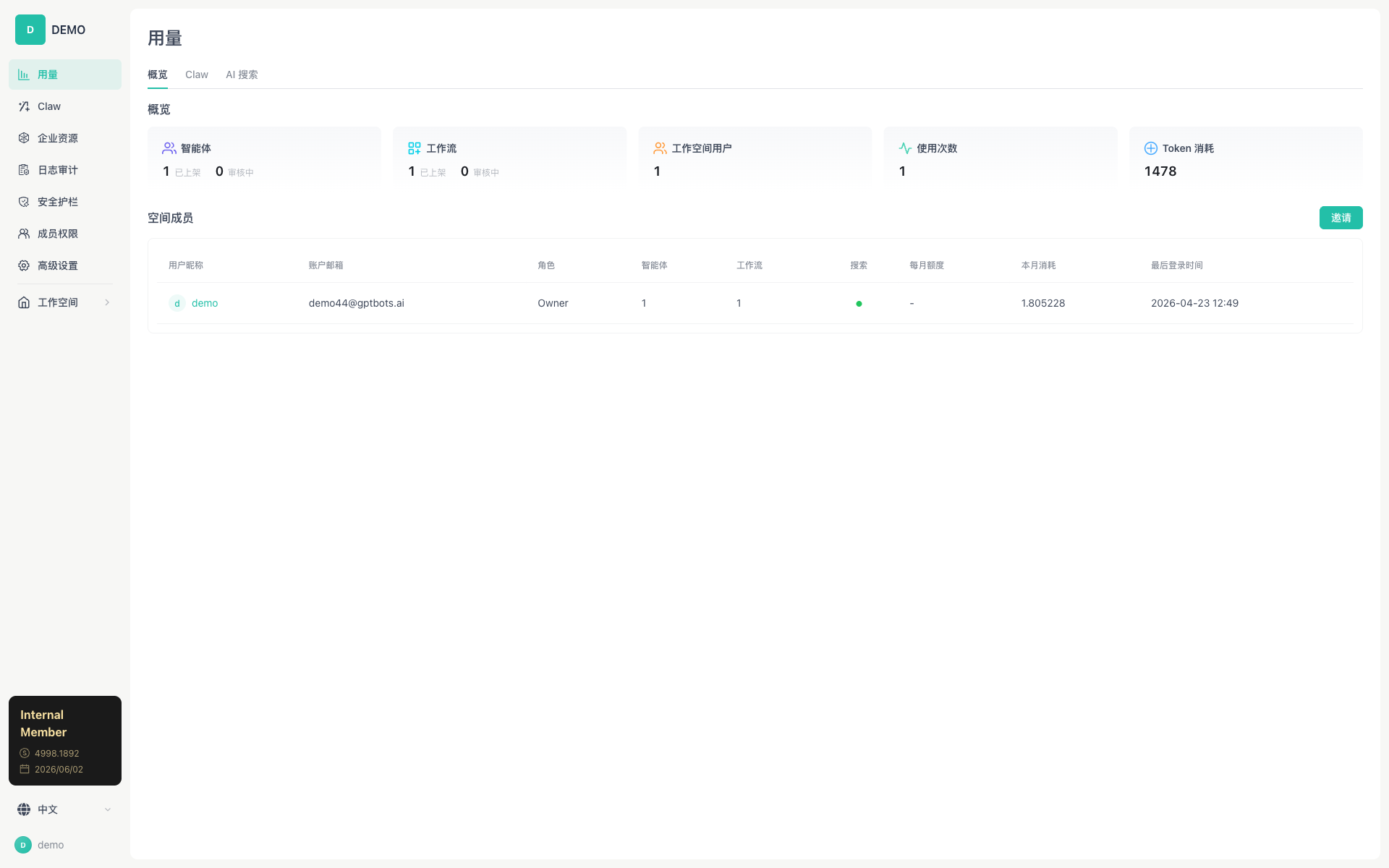
Tabs
| Tab | Description | Status |
|---|---|---|
| Overview | Overall usage statistics and member consumption table | ✅ Available |
| Work | Work conversation usage details | ✅ Available |
| AI Search | AI Search usage | ✅ Available |
Note: The Distill tab is not yet available online (Coming Soon).
Overview Tab
Usage Statistics Cards
Shows the overall key metrics of the workspace, with 5 cards in a row:
| Card | Content |
|---|---|
| Agents | Number of published / under-review agents |
| Workflows | Number of published / under-review workflows |
| Workspace Users | Number of active members |
| Usage Count | Total number of conversations in the workspace |
| Token Consumption | Cumulative Token consumption |
Space Members Table
| Column | Description |
|---|---|
| User Nickname | Avatar + username |
| Account Email | User email |
| Role | Owner / Admin / custom role |
| Agents | Number of agents owned/published by the member |
| Workflows | Number of workflows owned/published by the member |
| Search | Whether search permission is enabled (green dot) |
| Monthly Quota | Monthly credit quota (- indicates unlimited) |
| This Month's Consumption | Credits consumed this month |
| Last Login Time | Time of the most recent activity |
The Invite button in the top-right corner lets you invite new members to join.
Work Tab
Shows detailed usage data for the Work conversation module:
- Conversation volume by time period
- Token consumption by model
- Tool call count statistics
AI Search Tab
Shows AI Search usage:
- Number of searches
- Token consumption
- Top queries
Permission Requirements
| Permission Code | Description |
|---|---|
USAGE_OVERVIEW_VISIT |
Access the Overview tab |
USAGE_CLAW_VISIT |
Access the Work tab |
USAGE_SEARCH_VISIT |
Access the Search tab |
Related Documents
- Member Permissions — Manage members' credit quotas
- Log Audit — View detailed operation logs