
Advanced Settings
Overview
The Advanced Settings page provides brand customization, theme colors, SSO integration, and enterprise memory management for a workspace — this is the key configuration entry point for making AI truly "part of the enterprise."
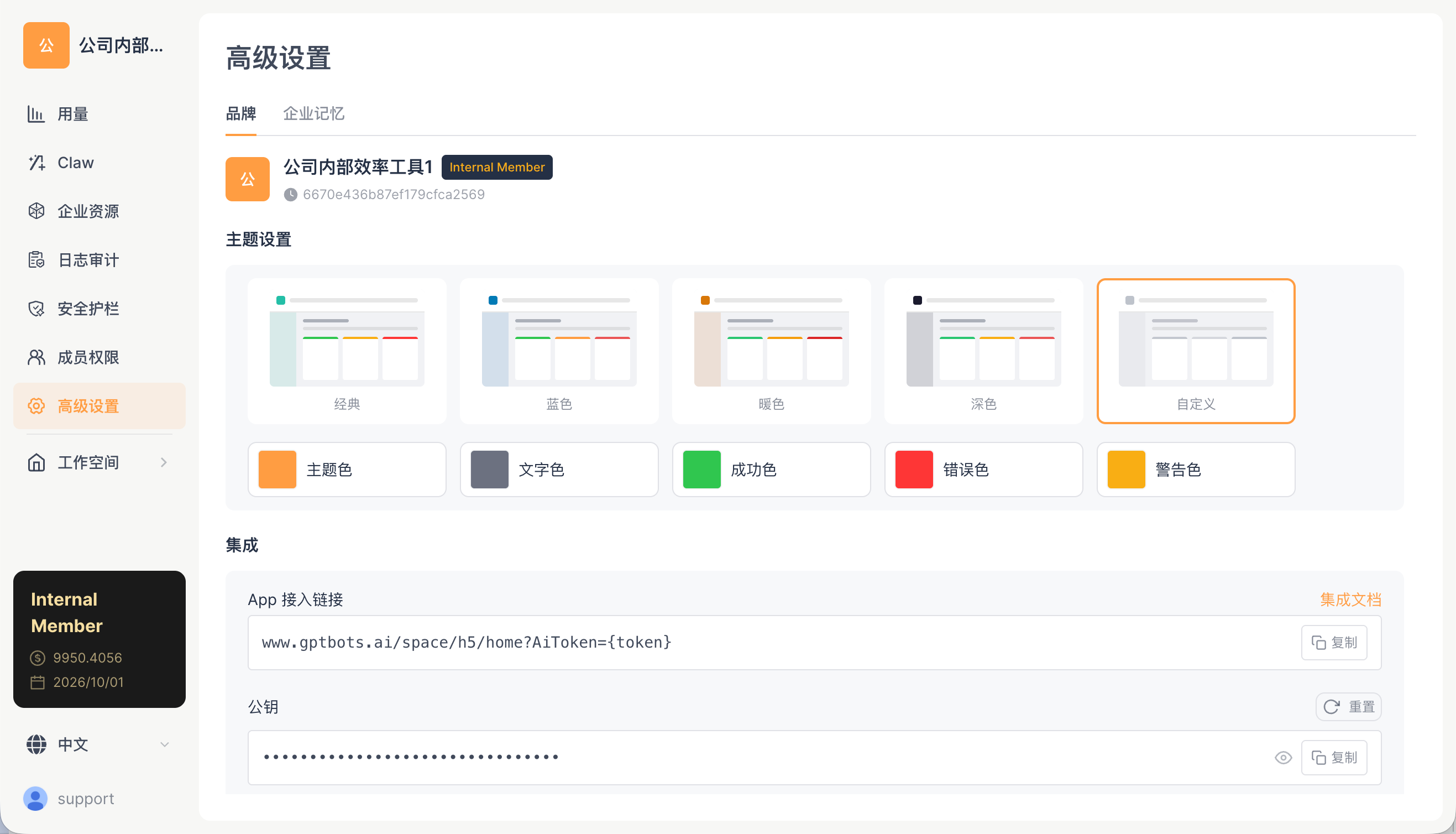
Two Sub-tabs
| Tab | Description |
|---|---|
| Brand | Logo, name, theme, integration |
| Enterprise Memory | Organization-level memory management (list + graph view) |
Brand Tab
Basic Information
| Field | Description |
|---|---|
| Logo | Pulls the organization's logo |
| Name | Pulls the organization's name |
Theme Settings
Provides 5 preset themes + a custom theme:
| Theme | Visual Effect | Use Case |
|---|---|---|
| Classic | Emerald primary color, fresh and clean | Recommended default |
| Blue | Blue palette, professional feel | Finance, formal enterprise environments |
| Warm | Beige/brown, cozy | Creative/education teams |
| Dark | Dark background | Extended use, reduces eye strain |
| Custom | Fully customizable | Match brand colors |
Color Tokens
You can configure 5 semantic colors individually:
| Token | Example Usage |
|---|---|
| Primary color | Buttons, highlights, emphasis elements (default emerald #23bfa8) |
| Text color | Body text (dark gray) |
| Success color | Success state (green) |
| Error color | Error state (red) |
| Warning color | Warning state (amber) |
Integration
Provides an integration entry point for embedding the workspace into an enterprise's own App or intranet system — enabling employees to open the workspace without logging in via AiToken.
| Field | Description |
|---|---|
| App Access Link | A template link similar to www.gptbots.ai/space/h5/home?AiToken={token} |
| Public Key | The RSA public key used to issue tokens; can be viewed and reset |
| Integration Docs | A link in the top-right corner that jumps to the integration development documentation |
For detailed configuration, go to the dedicated Mobile Integration documentation page, where you can view detailed integration methods and sample code.
Enterprise Memory Tab
Organization-level memory — knowledge maintained by administrators that is injected into every Work conversation for all members of the organization.
Typical Uses of Enterprise Memory
- Company tech stack:
We use React + Node.js + PostgreSQL - Business rules:
All external quotes require director approval, with a cap of 100,000 - Product terminology:
Our main product is called Alpha, and its core modules are X/Y/Z - Team structure:
The R&D team is divided into 3 groups: infrastructure, frontend, and backend
New members need no training after joining — the Agent automatically provides enterprise-tailored answers based on this background.
List View
| Action | Description |
|---|---|
| Browse | Displays enterprise memory entries with pagination (50 per page) |
| Search | Client-side keyword filtering |
| Add | Manually add a new enterprise memory |
| Edit | Modify memory content |
| Delete | Remove a single memory |
Graph View
Enterprise memory supports force-directed graph visualization:

| Node Type | Color | Description |
|---|---|---|
| Hub (organization center) | Purple #6d28d9 |
The organization center node |
| Fact | Blue #2563eb |
A single memory entry, connected to the Hub |
| Entity | Amber #f59e0b |
An entity extracted from graph relationships |
Graph interaction and optimization (updated 2026-04):
- Dual-density gate (PILL_READABILITY_MIN_SCALE = 1.5, PILL_MIN_SCREEN_AREA_PER_NODE = 3000): text labels are rendered only when both the zoom level and node density meet the thresholds, preventing the graph from becoming a blur when there are too many nodes
- Stable color mapping: entity types are mapped to a 10-color palette via a djb2 hash, ensuring the same entity type has a consistent color across different views
- Collapse mode: when there are more than 100 memories, the Hub node displays a count label (e.g., "128 memories") to avoid over-expansion
- Click / hover / drag / zoom: click a node to view details, edit, or delete; hover to show the full text; drag to adjust the layout; use the scroll wheel to zoom
Difference from Account Memory
| Comparison | Enterprise Memory | Account Memory |
|---|---|---|
| Manager | Workspace administrators only | Individual user |
| Visibility Scope | All members of the organization | Only the user themselves (across organizations) |
| Typical Content | Company rules, tech stack, project information | Personal preferences, habits, background |
| Management Interface | Space Management → Advanced Settings → Enterprise Memory | APP → Settings → Memory |
| Conversation Injection | "Enterprise overview" injected into the system prompt | "User overview" injected into the system prompt |
For a full technical explanation of the memory system, see Three-Dimensional Memory System.
How-To Guide
How to Customize Branding
- Open the Web client → Space Management → Advanced Settings → Brand tab
- Click the Logo area to upload a new image
- In the pop-up cropping window, adjust the crop area and preview the result
- Modify the theme and color tokens
- Save
Impact: Brand customization is visible to all members. After the update, members will see the new Logo and color scheme when they open the workspace.
How to Manage Enterprise Memory
- Open the Enterprise Memory tab
- Add a memory: click the add button and enter enterprise-level knowledge (e.g., "Company tech stack: React + Node.js + PostgreSQL")
- Edit: click an existing memory entry to modify its content
- Delete: click the delete button to remove a single memory
- View the graph: switch to the graph view to visualize the relationships between memories
Impact: Enterprise memory is automatically injected when any member in the organization starts a new conversation. After adding "The company tech stack is React," whenever any member discusses technical solutions with the Agent, the Agent will prioritize recommending React-related solutions.
How to Configure SSO Embedding
- Open the Integration area
- Copy the App Access Link template
- Obtain the public key on this page and issue an AiToken in your App / intranet system according to the specification
- Assemble the URL and open it in an iframe, WebView, or new window
For full implementation steps, RSA encryption code samples (Java / TypeScript), native APP bridging protocols, and other details, go to:
Related Documentation
- Mobile Integration Overview — AiToken encryption and the WebViewBridge protocol
- Android Integration — Android native App integration
- iOS Integration — iOS native App integration
- Memory Management — APP-side account-level memory management
- Three-Dimensional Memory System — Technical details of the memory system