
App Settings Overview
Overview
GWork is the desktop app of the GPTBots Workspace. It is the "execution end" that runs on your own computer: it reads and writes local files, runs commands, connects IM channels, runs scheduled tasks, and registers itself as a Work Node. The Web client does not have these local capabilities; the corresponding enterprise-level management features are found in Workspace Management.
For first-time use, we recommend reading App Quick Start first.
Main Window Layout
The main window of the app has a fixed left navigation bar and a content area on the right:
| Area | Description |
|---|---|
| Left navigation | New task / Scheduled tasks / Integrations / Tools & Skills / My Files, followed by the My projects list |
| Content area | The page of the selected navigation item; New task opens the conversation page |
| Bottom-left | Current user (nickname + organization) and the ⚙ Settings button that opens the Settings panel |
| Navigation item | What it does | Detailed docs |
|---|---|---|
| New task | Start a conversation with the Agent. Below the input box you can switch the Work Node, the model, and see the number of enabled tools/skills | App Quick Start |
| Scheduled tasks | Create and manage tasks that run automatically on a schedule | Scheduled Tasks |
| Integrations | Connect IM platforms (Telegram, WhatsApp, Discord, Slack, Teams, WeChat, DingTalk) | Channels |
| Tools & Skills | Install tools and skills from the Market, or use enterprise / personal ones | Skills, Tools |
| My Files | Files produced by tasks (filter by type, search by file or task) | — |
Settings Panel
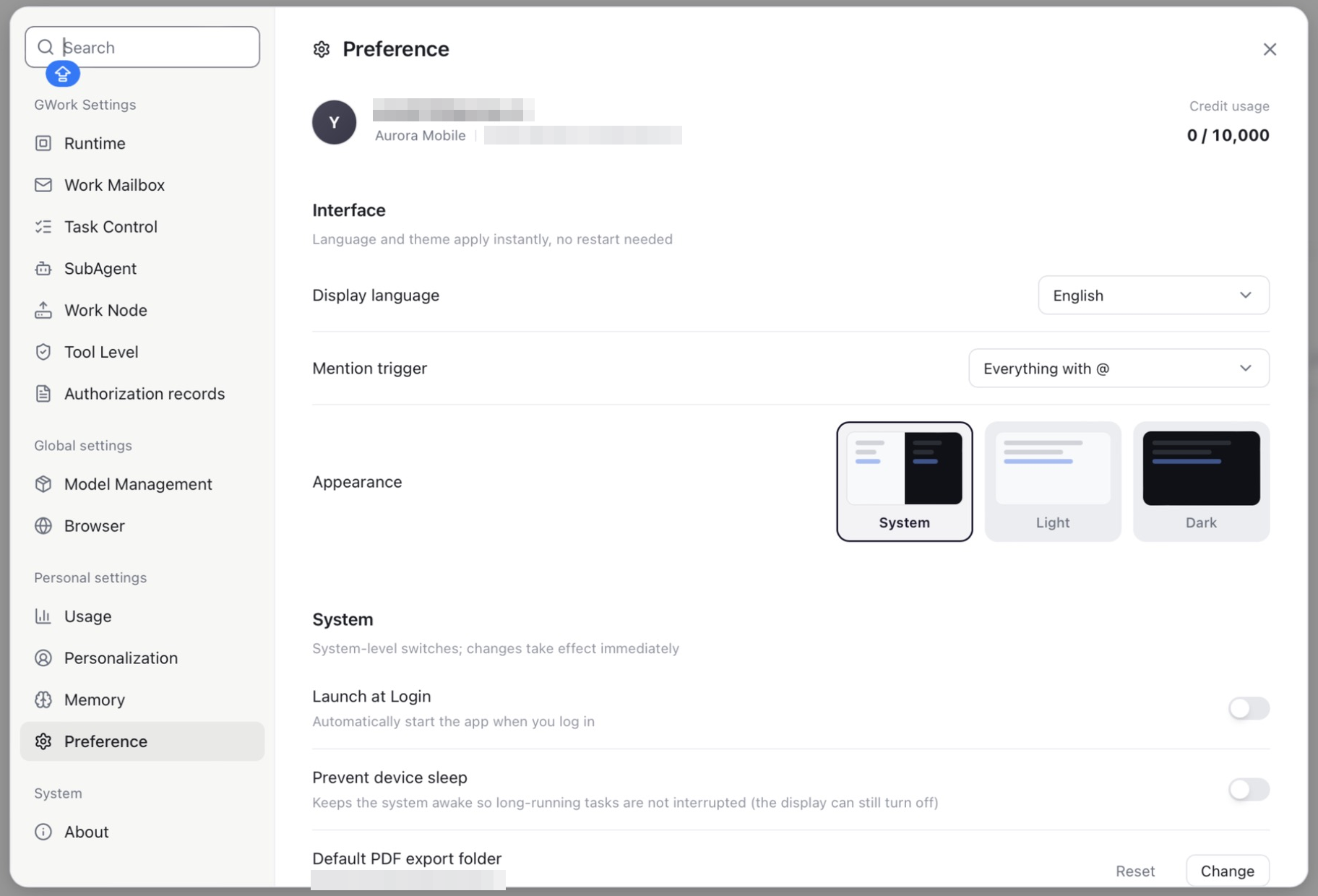
Click the ⚙ Settings button at the bottom-left of the main window. Settings open as a dialog over the main window; the left side is a searchable menu, the right side is the selected settings page.
GWork Settings
| Menu | Description | Detailed docs |
|---|---|---|
| Runtime | Agent environment (Local / Sandbox), sandbox installation, system security baseline | Runtime Security |
| Work Mailbox | Add a work mailbox (e.g. Microsoft 365) so the Agent can read, search and send mail on your behalf | — |
| Task Control | Limits per Agent run: max loop count, max error count, context compaction threshold, token budget, sub-agent timeout, memory injection limit, debug log | — |
| SubAgent | Pre-register sub-agents that the main Agent can dispatch tasks to | Subagent Management |
| Work Node | This device as a node: node name, Private / Public, system info, custom capabilities, commands | Runtime Security |
| Tool Level | Set the permission level (P0 / P1 / P2) of every built-in and installed tool | Runtime Security |
| Authorization records | Tools you have granted "Always Allow", and OS-level permissions (e.g. Full Disk Access) | Runtime Security |
Global settings
| Menu | Description | Detailed docs |
|---|---|---|
| Model Management | Use models managed by your organization (Enterprise Key) or your own provider keys (Owner Key) | Model Configuration |
| Browser | Allow Agent browser control, built-in browser engine, browsing data / history, imported browser data, password manager, downloads folder | — |
Personal settings
| Menu | Description | Detailed docs |
|---|---|---|
| Usage | Monthly credit quota, daily credit consumption (by model / by node) and tool activity | — |
| Personalization | Your nickname, the AI's nickname, and custom instructions applied to every task | — |
| Memory | Memory query mode, personal / enterprise memory, knowledge graph and memory entries | Memory Management |
| Preference | Account info and credit usage, display language, mention trigger, appearance, launch at login, prevent device sleep, default PDF export folder | see below |
System
| Menu | Description |
|---|---|
| About | App version, check for updates, open / export application logs |
Preference
The Preference page shows the current account and the most common app-level options:
| Item | Description |
|---|---|
| Account | Avatar, account email, organization name and organization ID, credit usage (used / quota) |
| Display language | UI language; applies instantly, no restart needed |
| Mention trigger | How @ mentions are triggered in the input box |
| Appearance | System / Light / Dark |
| Launch at Login | Start the app automatically when you log in to the OS |
| Prevent device sleep | Keep the system awake so long-running tasks are not interrupted (the display can still turn off) |
| Default PDF export folder | Where exported PDFs are saved (Change / Reset) |
Correspondence with the Web Version
Most desktop app settings are "local configurations" and have no corresponding entry in the web version — but some resource-type configurations can also be seen in the web version's Workspace Management:
| App | Web Equivalent |
|---|---|
| Model Management (Owner Key) | None (App exclusive); Enterprise Key models are managed by the organization |
| Tools & Skills → Enterprise | Workspace Management → Enterprise Resources → Skills / Tools |
| SubAgent | None (App exclusive) |
| Integrations | None (App exclusive) |
| Scheduled tasks | None (App exclusive) |
| Memory (Enterprise) | Workspace Management → Advanced Settings → Enterprise Memory (Enterprise only) |
| Tool Level | Workspace Management → Security Guardrails (Organization-level floor) |
Hierarchy: The configuration in Workspace Management is the organization floor, and personal configuration on the App side cannot be lowered below the organization floor. For example, if the administrator sets
Run commandto P1, you cannot change it to P0 in the App; but you can change it to a stricter P2. Tools fixed by the organization show a lock icon on the Tool Level page.
Organization Switching
An account may belong to multiple organizations. When switching organizations:
- ✅ The currently running conversation will not be terminated and stays active
- ✅ Account-level data (personal memory, IM credentials) is shared across organizations
- ❌ Organization-level data (enterprise skills / tools, projects and tasks, scheduled tasks, organization models / credits) switches to that of the new organization
Next Steps
- First time using the App → App Quick Start
- Want to dive into each module → the specific docs in the tables above
- Want to understand the permission model → Runtime Security