
Skill Management
Overview
Skills are pre-packaged professional capability modules. Each skill declares its identity, trigger conditions, and execution logic through a SKILL.md file. Skills are managed on the Tools & Skills page (left navigation → Tools & Skills → Skills tab).
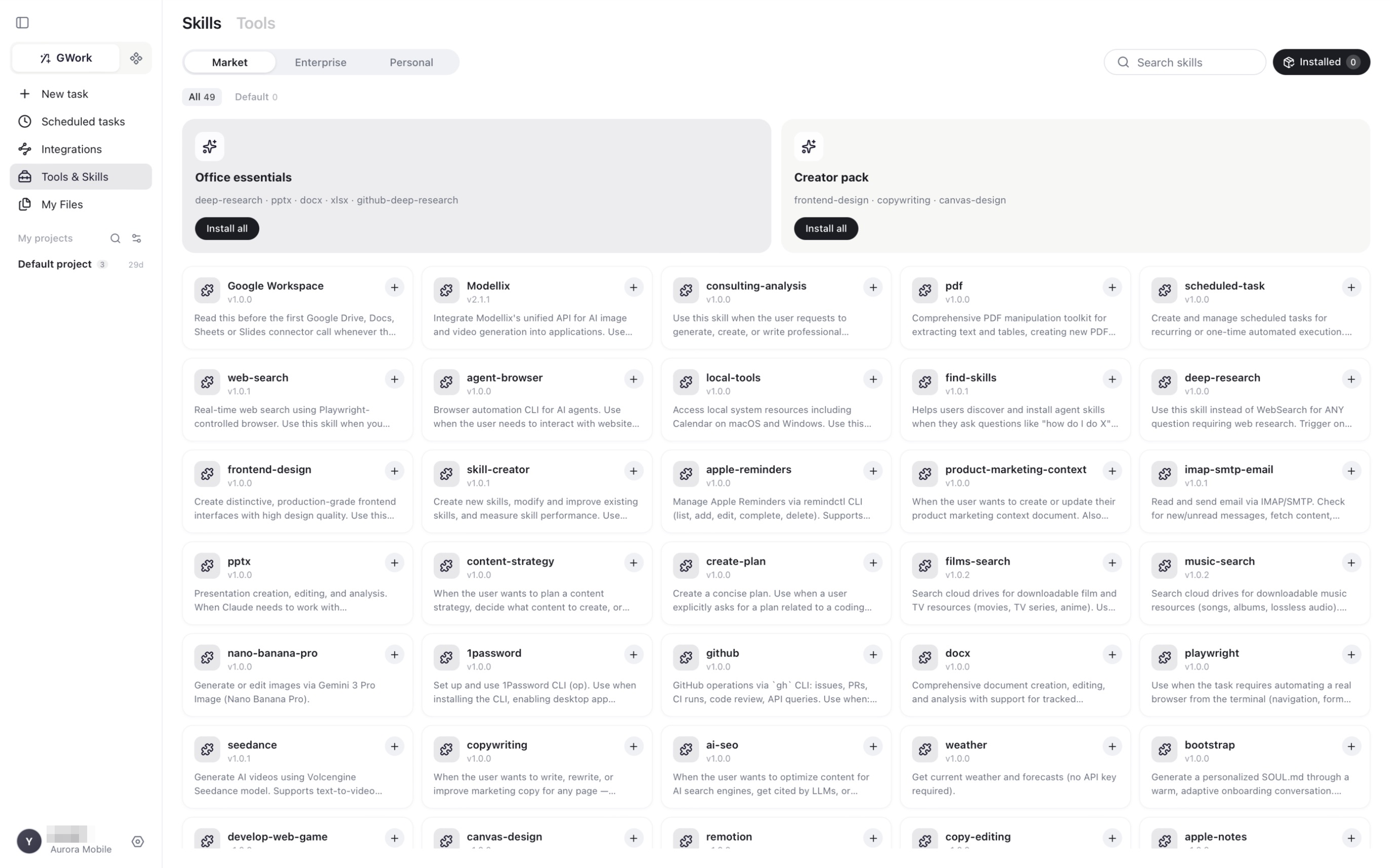
Page Layout
| Element | Description |
|---|---|
| Skills / Tools tabs | Switch between the skill market and the tool market |
| Market / Enterprise / Personal | Source of the skills: the public Market, skills published by your organization, or skills you created / imported yourself |
| All / Default filters | Default shows the skills pre-selected for your organization |
| Skill packs | Bundles such as Office essentials (deep-research · pptx · docx · xlsx · github-deep-research) and Creator pack (frontend-design · copywriting · canvas-design) — Install all with one click |
| Skill card | Name, version, one-line description and a + button to install |
| Search skills | Filter by name |
| Installed | Shows how many skills are installed; click to view and manage them |
A skill is only available to the Agent after it is installed. The count badge below the input box on the New task page reflects installed tools and skills.
Skills Available in the Market
The Market currently offers about 50 skills. Representative ones:
Office Documents
| Skill | Description |
|---|---|
| docx | Word document creation, editing and analysis |
| xlsx | Excel spreadsheet creation and processing |
| pptx | PowerPoint presentation creation, editing and analysis |
| PDF text / table extraction and PDF creation | |
| Google Workspace | Google Drive, Docs, Sheets and Slides |
Research and Search
| Skill | Description |
|---|---|
| web-search | Real-time web search using a Playwright-controlled browser |
| deep-research | Multi-source web research for questions that need more than a single search |
| films-search / music-search | Search cloud drives for downloadable film / music resources |
| find-skills | Helps you discover and install skills ("how do I do X") |
Writing and Marketing
| Skill | Description |
|---|---|
| copywriting / copy-editing | Write, rewrite or improve marketing copy |
| content-strategy / product-marketing-context / ai-seo | Plan content, maintain product marketing context, optimize for AI search engines |
| consulting-analysis | Generate professional analysis and reports |
Design and Generation
| Skill | Description |
|---|---|
| canvas-design / frontend-design | Visual design on a canvas; production-grade frontend interfaces |
| nano-banana-pro / seedance / Modellix | AI image and video generation |
| remotion | Programmatic video generation |
Development and Automation
| Skill | Description |
|---|---|
| github | GitHub operations via the gh CLI (issues, PRs, CI runs, code review) |
| playwright / agent-browser | Browser automation from the terminal |
| develop-web-game | Web mini-game development |
| scheduled-task | Create and manage scheduled tasks from a conversation |
| create-plan | Create a concise plan for a coding-related task |
| skill-creator | Meta-skill — create, modify and evaluate skills |
Local and Personal
| Skill | Description |
|---|---|
| local-tools | Access local system resources (e.g. Calendar on macOS / Windows) |
| apple-reminders / apple-notes | Manage Apple Reminders and Notes |
| imap-smtp-email | Read and send email via IMAP / SMTP |
| 1password | Set up and use the 1Password CLI |
| weather | Current weather and forecasts |
| bootstrap | Generate a personalized SOUL.md through an onboarding conversation |
The Market is updated continuously; open the Skills tab for the current list.
Skill Loading Mechanism
SKILL.md
Each skill is a directory with a SKILL.md file that declares:
- Skill name and description
- Trigger conditions: under what circumstances this skill is automatically activated
- Execution logic: the specific behavior and capabilities of the skill
How the Agent Uses Skills
Installed skills are exposed to the Agent as callable capabilities. The Agent automatically selects which to use based on the task; you can also name a skill explicitly in your message ("use the pptx skill to…").
Enterprise Skills
Workspace administrators can publish skills to the whole organization through Enterprise Resources. They appear under the Enterprise tab:
| Feature | Description |
|---|---|
| Organization Isolation | Enterprise skills belong to one organization; switching organizations switches the list |
| Automatic Sync | The app periodically syncs enterprise skills from the backend |
| Security Level | Enterprise skills can carry security-level restrictions set by the administrator |
Personal Skills
The Personal tab lists skills you created or imported yourself:
- Use the skill-creator skill in a conversation: describe the skill you want, and it generates the
SKILL.mdand auxiliary files - Import an existing skill directory (containing a
SKILL.md)
Operation Guide
How to Install a Skill
- Left navigation → Tools & Skills → Skills tab
- Find the skill in Market (use the search box or the category packs)
- Click
+on the card (or Install all on a pack) - The skill is now counted under Installed and available to the Agent
How to Remove or Disable a Skill
- Click Installed at the top right of the Skills tab
- Find the skill and remove it
Impact:
- Installed → The Agent can use the skill. For example, after installing
web-search, the Agent can search the web for real-time information.- Not installed → The Agent is unaware the skill exists. For example, without
web-searchthe Agent can only rely on its own knowledge.
Examples of the Actual Effect
| Skill | What the Agent Can Do When Installed | Without It |
|---|---|---|
| web-search | Search the web for the latest information | May give outdated answers |
| docx | Generate Word documents | Can only output plain text |
| playwright | Automatically control a browser (screenshots, forms, scraping) | Cannot operate a browser |
| nano-banana-pro | Generate or edit images | Cannot generate images |
| imap-smtp-email | Send and receive emails | Cannot handle email tasks |
| scheduled-task | Create scheduled tasks from the conversation | You must create tasks from the Scheduled tasks page |
FAQ
I can't see enterprise skills
Open the Enterprise tab. Enterprise skills are synced from the backend periodically; restarting the app triggers an immediate sync. Confirm that the workspace administrator has published the skills in Enterprise Resources.
I installed a skill but the Agent didn't use it
The Agent independently decides whether to use a skill based on the task. You can explicitly instruct it: "Please use the web-search skill to search for the latest React version."
Related Documentation
- Tool Management — the synergy between skills and tools
- Enterprise Resources — enterprise-level skill management