
Tool Management
Overview
Tools are the "hands and feet" that an Agent uses to carry out actions. The app ships with a set of built-in tools (file operations, run command, browser, …) and lets you extend them with tools from the Market (MCP servers, API tools), Enterprise tools published by your organization, and Personal tools you add yourself.
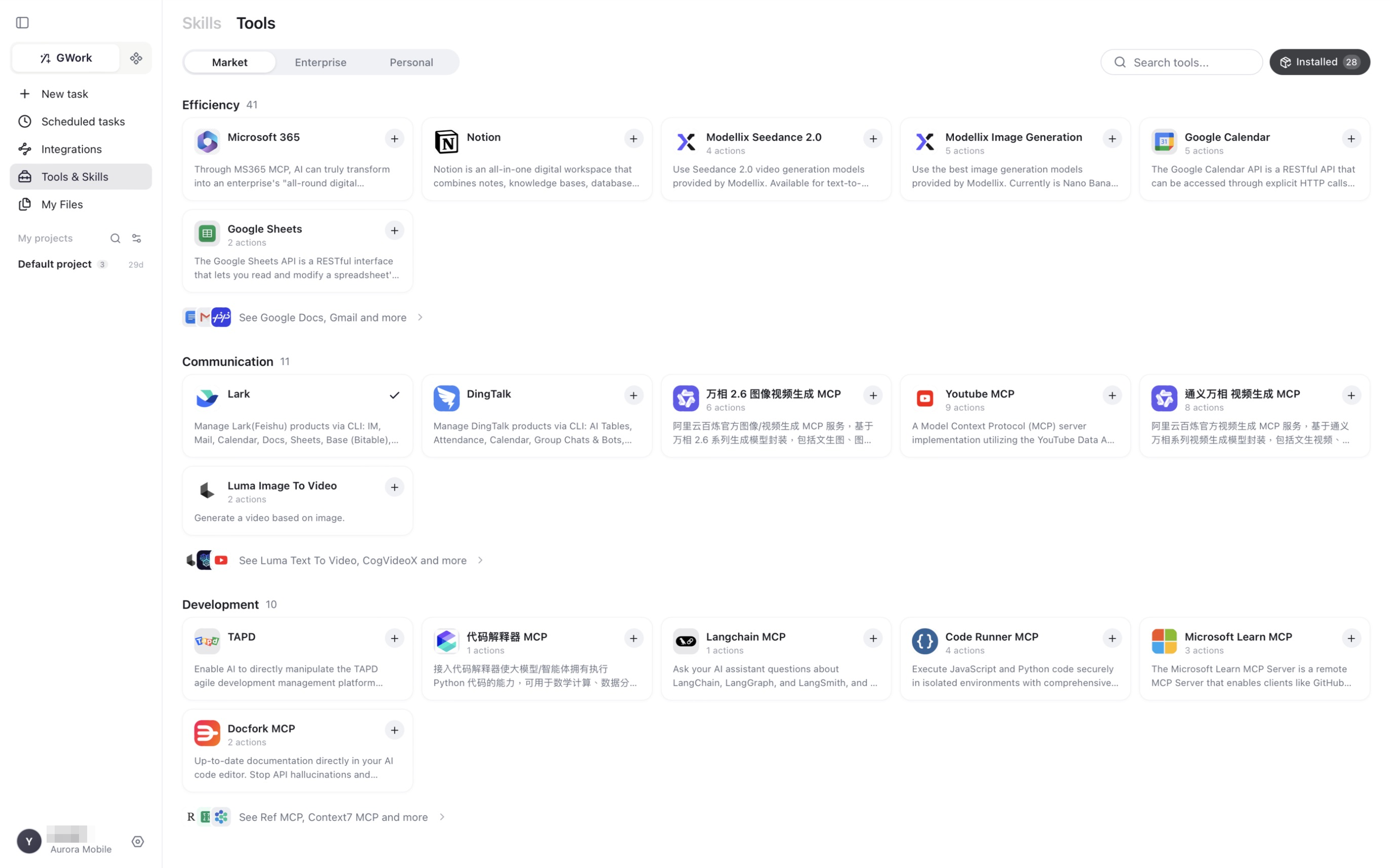
Tools are managed in two places:
| Where | What you do there |
|---|---|
| Left navigation → Tools & Skills → Tools tab | Install / remove tools from the Market, Enterprise or Personal sources |
| Settings → Tool Level | Set the permission level (P0 / P1 / P2) of every tool, built-in ones included |
Built-in Tools
Built-in tools are always present and are listed on the Tool Level page with a Built-in badge. Representative ones:
File Operations
| Tool | Function | Default level |
|---|---|---|
| Read file | Reads file contents from a path; supports relative and absolute paths | P0 Auto (locked) |
| Write file | Writes content to a path, creating the file (and parent directories) if needed | P1 Standard |
| Append to file | Appends to the end of an existing file, creating it if needed; never overwrites | P0 Auto |
| Browse folder | Lists files and subdirectories with sizes; used to browse project structure | P0 Auto (locked) |
| Find files | Fast file discovery by name pattern (glob), e.g. **/*.ts |
P0 Auto (locked) |
| Search in files | Searches file contents | P0 Auto (locked) |
Execution and Browser
| Tool | Function | Default level |
|---|---|---|
| Run command | Executes shell commands: scripts, package installation, Git operations | P1 Standard |
| Browser | Browses websites in this device's isolated browser profile: read pages, click, type | P1 Standard (locked) |
Other built-in tools cover task management, sub-agent dispatch, memory query and management, and conversation search. Open Settings → Tool Level for the complete list on your version.
Tool Levels
Every tool has a permission level that controls how often a task pauses for your confirmation:
| Level | Name | Behavior |
|---|---|---|
| P0 | Auto | Executes silently, no confirmation |
| P1 | Standard | A permission card is shown; you can choose Always Allow so the same kind of action is not asked again |
| P2 | High-Risk | A permission card is shown on every call; "Always Allow" is disabled |
| 🔒 Locked | — | The level is fixed (by the system or by your organization's Security Guardrails) and cannot be changed here |
Change levels in Settings → Tool Level. Each row shows the tool, its source (Built-in, installed tool name), and three level buttons; use the All levels / All sources filters and the search box to find a tool. Shell commands containing high-risk instructions (rm -rf, sudo, dd, …) are force-upgraded to P2 regardless of the configured level.
Administrators set the organization floor in Security Guardrails; individuals can only make a tool stricter, never looser, in the app.
Tool Market
The Tools tab of the Tools & Skills page lists tools by category (Efficiency, Communication, Development, …). Each card shows the tool name, the number of actions it provides, and a + button to install. Examples currently in the Market:
| Category | Examples |
|---|---|
| Efficiency | Microsoft 365, Notion, Google Calendar, Google Sheets, Google Docs, Gmail, image / video generation MCPs |
| Communication | Lark (Feishu), DingTalk, YouTube MCP, video-generation MCPs |
| Development | TAPD, code-interpreter MCP, Langchain MCP, Code Runner MCP, Microsoft Learn MCP, Docfork MCP, Context7 MCP |
Click Installed at the top right to see and manage the tools already installed.
Enterprise and Personal Tools
| Tab | Description |
|---|---|
| Enterprise | Tools published by your workspace administrator through Enterprise Resources; they are isolated per organization |
| Personal | Tools you add yourself — MCP servers or API (OpenAPI) tools |
MCP Tools
MCP (Model Context Protocol) is a standardized protocol that lets the Agent use external services as tools. An MCP server can be:
| Transport | Description | Applicable Scenario |
|---|---|---|
| stdio | Local subprocess (command + arguments) | Local CLI tools |
| SSE / HTTP | Remote server reached over HTTP | Remote services |
Authentication options include none, Bearer token, HTTP Basic, service-to-service, and OAuth2.
After a server is added, the app connects to it and discovers the tools (actions) it provides; they then appear in the installed list and on the Tool Level page.
Security: MCP subprocesses only receive whitelisted environment variables. If an MCP tool needs an API key, declare it explicitly in the server's environment configuration.
API Tools
Tools can also be created from an OpenAPI / Swagger definition:
| Function | Description |
|---|---|
| Automatic parsing | Extracts endpoints and parameter schemas from the specification |
| Authentication | Same options as MCP |
| Template variables | Dynamic {{variable}} substitution |
| HTTP methods | GET / POST / PUT / DELETE / PATCH |
Common Tool Usage Scenarios
| Example User Request | Tool Called by the Agent |
|---|---|
| "Show me the contents of package.json" | Read file |
| "Create a README.md" | Write file (P1 — permission card) |
| "Which .tsx files are in the project?" | Find files |
| "Where is useEffect used in the code?" | Search in files |
| "Run npm install for me" | Run command (P1 — permission card) |
| "Open this page and summarize it: https://…" | Browser |
| "Create an event in my Google Calendar" | Google Calendar (installed Market tool) |
How-to: Install a Tool from the Market
- Left navigation → Tools & Skills → Tools tab
- Find the tool (search box or category) and click
+ - Complete any sign-in or key configuration the tool requires
- The tool and its actions are now available; its permission level can be adjusted in Settings → Tool Level
Impact of Removing a Tool
After a tool is removed, the Agent is completely unaware of that tool's existence. Built-in tools cannot be removed, but a strict level (P2) means you confirm every use.
Recommendation: Keep Run command and Write file at P1 or stricter unless you fully trust the environment; the system security baseline additionally enforces manual confirmation before any delete operation.
FAQ
The Agent keeps asking for permission
The tool is at P1 and you have been clicking Allow (one time). Click Always Allow on the permission card, or lower the level in Tool Level if the organization allows it. Grants you have given appear under Settings → Authorization records, where they can be removed.
MCP Tool Connection Failure
- Confirm that the server's command / URL is correct
- If using stdio, confirm that the command is installed (e.g.
npxrequires Node.js) - Check whether environment variables (such as an API key) are required
- Check the application logs (Settings → About → Open log folder / Export logs)
The Agent Isn't Using the Tool I Expected
The Agent autonomously selects tools based on task requirements. Give explicit instructions in the conversation: "Please use the Run command tool to run this."
Related Documents
- Skill Management — The skill system
- Runtime Security — Tool permission configuration and authorization records
- Security Guardrails — Enterprise-grade tool permission management