
Model Configuration
Overview
Model Management (Settings → Global settings → Model Management) decides which LLMs the Agent can use. There are two Model Service modes, switched by the radio buttons at the top of the page:
| Mode | Who provides the key | Typical use |
|---|---|---|
| Enterprise Key (default) | Your organization. Models are managed by the workspace administrator and billed in organization credits | Most enterprise users — nothing to configure |
| Owner Key | You. Use your own API keys and model configurations | Personal keys, private endpoints, providers the organization has not enabled |
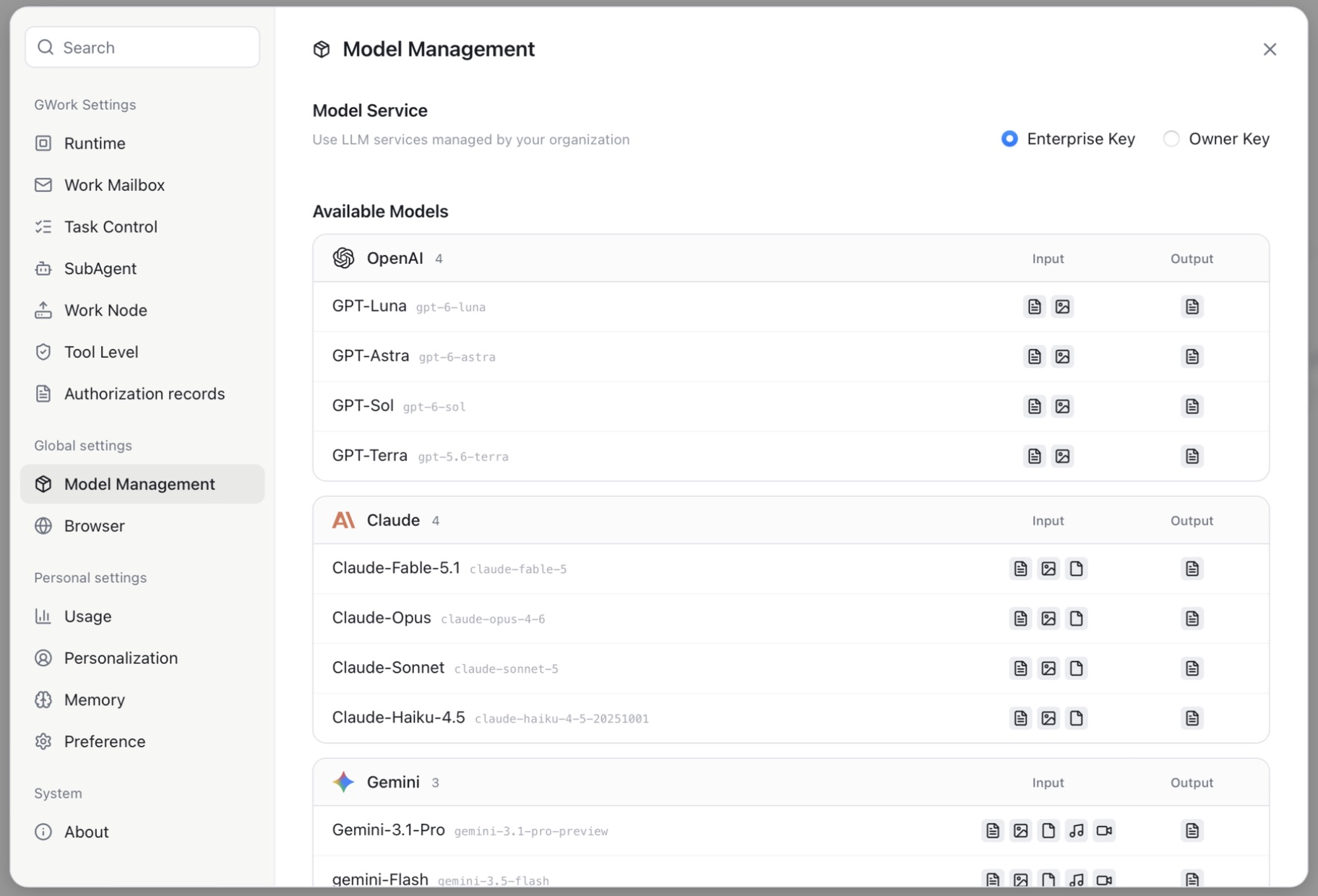
Enterprise Key
In Enterprise Key mode the page lists the Available Models provided by your organization, grouped by provider (e.g. OpenAI, Claude, Gemini). Each model row shows:
| Column | Description |
|---|---|
| Model name + version ID | The display name and the underlying model version |
| Input | Supported input types, shown as icons: text, image, document, audio, video |
| Output | Supported output types |
Nothing can be edited here; the list follows the organization's configuration. Credits consumed by these models are counted against the organization's monthly quota (see Settings → Usage).
Owner Key
Switch Model Service to Owner Key to use your own API keys. The page splits into a provider list on the left and the provider's configuration on the right.
Supported Providers
OpenAI, Anthropic, Gemini, Grok, OpenRouter, DeepSeek, Moonshot, Qwen, Zhipu, MiniMax, Volcengine, StepFun, and more. Each provider has an enable toggle in the list.
Configuration Items
| Item | Description |
|---|---|
| API Base URL | API endpoint. Pre-filled with the provider's default; change it to use a proxy or a compatible third-party endpoint |
| API Key | Your key for that provider (stored locally, encrypted; masked in the UI) |
| LLM Protocol | OpenAI Completions / OpenAI Responses / Anthropic Claude — the request format the endpoint speaks |
| Coding Plan (some providers) | Use the provider's dedicated coding-plan endpoint when enabled |
| Test Connection | Validates the URL + key; the provider badge changes from Unverified to verified |
| Available Models | The models exposed by this provider, each with input / output capability icons; + Add Model lets you add a model version ID manually |
How to Configure a Provider
- Settings → Model Management → select Owner Key
- Click a provider in the left list (e.g. Anthropic)
- Enter the API Key (and change the API Base URL if you use a compatible service)
- Choose the LLM Protocol that matches the endpoint
- Click Test Connection
- Turn on the provider's toggle — its models now appear in the model selector below the input box
Note: Owner Key credentials are stored locally and are not uploaded to the cloud. Never share your API Key with others or commit it to a code repository.
Switching Models
The current model is shown below the input box on the New task page. Click it to switch; the next message uses the new model, and the history of existing conversations is not affected.
Scheduled tasks can either follow the global model or pin a specific one (see Scheduled Tasks).
Model Capabilities
The input / output icons on each model row tell you what the model accepts:
| Capability | Icon meaning | Impact |
|---|---|---|
| Text | document-lines icon | Always supported |
| Image | picture icon | Whether image attachments are passed to the model |
| Document | file icon | Whether PDF / Office attachments are passed to the model |
| Audio / Video | note / camera icon | Whether audio or video attachments are passed to the model |
If you attach a file type the current model does not support, switch to a model that does.
Context Window and Task Limits
The usable context depends on the model's window and on the Task Control settings (Settings → Task Control):
| Setting | Default | Description |
|---|---|---|
| Context Compaction Threshold | 128K | The conversation is summarized once its context exceeds this many tokens; the lower of this value and the model window applies |
| Max Token Budget | 0 (unlimited) | Stop the task when cumulative input tokens exceed this limit |
| Full Context Rounds | 3 | Keep the most recent N rounds with full tool call / result detail; older rounds keep text only |
| Max Loop Count | 100 | Maximum agentic turns per run |
| Max Error Count | 100 | Stop after this many consecutive tool errors |
For the complete list of models, refer to Supported Models List.
Model Selection Recommendations
| Use Case | Recommendation | Reason |
|---|---|---|
| Everyday conversation and lightweight tasks | A fast, low-cost model | Fast response, low credit consumption |
| Complex reasoning and long document analysis | A flagship model with a large window and document input | Strong reasoning, document input |
| Code development and debugging | A flagship or code-specialized model | Code comprehension |
| Requires image / video understanding | A model whose Input icons include image / video | Multimodal input |
| Cost-sensitive | A smaller model | Lowest credit cost |
Tip: If you are unsure, use the organization default shown in the model selector — it is chosen by the administrator for balanced performance.
FAQ
Invalid API Key (Owner Key)
- Confirm the Key was copied correctly (watch for leading and trailing spaces)
- Confirm the Key belongs to the selected provider and that the LLM Protocol matches
- Confirm the Key has not expired or been revoked; click Test Connection again
Request Timeout
- Check your network connection
- If using a custom Base URL, confirm the address is reachable
- Some models may respond slowly under high load; you can retry later
A model is missing from the selector
- Enterprise Key: ask your administrator to enable it for the organization
- Owner Key: make sure the provider's toggle is on, and add the model with + Add Model if it is not listed
Related Documents
- Supported Models List — Complete model capability matrix
- 5-Layer Context Compression — Context window management strategy