
Log Audit
Log Audit
Overview
The Log Audit page provides operation log viewing and filtering for each workspace module, helping administrators monitor system usage, troubleshoot issues, and meet compliance audit requirements.
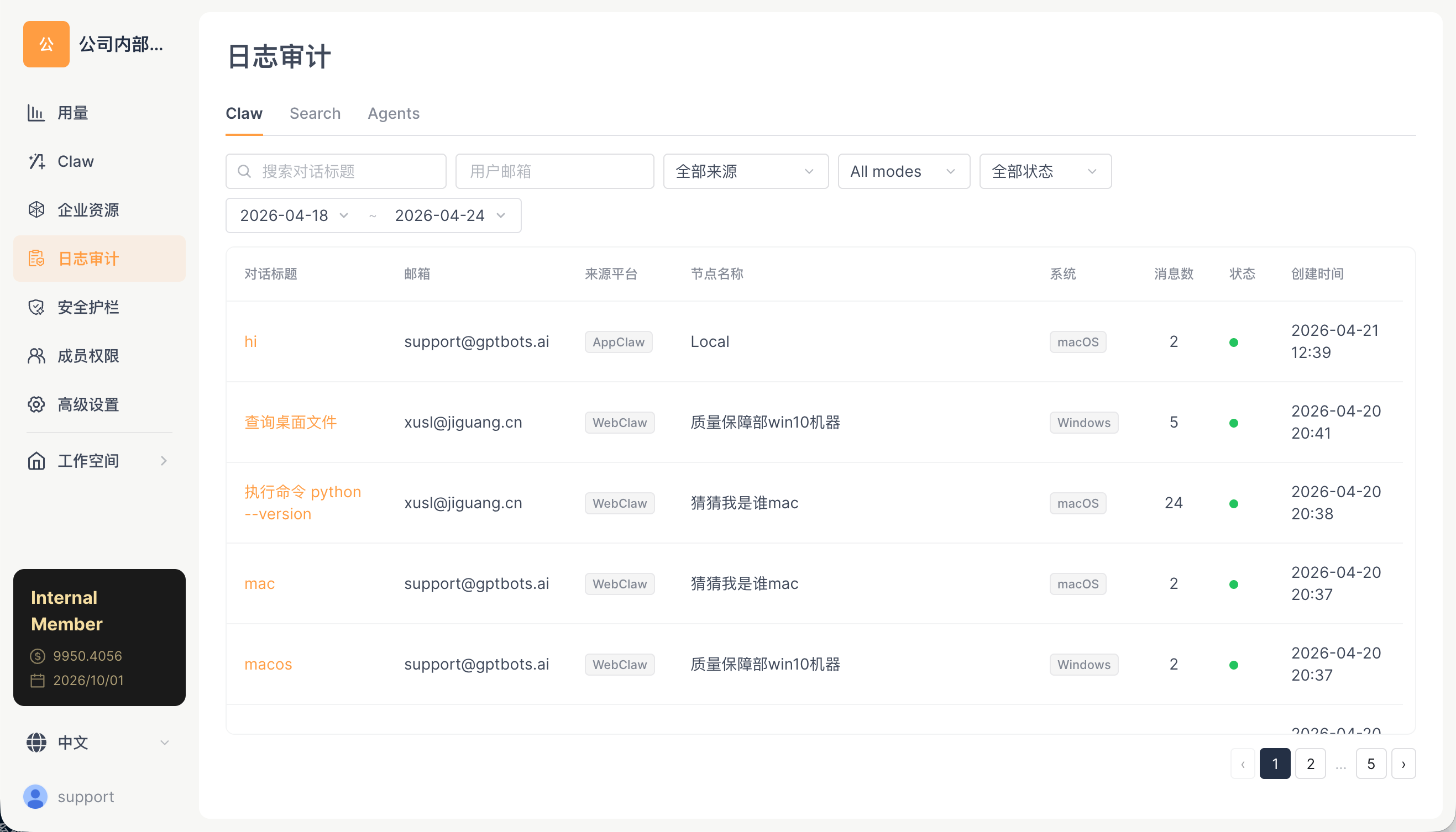
Sub-tabs
| Tab | Description | Status |
|---|---|---|
| Work | Work conversation execution logs | ✅ Available |
| Search | AI Search query logs | ✅ Available |
| Agents | A2A agent interaction logs | ✅ Available |
Work Logs
Displays the execution records of Work conversations.
Filters
| Filter | Description |
|---|---|
| Search conversation title | Fuzzy keyword matching |
| User email | Exact or fuzzy user matching |
| All sources | Source channel: Web / APP / IM channels, etc. |
| All modes | Execution mode |
| All statuses | Completed / Error / Interrupted |
| Time range | Start date ~ End date (e.g., 2026-04-17 ~ 2026-04-23) |
Record Fields
| Field | Description |
|---|---|
| Session ID | Conversation ID and title |
| User | The user who initiated the conversation |
| Time | Conversation timestamp |
| Execution node | Information about the node that processed the conversation (nodeId + displayName) |
| Status | Completed / Error / Interrupted |
| Tool calls | List of tools used and the number of calls |
| Message count | Number of conversation messages |
| Token consumption | Cumulative tokens for the session |
Search Logs
Displays AI Search query records:
- Search query content
- Model used
- Result sources
- Search time
Agents Logs
Displays interaction records of A2A agents:
| Field | Description |
|---|---|
| Agent | Name of the A2A agent involved in the interaction |
| User | The user who initiated the interaction |
| Time | Interaction timestamp |
| Message count | Number of interaction messages |
| Status | Completed / Error |
Question Classification (supported by some logs)
Some logs support a question classification drawer, which categorizes and labels questions asked to the AI Search bot for quality monitoring and optimization.
Permission Requirements
Each tab has independent permission control, ensuring that different roles can only view logs within their authorized scope. Log data is protected by organization isolation, so logs from different orgIds are isolated from one another.
Compliance and Data Export
- All logs are isolated by orgId, and the data retention policy is centrally configured by the platform
- To export an audit report, contact your administrator or platform support
- Sensitive content (such as keys and ID numbers) is processed according to the configuration in Security Guardrails → Data Anonymization
Related Documentation
- Security Guardrails — Content review and anonymization configuration
- Usage Statistics — Usage data at the aggregate level