
Work Node Management
Overview
The Work Node Management page displays all nodes connected to the workspace in real time — including every launched desktop APP and every online Web browser session. Administrators can monitor node status, view capability declarations, and filter nodes.
What is a node? In the workspace's distributed architecture, every endpoint capable of "doing things" is called a node: a desktop APP is an Agent-type node (can execute tasks), and a browser Web session is a Human-type node (can initiate but cannot execute). See Multi-node Architecture for details.
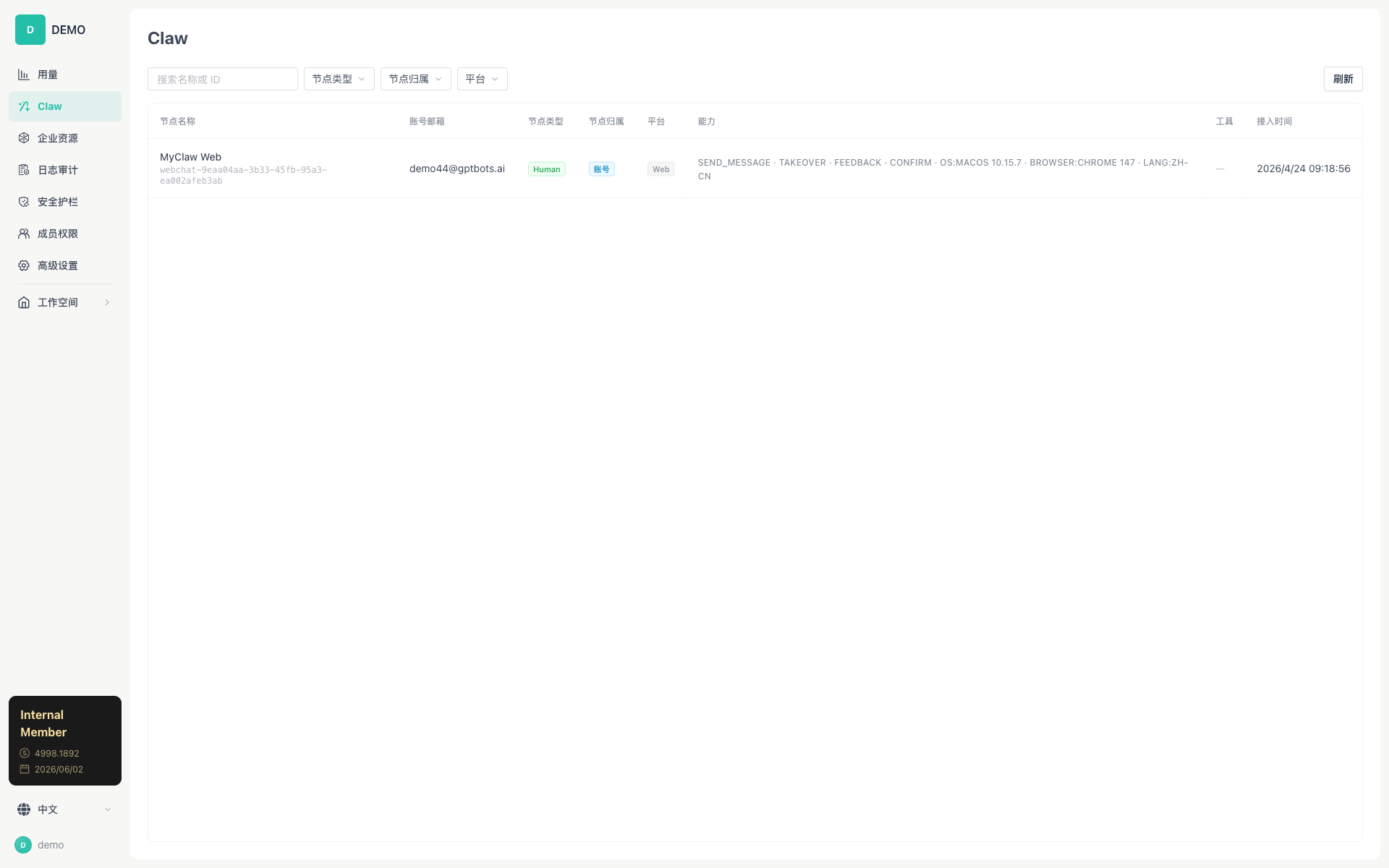
Real-time Node List
The node list is updated in real time via WebSocket, with no need to refresh manually. The page provides a Refresh button (with a loading state) and a connection status indicator.
Table Columns
| Column | Description |
|---|---|
| Node Name | The node's custom name (e.g., Workspace (liujishideMacBook-Air.local)) + the nodeId displayed below |
| Account Email | The email of the user the node belongs to |
| Node Type | Human / Agent / Action / Monitor (colored badge) |
| Node Ownership | Account (personal) / Enterprise |
| Platform | Operating system label (macOS / Windows / Linux / Web) |
| Capabilities | The capability text declared by the node (up to 2 lines, hover to expand) |
| Tools | The number of tools registered by the node (hover to show the full list) |
| Connection Time | The timestamp when the node connected to the Gateway |
Node Types
| Type | Color | Description |
|---|---|---|
| Human | Blue | Web-side user node, no Agent execution capability; capabilities include SEND_MESSAGE, TAKEOVER, FEEDBACK, etc. |
| Agent | Green | APP-side Agent node, full execution capability; capabilities include system information such as OS:xxx, CPU:xxx, etc. |
| Action | Orange | Automated execution node (unattended) |
| Monitor | Gray | Monitoring node |
Node Ownership
| Ownership | Visibility Scope | Description |
|---|---|---|
| Account | Visible only to the same userId | Personal account-level node, available across organizations |
| Enterprise | Visible to all members of the same orgId | Enterprise-level node, shared within the organization, and can be remotely invoked by other members of the same organization |
Filters
| Filter | Description |
|---|---|
| Search by Name or ID | Filter by display name or nodeId |
| Node Type | Dropdown to select Human / Agent / Action / Monitor |
| Node Ownership | Dropdown to select Account / Enterprise |
| Platform | Platform options dynamically extracted from the current data |
Relationship with the Multi-node Architecture
This page displays the online nodes registered with the Gateway. When a user initiates a conversation in Work, the Gateway selects the most suitable execution node from these nodes according to the smart routing strategy.
Routing Priority:
- LLM Semantic Routing: Matches the most suitable node based on the intent of the user's message
- BM25 Keyword Matching: A fallback approach based on node description keywords
- Most Recent Connection Fallback: Selects the most recently connected node
Operation Guide
View Online Nodes
- Open the Web side → Space Management → Work
- The node list loads automatically (WebSocket real-time connection)
- Use the filters at the top to filter nodes
- Hover over the "Tools" column to view the full list of tools registered by the node
How to Read the Table Information
| Information you see | Meaning |
|---|---|
| Type = Agent | This is an APP node with full AI Agent execution capability |
| Type = Human | This is a Web browser node that can only initiate conversations but cannot execute |
| Ownership = Account | Personal node, usable only by the node owner |
| Ownership = Enterprise | Enterprise node, usable by all members of the organization |
| Tools = 20 tools | This node has registered 20 tools (usually 19 built-in + several MCP) |
| Connection Time | The time the node came online; the more recent, the more active |
Tip: If a Web-side conversation shows "No available node", come here to check whether any Agent-type node is online. If there are only Human nodes, it means no desktop APP is online yet.
Related Documents
- Multi-node Architecture — Node discovery, routing, and remote execution
- Runtime Security — Nodes — Node security configuration