
Save and Publish
This is the first rule to understand when using LoopAgent, and the most easily confused: "Save" only updates the Debug version; "Publish" is what updates the Online version.
The core rule
- Clicking Save on the settings page (changing the model, editing the persona, binding a knowledge base, adding a tool…) → writes only to the Debug version → the debug chat on the right takes effect immediately, so you can verify right away.
- But every external channel (Open API, share page, Widget, website plugin, Telegram, Slack, LiveChat, LiveDesk…) runs on the configuration snapshot frozen at the last "Publish."
Without clicking "Publish," production always keeps the old configuration.
flowchart LR
    S[Click Save] --> DBG[Debug version]
    DBG --> DC[Debug chat takes effect immediately]
    P[Click Publish] --> PROD[Online version]
    PROD --> CH[External channels take effect]
Common question: "I changed the configuration / persona, why hasn't production changed?" — because you only saved and did not publish. To make a change take effect in production, you have to click Publish / Release again. A working debug chat ≠ working production.
If a LoopAgent has never been published, external channels will simply error out and fail to run at all. Always publish once before you first connect an API or a channel.
What follows Publish, and what takes effect immediately
Not everything requires "Publish" to take effect. Telling them apart saves detours:
| Object | When it takes effect |
|---|---|
| Persona, loop limits, model, and the on/off switches and bindings of each capability | On Publish (part of the agent configuration, goes into the publish snapshot) |
| Agent-private skills | On Publish (same logic as the persona) |
| Organization / platform skills | Immediately and globally (saving takes effect for every agent that references it) |
| Knowledge-base documents, key-event data, user attribute values | Immediately and globally (runtime data, not configuration) |
In one sentence: configuration changes require Publish; data / org-level resource changes take effect immediately.
Debug chat
The debug chat on the right of the settings page is for verifying configuration:
- It reads the Debug version configuration, which takes effect right after saving, so you can adjust repeatedly and see the effect instantly.
- The debug chat is a real conversation and is billed the same way.
- In debug / preview mode it does not carry cross-turn history memory (every session starts with a clean context), which is normal.
Back-to-back messages merge into one reply
If you send more messages while the agent is still generating, those messages are not lost. The system first grabs a session lock: whichever message wins is processed immediately; the ones that lose are queued or marked for absorption, and are ultimately merged into a single reply. So "I sent several in a row but only got one reply" is by design, not a lost message.
Back-to-back messages are handled in two modes: QUEUE and APPEND.
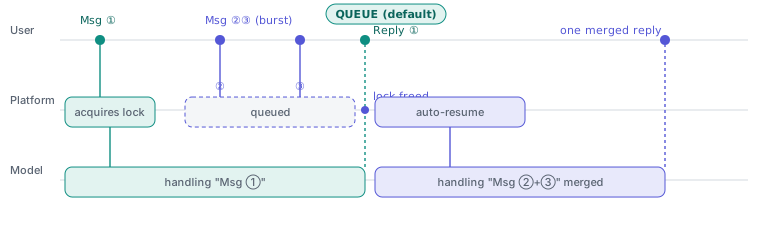
QUEUE (the default)
Queued messages merge at the message boundary — they are not processed as a new turn until the current reply has fully finished.
- Message ① grabs the session lock and is processed immediately, producing reply ① on its own.
- Messages ② and ③ arrive while ① is still being processed, fail to grab the lock, and enter the queue.
- Only after ① finishes and releases the lock does the system automatically run another turn, merging ② and ③ at once into a single reply.
Message ② will not get a reply of its own — this is the point most easily mistaken for a "lost message."
APPEND
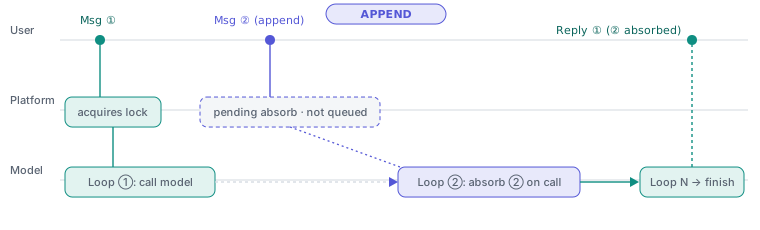
Appended messages do not have to wait for the turn to end; they are absorbed into the ongoing turn at the next request to the model.
- Message ② arrives while ① is still running, and — instead of being queued or waiting for ① to end — is simply marked "pending absorption."
- When the engine reaches its next loop and makes a request to the model, it carries ②'s content along.
The merge happens at the loop boundary, earlier than in QUEUE: no new message is created and no extra reply appears; the customer still sees the same reply ① that was influenced by the "appended" content. This suits real-time additions and corrections mid-run.
Multimodal bursts: if the back-to-back messages between turns carry multimodal content such as images, files, or audio, that content is submitted to the model along with the merge — provided the selected model supports the corresponding multimodal input and that category is enabled in the input settings.
The body of a single queued / appended message is capped at 8192 characters.