
1. What are "Key Events"
"Key Events" is GPTBots' built-in long-term business memory capability: during multi-turn conversations between a user and the Bot, the platform calls an LLM to automatically identify business-valuable events from the dialogue (such as withdrawal, complaint, appointment, refund, etc.), stores them in a structured form by user, and re-injects them as context in subsequent conversations, so the Bot "remembers" what happened to this user in the past and where the current event stands.
The core problems it solves:
- Cross-conversation memory loss: Traditional LLMs only see the short-term memory window of the current conversation; key business actions across or within long conversations are forgotten.
- Structured data accumulation: Turn scattered conversations into a queryable, statistical, and auditable event stream, reusable for risk control, customer-service quality inspection, and user profiling.
- State progression tracking: Each event has a
PENDING / IN_PROGRESS / RESOLVED / CLOSEDstatus, and can be progressed continuously across multiple conversations.
2. Design Principles
1. Distill "conversations" into "event streams"
Conversations are unstructured; events are structured. Key events translate "what the user said and did" into event records of "category + summary + entities + status + priority + confidence", so downstream systems beyond the LLM (statistics, risk control, manual review) can also consume this memory.
2. Dual-track triggering — neither miss nor over-extract
Within a single conversation, an event may surface mid-dialogue, or only after the user has left, when it needs to be backfilled. The system uses a three-tier scheme: message threshold (real-time) + idle timeout (batch) + manual trigger (fallback). Developers can tune parameters to balance cost and timeliness.
3. LLM extraction enabled by default, with downgrade to cheaper models
Event extraction itself requires LLM inference and consumes tokens. The extraction model can be configured independently from the Bot's main conversation model — for example, the main conversation can use Claude / GPT while extraction uses a cheaper, smaller model — billed and optimized separately.
4. Dual-link fallback for user identity
Events are aggregated by user. The system prefers the developer-passed userId (top-level identifier), falling back to the platform-generated anonymousId when missing (e.g., for non-logged-in users). Even if the developer doesn't pass userId, anonymous visitors' conversations can still accumulate events.
5. Strict user-scope isolation to prevent LLM hallucination contamination
The LLM may "fabricate" eventIds belonging to other users during UPDATE / DELETE / MERGE operations. Internally, every operation runs through matchesUserScope validation, hard-filtering by userId / anonymousId to prevent cross-user event contamination.
6. Two prompt-injection paths: explicit + implicit
- Explicit: Write
{{key_event_<eventType>}}placeholders in the prompt to fetch values precisely by event type. - Implicit: When no placeholder is written, a
## Recent Key Eventssection is automatically appended to the end of the prompt — zero-config, ready to use.
3. Core Mechanics
3.1 Data model
| Role | Notes |
|---|---|
| Key event main table | Multi-dimensional indexing by user/type/time |
| Bot-level config (one per Bot) | Controls switches, thresholds, extraction rules |
| Conversation-level extraction state | Records pending message count, idle time, concurrency state |
| Extraction execution log | Audit + token / credit consumption for each extraction |
3.2 Three-tier triggering
flowchart TB
subgraph L1["Level 1: Real-time trigger"]
direction TB
A1["Each user message<br/>pendingMessageCount +1"] --> A2{"pendingMessageCount<br/>≥ messageThreshold ?"}
end
subgraph L2["Level 2: Idle trigger"]
direction TB
B1["Scheduled scan<br/>every 30 / 60 / 300 s"] --> B2{"lastMessageTime > idleTimeout ago<br/>AND pendingMessageCount > 0<br/>AND extractionStatus == IDLE"}
end
subgraph L3["Level 3: Manual trigger"]
direction TB
C1["POST /bot/event/execute/.../retry<br/>or click Retry on execution log page"]
end
LLM(["Call LLM to extract"])
A2 -->|Yes| LLM
B2 -->|All satisfied| LLM
C1 --> LLM
3.3 How to use key events
- The memory module now supports key-event control: the memory component can read and remember key events. You can enable key events and customize which key-event types and count to inject.
- All LLM-driven nodes in FlowAgent now support enabling key events from the memory module, improving classifier routing, LLM response accuracy, judgment-node accuracy, and more.
- Variable references via Global Variables – Key Events are supported; If/else branches can route by key-event type.
3.4 Injection mechanism
Mode A: Auto-append (zero-config)
When the Bot has key events enabled and no {{key_event_*}} placeholder appears in the prompt, the system, before each LLM call, automatically appends the most recent N events to the end of the prompt in the following format:
                      ## Recent Key Events
eventType: withdrawal | summary: User requested withdrawal of 5000 | status: In Progress | priority: High | confidence: High | updateTime: 2026-04-28 09:21:33 | entities: {"amount":5000,"channel":"bank"}
eventType: complaint | summary: User complained about slow customer-service response | status: Resolved | priority: Medium | confidence: Medium | updateTime: 2026-04-27 18:02:11
Mode B: Placeholder substitution (precise control)
Write the following in the prompt / workflow component / rule:
                      {{key_event_withdrawal}}     ← Inject only "withdrawal" events
{{key_event_complaint}}      ← Inject only "complaint" events
The platform groups events by eventType to generate corresponding variables; unmatched event types are not injected. Up to 30 events per variable.
Flow Bot: component-level independent control
Each LLM node in the workflow has its own FlowKeyEventConfig: it can be toggled independently, can pick its own event types, and can set its own recentEventCount (default 5). Within the same conversation, events are queried only once (cached in ChatContext) and shared across multiple nodes.
4. Usage Guide
4.1 Enable in the Bot configuration panel
Path: Developer Console → Bot Detail → User Manage → "Key Events" drawer
Steps:
- Turn on the master switch.
- Extraction model: optional; if not selected, the Bot's default conversation model is used. Recommend a cheap model (e.g., GPT-4o-mini / Haiku family).
- Extraction rules (≤2000 characters): tell the LLM in natural language what counts as a "key event" in this Bot's scenario. Example:Only extract money-related business actions (withdrawal, deposit, transfer, refund). Ignore chit-chat and emotional expression. The entities field must include amount, currency, and orderId.
                      Only extract money-related business actions (withdrawal, deposit, transfer, refund).
Ignore chit-chat and emotional expression.
The entities field must include amount, currency, and orderId.
This code block in the floating window - Recent event count (0–50): number of events injected into the prompt per conversation. 0 means no injection; 5–10 is common.
- Trigger timing:
- Message threshold (5–50): default 10.
- Idle timeout (2–60 minutes): default 3.
- Event-type dictionary (up to 10): each category has a "name" (≤10 characters) and a "description" (≤100 characters, telling the LLM what fits this category).
- Click Save.
⚠️ Warning: Once a category name is live, do not rename it casually — historical events still carry the old name, leading to
{{key_event_<old-name>}}returning empty values. The frontend will pop an orange warning when a category already exists.
4.2 Reference events in the prompt
General Bot prompt
                      You are a financial customer-service assistant.

[This user's recent money actions]
{{key_event_withdrawal}}

[This user's recent complaints]
{{key_event_complaint}}

Please answer the user's question based on the context above.
Flow Bot component prompt
- Click the LLM-driven node on the canvas → find the "Memory - Key Events" config in the settings panel.
- Check
enable, choose the event types this node should inject, and set the recall count (default 5).
4.3 Monitoring extraction execution logs
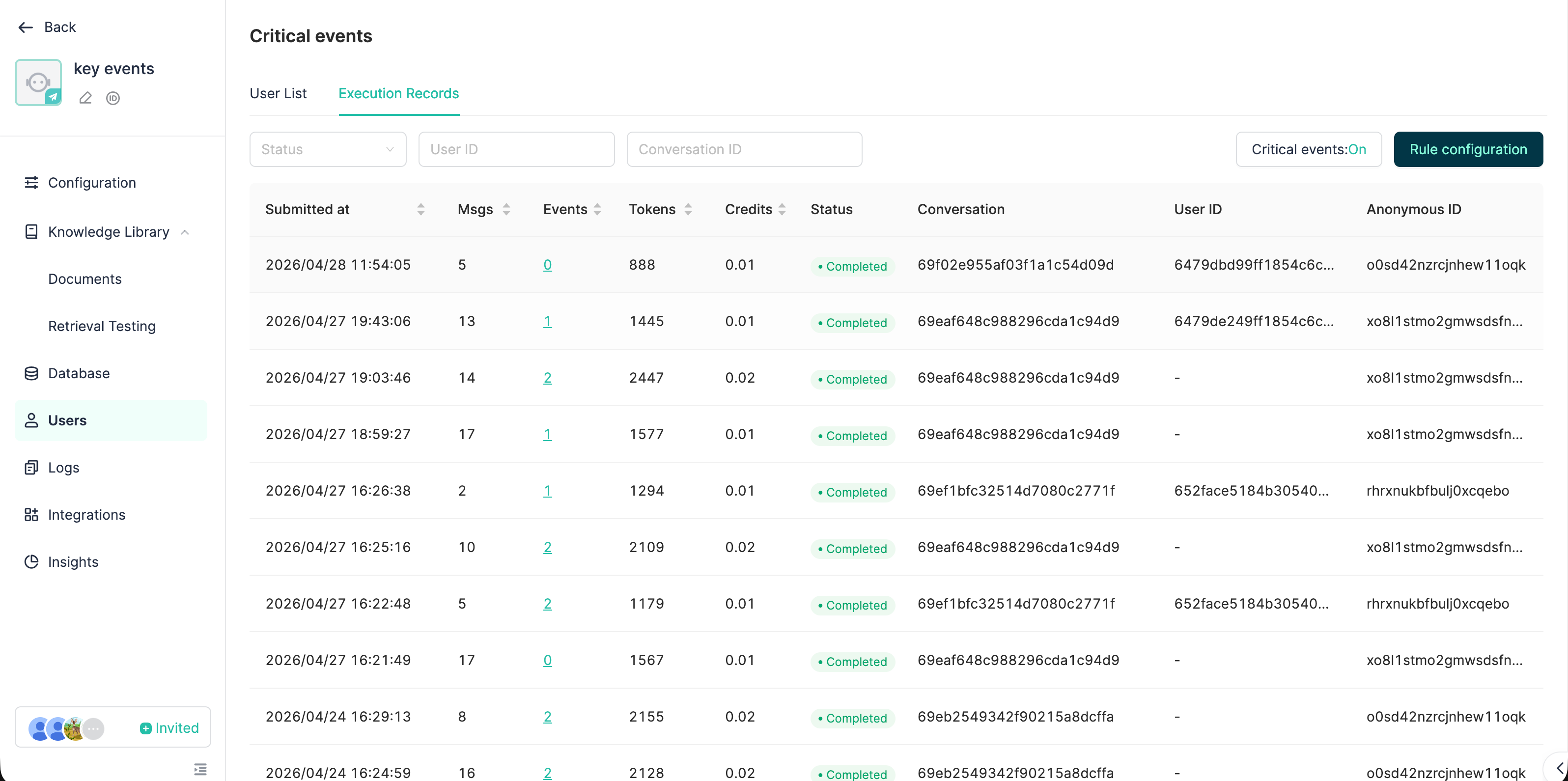
Path: Developer Console → Bot Detail → User Manage → Execution Log tab
What you can see:
- Status of each extraction (PENDING / RUNNING / COMPLETED / FAILED)
- Trigger source (REALTIME / SCHEDULED / MANUAL)
- Messages processed / events extracted
- Token consumption / credit consumption
- Failure reason + "Retry" button
- Detail drawer: lists all events created/modified by this extraction
4.4 Billing
LLM call costs for key events are charged to the Key Events line on the bill, accounted separately from the main conversation flow, making it easy to control costs independently.
5. Typical Application Scenarios
| Scenario | Example event types | Value |
|---|---|---|
| Finance / Cross-border payment customer service | withdrawal / deposit / kyc / dispute |
Cross-conversation tracking of money actions; risk control and human agents see this user's historical business flow at a glance when taking over |
| E-commerce after-sales | refund / return / complaint |
Auto-maintain the user's after-sales state machine, advance continuously across multiple conversations |
| Booking / Scheduling | appointment / cancellation |
Let the Bot remember how many times the user changed time and which slot is currently confirmed |
| HR / Internal IT assistant | leave_request / it_ticket |
Distill conversations into a queryable ticket flow |
| Education / Learning companion | homework_submission / quiz_score / weak_topic |
Long-term tracking of student learning state, generating personalized review plans |
| Healthcare / Health consulting | symptom / medication / appointment |
Preserve illness progression across consultations, improving consultation continuity |
6. Best Practices
✅ Configuration
- Write descriptions for category dictionary — fill both
nameanddescription. The LLM relies mainly ondescriptionto judge "does this conversation belong to this category". Leavingdescriptionempty significantly lowers classification accuracy. - Keep the number of categories between 5–10. Too many categories make the LLM struggle to classify, and bloat the prompt. Merge synonyms ("withdrawal" and "cash-out" share one).
- Extraction rules should describe both "do" and "don't". For example:Only extract confirmed-completed or in-progress business actions. Exclude: hypothetical discussions ("what if..."), pure emotion, chit-chat.
                      Only extract confirmed-completed or in-progress business actions.
Exclude: hypothetical discussions ("what if..."), pure emotion, chit-chat.
This code block in the floating window - Pick a smaller model for extraction. Extraction is a structured-output task with low reasoning requirements. GPT-4o-mini / Claude Haiku / DeepSeek-V3 are usually enough; per-call cost can be an order of magnitude lower than the main conversation model.
- Don't max out
recentEventCountat the start. Injecting too many events squeezes the main conversation context. Start with 5; raise it only when the Bot frequently "can't remember".
✅ Trigger parameters
- Long conversations / customer service:
messageThreshold = 10,idleTimeoutMinutes = 3is generally a good fit. - Short interactions / task Bots: lower
idleTimeoutMinutesto 2 to avoid event extraction lagging after the user finishes. - High-frequency low-value conversations (e.g., general Q&A): raise
messageThresholdto 20–30 to avoid running LLM extraction every turn.
✅ Prompt referencing
- Prefer placeholders over relying on auto-append. Placeholders are controllable and can slice precisely by type; auto-append fits the "I want it all" fallback case.
- Don't enable on every Flow Bot node. Only enable on nodes that genuinely need event context (e.g., customer-reply nodes, risk-decision nodes); intent-recognition / routing nodes don't need it.
- Avoid placing
{{key_event_xxx}}at the top of system prompts — historical events tend to grow over time; if they blow out the token budget, the main instructions get truncated. Place them in the middle of the prompt or before the few-shot section.
✅ Data governance
- Periodically review LOW-confidence events manually. The LLM also extracts "user one-sided claims"; the business side should filter through them — try filtering by
confidence=LOW+disputeFlag=true. - Use API writes for important business flows. When the order system already has structured data, writing directly via
createdBy=APIis more accurate than letting the LLM extract from conversation, and can coexist with LLM extraction results. - Use MERGE operations cautiously. The LLM occasionally merges events that shouldn't be merged. Watch MERGE operations in the execution log and split via API when necessary.
- Make good use of the
entitiesfield. Explicitly require the LLM in the extraction rules to extract key KV pairs (amount, order ID, time, etc.); subsequent structured queries are more reliable than parsing summary text.
⚠️ Troubleshooting checklist
| Symptom | Investigation path |
|---|---|
| Events not extracted | ① Master switch on? ② Bot has credit balance? ③ Any FAILED in execution log? ④ Extraction rules too strict? |
| A category's key event content is empty | ① Does this user have events of this type? ② Was the type created correctly? ③ Spelling consistency of category names? |
| Cross-user contamination | Check that the correct userId is passed; for non-logged-in users, check that anonymousId is stable |
| Extraction cost too high | ① Lower extraction frequency ② Switch to a cheaper extraction model |
| Misclassified extractions | ① Provide more accurate descriptions ② Add few-shot examples in the extraction rules |
7. Capability Boundaries and Caveats
- Extraction is not real-time. Even with Level 1 real-time triggers, extraction happens only after messages reach the threshold. Strictly strongly-consistent business (e.g., transactions) cannot rely on the event stream for decisions — events are auxiliary memory, not the source of truth.
- The extraction window is at most 100 messages (
MAX_MESSAGES_PER_BATCH). Very long conversations are split into multiple windows; cross-window causal relations are recovered by "historical events comparison". - Event queries have a 500ms timeout protection. Slow queries won't drag down the chat path, but in extreme cases no events will be injected.
- Anonymous IDs reset after client-side cleanup. Anonymous users switching devices / clearing cache are treated as new users; events do not follow.
- Multi-agent mode does not participate in the event stream (see the deprecation notice in oversea-ailab CLAUDE.md).