
Agent Engine
The "Agent Engine" panel manages three things: the model, the loop limits, and the system-prompt preview. Together they determine which model the LoopAgent thinks with and how long it may loop.
Model
- Prefer new-generation, agent-oriented models such as the GPT-5 series or Claude 4 series, which are more stable at tool calling and multi-step reasoning.
- Models without text capability — such as image, audio, or video generation models — cannot be used with LoopAgent.
- Switching the model has side effects: it caps "Maximum reply length" to the new model's limit and drops parameters the new model does not support. After switching, parameters like temperature may disappear, which is normal.
Reply length, reasoning, and parameters
| Item | Description |
|---|---|
| Maximum reply length | Defaults to 4096, bounded by the selected model's limit. Setting it too small may cut off replies; too large increases cost. |
| Reasoning | Appears only for models that support reasoning. You can set the reasoning depth and the visibility of the reasoning process (shown / collapsed / hidden). |
| Model parameters | Parameters such as temperature appear according to the model's capabilities; some low-level parameters are forcibly ignored to avoid breaking the agent's multi-turn loop. |
Fallback model
You can configure a Fallback model for the main model. When the main model hits rate limits, timeouts, or service errors and retrying does not help, the agent automatically switches to the Fallback model within the same turn — transparent to the user and without an error. It is a "fallback to keep running," not "load balancing" — under normal conditions the main model is always used.
Loop limits
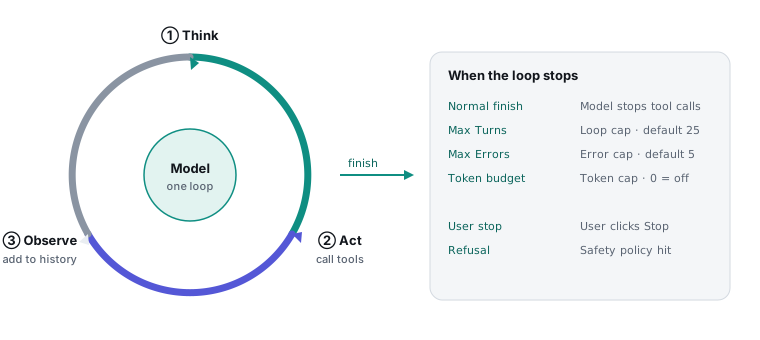
The loop limits are the LoopAgent's "guardrail," bounding how long the model may keep trying within a single turn. The figure below shows the loop inside one turn and the conditions that make it stop:
| Field | Range / Default | Effect |
|---|---|---|
| Max Turns | 1–100 / 25 | How many times a single turn may loop internally (each loop calls the model once). It stops if the limit is reached before wrapping up. |
| Max Errors | 0–50 / 5 | Stops once tool calls fail this many times consecutively; a single success in between resets the count. 0 means unlimited. |
| Token budget | ≥0 / 0 | The cumulative input-token cap within one turn. 0 means unlimited. |
- Clearing a field and clicking away automatically restores the default (25 / 5 / 0).
- Increase it when tasks are complex and frequently hit Max Turns; also watch out for whether it is stuck on a tool that keeps failing.
Can't add tools, buttons greyed out? The most common cause is that the selected model does not support tool calling. In that case tools, workflows, data tables, human service, and so on are all disabled. Just switch to a model that supports tool calling.
System-prompt preview
This section only shows an overview of the system prompt assembled from the persona and other pieces; the actual editing happens in the persona's full-screen editor — see Persona.