
ส่งข้อความ
ใช้ API นี้เพื่อส่งข้อความไปยัง conversation_id ที่ระบุและรับการตอบกลับที่สร้างโดย Agent API รองรับเนื้อหาข้อความหลายประเภท เช่น ข้อความตัวอักษร, รูปภาพ, เสียง และเอกสาร
วิธีการร้องขอ
POST
Endpoint
https://api-${endpoint}.gptbots.ai/v2/conversation/message
การยืนยันตัวตน
โปรดดูที่ ภาพรวม API สำหรับคำแนะนำการยืนยันตัวตน
การร้องขอ
ตัวอย่างการร้องขอ
                      curl -X POST 'https://api-${endpoint}.gptbots.ai/v2/conversation/message' \
-H 'Authorization: Bearer ${API Key}' \
-H 'Content-Type: application/json' \
-d '{
    "conversation_id": "686e2646cb8ee942d9a62d79",
    "response_mode": "blocking",
    "messages": [
        {
            "role": "user",
            "content": [
                {
                    "type": "text",
                    "text": "I have uploaded 2 image files, please OCR and return 2 json records."
                },
                {
                    "type": "image",
                    "image": [
                        {
                            "base64_content": "<complete_base64_string>",
                            "format": "jpeg",
                            "name": "TAXI1"
                        },
                        {
                            "url": "https://gptbots.ai/example.png",
                            "format": "png",
                            "name": "TAXI2"
                        }
                    ]
                },
                {
                    "type": "audio",
                    "audio": [
                        {
                            "url": "https://gptbots.ai/example.mp3",
                            "format": "mp3",
                            "name": "example1 audio"
                        }
                    ]
                },
                {
                    "type": "document",
                    "document": [
                        {
                            "base64_content": "<complete_base64_string>",
                            "format": "pdf",
                            "name": "example pdf"
                        }
                    ]
                }
            ]
        }
    ],
    "conversation_config": {
        "long_term_memory": false,
        "short_term_memory": false,
        "knowledge": {
            "data_ids": [
                "58c70da0403cc812641b9356",
                "59c70da0403cc812641df35a"
            ],
            "group_ids": [
                "67c70da0403cc812641b93je",
                "69c70da0403cc812641df35f"
            ]
        },
        "custom_variables": {
            "var_current_url": "https://gptbots.ai/example",
            "var_session_id": "abcdef"
        }
    }
}'
หมายเหตุสำคัญ:
- สำหรับเนื้อหา
image,audioและdocumentสามารถใช้ได้ทั้งแบบ base64 หรือ URL - รองรับทั้งสองรูปแบบ - ในโหมดระบบบริการลูกค้าที่สร้างเอง (Custom Helpdesk) ข้อความของเจ้าหน้าที่และข้อความของผู้ใช้ที่ได้รับระหว่างการรับช่วงต่อโดยเจ้าหน้าที่ที่เป็นมนุษย์ จะถูกส่งพร้อม
ai_response=falseหรือrole=human_agentซึ่งจะถูกจัดเก็บเข้าคลังเท่านั้นและจะไม่กระตุ้นให้ AI ตอบกลับ ตัวอย่าง:{ "conversation_id": "686e2646cb8ee942d9a62d79", "response_mode": "blocking", "ai_response": false, "human_agent_info": { "name": "Alice", "email": "alice@example.com", "image_url": "https://gptbots.ai/avatar.png" }, "messages": [ { "role": "human_agent", "content": "สวัสดีค่ะ นี่คือเจ้าหน้าที่บริการลูกค้า มีอะไรให้ช่วยไหมคะ?" } ] }{ "conversation_id": "686e2646cb8ee942d9a62d79", "response_mode": "blocking", "ai_response": false, "human_agent_info": { "name": "Alice", "email": "alice@example.com", "image_url": "https://gptbots.ai/avatar.png" }, "messages": [ { "role": "human_agent", "content": "สวัสดีค่ะ นี่คือเจ้าหน้าที่บริการลูกค้า มีอะไรให้ช่วยไหมคะ?" } ] }บล็อกโค้ดนี้ในหน้าต่างลอย - นักพัฒนาต้องส่งเฉพาะข้อความล่าสุดของผู้ใช้เท่านั้น เพราะ GPTBots จะจัดการ short-term และ long-term memory ให้อัตโนมัติ หากต้องการปรับ context ของ short-term memory ดูตัวอย่างด้านล่าง:"messages": [ { "role": "user", "content": "Hello" //ปรับแต่ง short-term memory }, { "role": "assistant", "content": "Hello! How can I assist you today?" //ปรับแต่ง short-term memory }, { "role": "user", "content": "Hello" //ข้อความล่าสุดของผู้ใช้ }]
                          "messages": [
        {
            "role": "user",
            "content": "Hello"                                //ปรับแต่ง short-term memory
        },
        {
            "role": "assistant",
            "content": "Hello! How can I assist you today?"   //ปรับแต่ง short-term memory
        },
        {
            "role": "user",
            "content": "Hello"                                //ข้อความล่าสุดของผู้ใช้
        }]
บล็อกโค้ดนี้ในหน้าต่างลอย - เมื่อนักพัฒนาใช้ LoopAgent ในโหมดสตรีม หากต้องการข้อความแสดงกระบวนการระหว่างที่ agent ทำงาน สามารถประกาศได้ด้วยฟิลด์
is_process_resultในพารามิเตอร์การร้องขอ{ "conversation_id": "686e2646cb8ee942d9a62d79", "response_mode": "streaming", "is_process_result": true, "messages": [ { "role": "human_agent", "content": "สวัสดีค่ะ นี่คือเจ้าหน้าที่บริการลูกค้า มีอะไรให้ช่วยไหมคะ?" } ] }{ "conversation_id": "686e2646cb8ee942d9a62d79", "response_mode": "streaming", "is_process_result": true, "messages": [ { "role": "human_agent", "content": "สวัสดีค่ะ นี่คือเจ้าหน้าที่บริการลูกค้า มีอะไรให้ช่วยไหมคะ?" } ] }บล็อกโค้ดนี้ในหน้าต่างลอย
Request Headers
| ฟิลด์ | ประเภท | คำอธิบาย |
|---|---|---|
| Authorization | Bearer ${API Key} | ใช้ Authorization: Bearer ${API Key} สำหรับการยืนยันตัวตน รับ API Key ได้จากหน้า API Key |
| Content-Type | application/json | ประเภทข้อมูล ต้องเป็น application/json |
พารามิเตอร์การร้องขอ
| ฟิลด์ | ประเภท | จำเป็น | คำอธิบาย |
|---|---|---|---|
| conversation_id | string | ใช่ | รหัสสนทนา ต้องระบุ conversation_id เพื่อดำเนินการสนทนาต่อ |
| response_mode | string | ใช่ | โหมดการตอบกลับของ Agent: |
| messages | JSON Array | ใช่ | เนื้อหาข้อความ รองรับบทบาท user, assistant และ human_agent รวม 3 บทบาทเพื่อสร้างบริบทการสนทนาai_response |
| is_process_result | boolean | ไม่จำเป็น | LoopAgent จะแสดงข้อมูลกระบวนการหรือไม่ เว้นว่างได้ ค่าเริ่มต้นคือ falsefalse: ส่งเฉพาะคำตอบสุดท้ายแบบสตรีม ไม่มีข้อความแสดงกระบวนการtrue: ข้อความบรรยายระหว่างรอบและกระบวนการให้เหตุผลจะถูกส่งทีละอักขระ และคำตอบสุดท้ายก็ยังคงส่งแบบเพิ่มทีละอักขระ |
| ai_response | boolean | ไม่จำเป็น | AI ตอบกลับข้อความนี้หรือไม่ ค่าเริ่มต้นคือ true กล่าวคือหากไม่ส่งฟิลด์นี้ พฤติกรรมจะเหมือนกับการเรียกใช้งานแบบเดิมทุกประการfalse: ข้อความนี้จะถูกจัดเก็บเข้าคลังเท่านั้น AI จะไม่ตอบกลับ และไม่ใช้ token หรือเครดิต การตอบกลับจะเป็นใบรับแบบเบาtrue: AI ตอบกลับตามปกติ ในโหมดระบบบริการลูกค้าที่สร้างเอง (Custom Helpdesk) การส่ง true อย่างชัดเจนยังเป็นการส่งการสนทนากลับคืนให้ AI จากสถานะการรับช่วงต่อโดยเจ้าหน้าที่ที่เป็นมนุษย์false มิฉะนั้นจะเทียบเท่ากับ true |
| human_agent_info | object | ไม่จำเป็น | ข้อมูลระบุตัวตนของเจ้าหน้าที่ มีความหมายเฉพาะเมื่อ messages มี role=human_agent เท่านั้น (ฟิลด์ระดับบนสุด หนึ่งคำขอต่อเจ้าหน้าที่หนึ่งคน) |
| name | string | ไม่จำเป็น | ชื่อเจ้าหน้าที่ |
| string | ไม่จำเป็น | อีเมลเจ้าหน้าที่ | |
| image_url | string | ไม่จำเป็น | URL รูปโปรไฟล์ของเจ้าหน้าที่ |
| conversation_config | object | ไม่จำเป็น | ปรับขอบเขตฟังก์ชันของ Agent ชั่วคราวสำหรับการสนทนานี้เพื่อรองรับความต้องการพิเศษ |
| short_term_memory | boolean | ไม่จำเป็น | เปิด/ปิด short-term memory สำหรับการสนทนานี้เท่านั้น |
| long_term_memory | boolean | ไม่จำเป็น | เปิด/ปิด long-term memory สำหรับการสนทนานี้เท่านั้น |
| knowledge | object | ไม่จำเป็น | ขอบเขตการค้นหาความรู้ กำหนดขอบเขตการค้นหาความรู้เฉพาะสำหรับการสนทนานี้ หากระบุทั้ง group_ids และ data_ids จะค้นหาในฐานความรู้รวมกัน หากทั้งสองเป็นอาร์เรย์ว่างจะไม่ดึงความรู้ใด ๆ ถ้าไม่ระบุ knowledge จะใช้ค่าตั้งต้นของ Agentgroup_ids: รหัสฐานความรู้data_ids: รหัสเอกสารในฐานความรู้ |
| custom_variables | object | ไม่จำเป็น | ตัวแปรกำหนดเอง ปรับค่าตัวแปรของ Agent สำหรับการสนทนานี้เท่านั้น |
หมายเหตุ:
หน้า configuration input/output ของ Agent รองรับรูปแบบการรับรู้ที่ต่างกันสำหรับแต่ละประเภทข้อความ ประเภทไฟล์และขนาดที่รองรับอาจแตกต่างกัน โปรดปรับข้อมูล API ให้เหมาะสมกับแต่ละกรณี รูปแบบข้อความที่รองรับสูงสุด:
- ข้อความ: string
- เสียง: .mp3, .wav, .acc
- รูปภาพ: .jpg, .jpeg, .png, .gif, .webp
- เอกสาร: .pdf, .txt, .docx, .csv, .xlsx, .html, .json, .md, .tex, .ts, .xml ฯลฯ
การตอบกลับ
ตัวอย่างการตอบกลับ
                      {
    "create_time": 1679587005,
    "conversation_id": "657303a8a764d47094874bbe",
    "user_id": "65a4ccfc7ce58e728d5897e0",
    "anonymous_id": "device_abcdef123456",
    "message_id": "65a4ccfC7ce58e728d5897e0",
    "output": [
        {
            "from_component_branch": "1",
            "from_component_name": "Component Name",
            "content": {
                "text": "Hi, is there anything I can help you?",
                "audio": [
                    {
                        "audio": "http://gptbots.ai/example.mp3",
                        "transcript": "Transcribed audio content"
                    }
                ]
            }
        }
    ],
    "usage": {
        "tokens": {
            "total_tokens": 29,
            "prompt_tokens": 19,
            "prompt_tokens_details": {
                "audio_tokens": 0,
                "text_tokens": 0
            },
            "completion_tokens": 10,
            "completion_tokens_details": {
                "reasoning_tokens": 0,
                "audio_tokens": 0,
                "text_tokens": 0
            }
        },
        "credits": {
            "total_credits": 0.0,
            "text_input_credits": 0.0,
            "text_output_credits": 0.0,
            "audio_input_credits": 0.0,
            "audio_output_credits": 0.0
        }
    },
    "human_trigger": true
}
ตัวอย่างการตอบกลับเมื่อมีการทริกเกอร์การส่งต่อให้เจ้าหน้าที่ที่เป็นมนุษย์
ในโหมดระบบบริการลูกค้าที่สร้างเอง (Custom Helpdesk) เมื่อการตอบกลับรอบนี้ทริกเกอร์การส่งต่อให้เจ้าหน้าที่ที่เป็นมนุษย์ human_trigger จะเป็น true หากมีบันทึกการส่งต่อด้วย จะมีการคืนออบเจ็กต์ handoff เพิ่มเติม (ฟิลด์นี้จะไม่ปรากฏเมื่อไม่มีบันทึก)
                      {
    "create_time": 1679587005,
    "conversation_id": "657303a8a764d47094874bbe",
    "user_id": "65a4ccfc7ce58e728d5897e0",
    "anonymous_id": "device_abcdef123456",
    "message_id": "65a4ccfC7ce58e728d5897e0",
    "output": [
        {
            "from_component_branch": null,
            "from_component_name": "AI Model-1",
            "content": {
                "text": "กำลังโอนสายไปยังเจ้าหน้าที่บริการลูกค้า กรุณารอสักครู่",
                "audio": null
            }
        }
    ],
    "usage": {
        "tokens": {
            "total_tokens": 29,
            "prompt_tokens": 19,
            "prompt_tokens_details": {
                "audio_tokens": 0,
                "text_tokens": 19
            },
            "completion_tokens": 10,
            "completion_tokens_details": {
                "reasoning_tokens": 0,
                "audio_tokens": 0,
                "text_tokens": 10
            }
        },
        "credits": {
            "total_credits": 0.0,
            "text_input_credits": 0.0,
            "text_output_credits": 0.0,
            "audio_input_credits": 0.0,
            "audio_output_credits": 0.0
        }
    },
    "human_trigger": true,
    "handoff": {
        "note": "เหตุผลการโอนสาย: ผู้ใช้แสดงความไม่พอใจต่อขั้นตอนการคืนเงินติดต่อกันสองครั้ง และร้องขอให้เจ้าหน้าที่ที่เป็นมนุษย์ดำเนินการ\nสรุปการสนทนา: ผู้ใช้สั่งซื้อเมื่อวันที่ 2 มีนาคม หลังจากยื่นขอคืนเงินแล้วไม่ได้รับการแจ้งเตือนการคืนเงิน และได้ยืนยันหมายเลขคำสั่งซื้อ 20260302-8891 แล้ว"
    }
}
การตอบกลับสำเร็จ (Blocking)
⚠️ ในโหมดการตอบกลับ blocking เมื่อเชื่อมต่อกับระบบบริการลูกค้าที่เป็นมนุษย์ของบุคคลที่สาม เช่น LiveChat หรือ Intercom จะไม่รองรับบริการรับช่วงต่อโดยเจ้าหน้าที่ที่เป็นมนุษย์ (ข้อความของเจ้าหน้าที่ถูกส่งแบบอะซิงโครนัส ต้องใช้โหมด webhook ในการรับ)
เมื่อใช้ระบบบริการลูกค้าที่สร้างเอง (Custom Helpdesk) จะไม่มีข้อจำกัดนี้: สัญญาณการส่งต่อให้เจ้าหน้าที่ที่เป็นมนุษย์จะถูกคืนผ่านhuman_trigger/handoffใน response body และข้อความของเจ้าหน้าที่จะถูกเขียนโดยนักพัฒนาผ่าน API เดียวกันนี้ด้วยrole=human_agent
| ฟิลด์ | ประเภท | คำอธิบาย |
|---|---|---|
| user_id | string | รหัสผู้ใช้ที่นักพัฒนาผูกไว้ จะเป็น null เมื่อไม่มีผู้ใช้ผูกอยู่ |
| anonymous_id | string | รหัสผู้ใช้ที่ไม่ระบุตัวตน (อุปกรณ์) |
| conversation_id | string | ใช่ |
| message_id | string | รหัสข้อความเฉพาะในแต่ละสนทนา |
| create_time | long | เวลาที่สร้างข้อความตอบกลับนี้ (timestamp) |
| output | JSON Array | เนื้อหาการตอบกลับของ Agent |
| from_component_branch | string | สาขา FlowAgent |
| from_component_name | string | ชื่อ component ต้นทางใน FlowAgent |
| content | object | เนื้อหาข้อความที่ AI Agent ตอบกลับ ปัจจุบันรองรับ 2 ประเภทคือ text และ audio |
| human_trigger | boolean | การตอบกลับนี้ทริกเกอร์การส่งต่อให้เจ้าหน้าที่ที่เป็นมนุษย์หรือไม่ เป็น false เมื่อไม่ได้ทริกเกอร์ |
| handoff | object | ข้อมูลการส่งต่อให้เจ้าหน้าที่ที่เป็นมนุษย์ ปรากฏเฉพาะเมื่อ human_trigger เป็น true และมีบันทึกการส่งต่อเท่านั้น |
| note | string | บันทึกการส่งต่อ (เหตุผลการส่งต่อ + สรุปการสนทนา) ยาวสูงสุด 2000 อักขระ |
| ai_response | boolean | แสดงกลับในใบรับของคำขอที่จัดเก็บเข้าคลังเท่านั้น (ai_response=false หรือมี role=human_agent) เพื่อยืนยันว่าข้อความนี้ถูกระบุว่าเป็น «จัดเก็บเข้าคลังเท่านั้น» |
| sender_role | string | แสดงกลับในใบรับของคำขอที่จัดเก็บเข้าคลังเท่านั้น มีค่าเป็น human_agent หรือ user เพื่อยืนยันบทบาทของข้อความที่จัดเก็บ |
| usage | object | รายละเอียดการใช้ทรัพยากร |
| tokens | JSON Array | จำนวนโทเคนที่ Agent ใช้ในสนทนานี้ทั้งหมด |
| total_tokens | integer | จำนวนโทเคนรวมที่ใช้ทั้ง input และ output |
| prompt_tokens | integer | จำนวนโทเคน input ที่ใช้ |
| completion_tokens | integer | จำนวนโทเคน output ที่ใช้ |
| prompt_tokens_details | object | รายละเอียดโทเคน input |
| completion_tokens_details | object | รายละเอียดโทเคน output |
| credits | object | เครดิตที่ Agent ใช้ในสนทนานี้ทั้งหมด |
| text_input_credits | double | เครดิตที่ใช้สำหรับข้อความ input |
| text_output_credits | double | เครดิตที่ใช้สำหรับข้อความ output |
| audio_input_credits | double | เครดิตที่ใช้สำหรับเสียง input |
| audio_output_credits | double | เครดิตที่ใช้สำหรับเสียง output |
การตอบกลับสำเร็จ (Streaming)
⚠️ ในโหมดการตอบกลับ streaming เมื่อเชื่อมต่อกับระบบบริการลูกค้าที่เป็นมนุษย์ของบุคคลที่สาม เช่น LiveChat หรือ Intercom จะไม่รองรับบริการรับช่วงต่อโดยเจ้าหน้าที่ที่เป็นมนุษย์ (ข้อความของเจ้าหน้าที่ถูกส่งแบบอะซิงโครนัส ต้องใช้โหมด webhook ในการรับ)
เมื่อใช้ระบบบริการลูกค้าที่สร้างเอง (Custom Helpdesk) จะไม่มีข้อจำกัดนี้: การทริกเกอร์การส่งต่อให้เจ้าหน้าที่ที่เป็นมนุษย์จะถูกส่งเป็นเฟรมcode:36 HumanTriggerและบันทึกการส่งต่อจะตามมาทันทีเป็นเฟรมcode:107 HumanHandoffNote
| ฟิลด์ | ประเภท | คำอธิบาย |
|---|---|---|
| code | int | รหัสประเภทข้อความ: 3-ข้อความ, 10-ผลลัพธ์ FlowAgent, 0-จบ, 4-ข้อมูลการใช้, 39-ข้อความเสียง, 36-การทริกเกอร์ส่งต่อให้เจ้าหน้าที่ที่เป็นมนุษย์, 107-บันทึกการส่งต่อให้เจ้าหน้าที่ที่เป็นมนุษย์ |
| message | string | ประเภทข้อความ: Text, FlowOutput, End, HumanTrigger, HumanHandoffNote |
| data | object | เนื้อหาการตอบกลับ |
- ตัวอย่างการสตรีมข้อความ:
                      {"code":11,"message":"MessageInfo","data":{"message_id":"6785dba0f06d872bff9ee347"}}
{"code":3,"message":"Text","data":"How "}
{"code":3,"message":"Text","data":"can "}
{"code":3,"message":"Text","data":"I "}
{"code":3,"message":"Text","data":"help "}
{"code":3,"message":"Text","data":"you?"}
{"code":0,"message":"End","data":null}
- ตัวอย่างการสตรีมข้อความเสียง:
                      {"code":11,"message":"MessageInfo","data":{"message_id":"67b857b6be1f2906861a5e75"}}
{"code":39,"message":"Audio","data":{"audioAnswer":"","transcript":"Hello"}}
{"code":39,"message":"Audio","data":{"audioAnswer":"EQAUAA0...IA3bi","transcript":""}}
{"code":0,"message":"End","data":null}
- ในโหมดระบบบริการลูกค้าที่สร้างเอง (Custom Helpdesk) เมื่อมีการทริกเกอร์การส่งต่อให้เจ้าหน้าที่ที่เป็นมนุษย์ เฟรมทริกเกอร์การส่งต่อและเฟรมบันทึกการส่งต่อจะถูกส่งตามลำดับก่อนเฟรม
End:
                      {"code":3,"message":"Text","data":"กำลังโอนสายไปยังเจ้าหน้าที่บริการลูกค้า กรุณารอสักครู่"}
{"code":36,"message":"HumanTrigger","data":"HumanTrigger"}
{"code":107,"message":"HumanHandoffNote","data":{"note":"เหตุผลการโอนสาย: ผู้ใช้แสดงความไม่พอใจต่อขั้นตอนการคืนเงินติดต่อกันสองครั้ง และร้องขอให้เจ้าหน้าที่ที่เป็นมนุษย์ดำเนินการ\nสรุปการสนทนา: ผู้ใช้สั่งซื้อเมื่อวันที่ 2 มีนาคม หลังจากยื่นขอคืนเงินแล้วไม่ได้รับการแจ้งเตือนการคืนเงิน และได้ยืนยันหมายเลขคำสั่งซื้อ 20260302-8891 แล้ว"}}
{"code":0,"message":"End","data":null}
หมายเหตุ:
code: 36, message: "HumanTrigger"หมายถึงการตอบกลับรอบนี้ทริกเกอร์การส่งต่อให้เจ้าหน้าที่ที่เป็นมนุษย์ โดยdataเป็นสตริงตัวระบุคงที่code: 107, message: "HumanHandoffNote"คือบันทึกการส่งต่อ โดยโครงสร้างdataจะเหมือนกับฟิลด์handoffในการตอบกลับแบบ blocking ({"note": "..."})- เฟรม
HumanHandoffNoteจะถูกส่งเฉพาะเมื่อมีบันทึกการส่งต่อเท่านั้น หากไม่มีบันทึกจะมีเพียงเฟรมHumanTriggerและจะไม่มีเฟรม107ที่ว่างเปล่า - ทั้งสองเฟรมจะถูกส่งก่อนเฟรม
End(code: 0) เสมอ
การตอบกลับสำเร็จ (Webhook)
หลังจากที่นักพัฒนากำหนดค่าที่อยู่ webhook ในส่วน «การเชื่อมต่อ-API» เรียบร้อยแล้ว ระบบ GPTBots จะส่งข้อความ «การตอบกลับของ Agent» และ «การตอบกลับของเจ้าหน้าที่บริการที่เป็นมนุษย์» ไปยังที่อยู่ webhook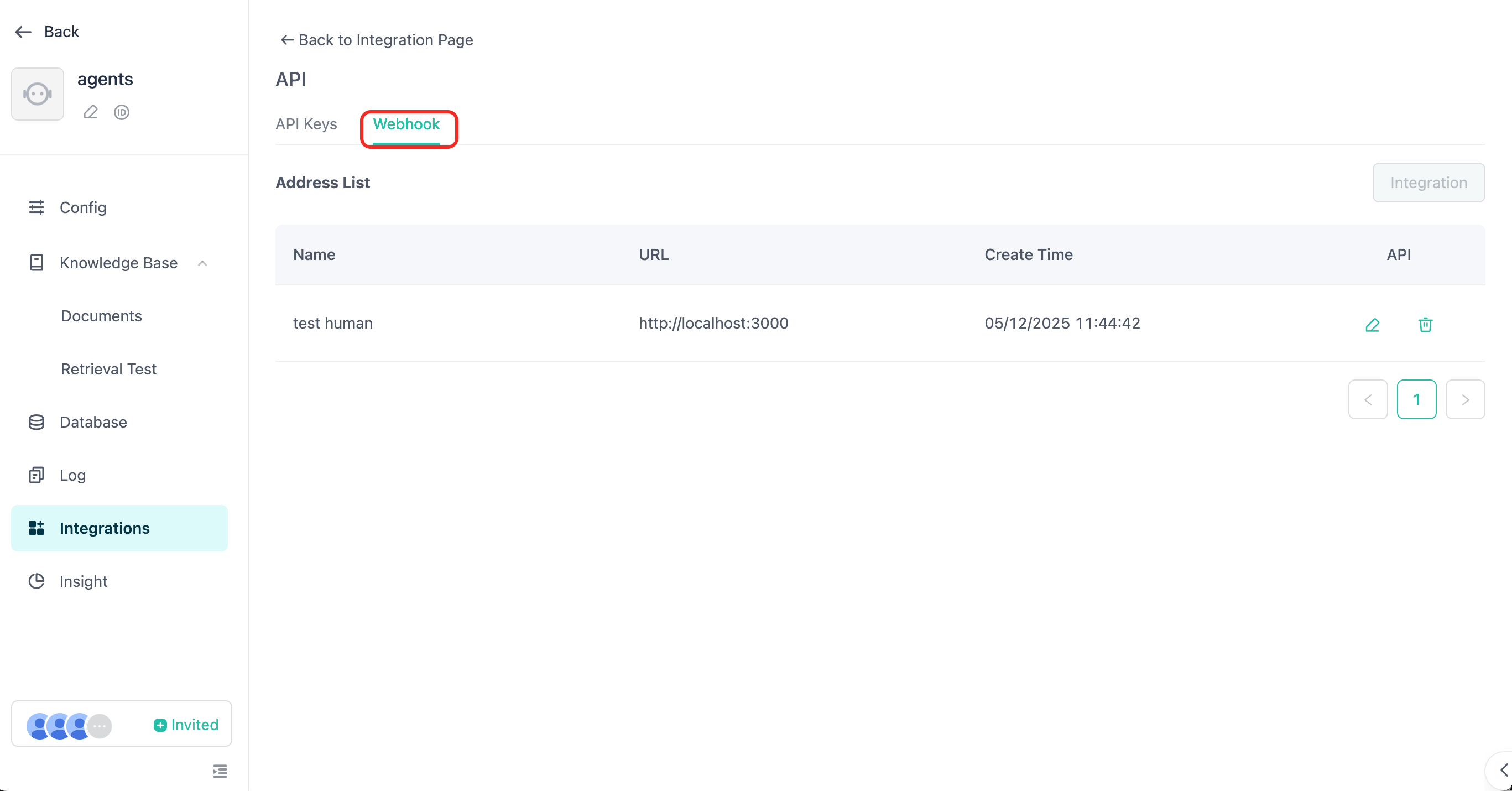
สำหรับรายละเอียดเพิ่มเติมเกี่ยวกับข้อความ webhook โปรดดูที่ การรับข้อความผ่าน Webhook และ human handoff service
⚠️ ในโหมด API หากเปิดใช้งานบริการส่งต่อให้เจ้าหน้าที่ที่เป็นมนุษย์ คุณต้องใช้โหมดการตอบกลับ webhook จึงจะสามารถรับข้อความตอบกลับจากเจ้าหน้าที่บริการที่เป็นมนุษย์ได้
การตอบกลับผิดพลาด
| ฟิลด์ | ประเภท | คำอธิบาย |
|---|---|---|
| code | int | รหัสข้อผิดพลาด |
| message | string | รายละเอียดข้อผิดพลาด |
ตัวอย่างการตอบกลับผิดพลาด
                      {
  "code": 40000,
  "message": "พารามิเตอร์ไม่ถูกต้อง",
  "errors": [
    {
      "error_code": 40000,
      "error_message": "Message user role type must have file or content."
    }
  ],
  "data": {
    "create_time": 1679587005,
    "conversation_id": "657303a8a764d47094874bbe",
    "user_id": "65a4ccfc7ce58e728d5897e0",
    "anonymous_id": "device_abcdef123456",
    "message_id": "65a4ccfC7ce58e728d5897e0",
    "output": [
      {
        "from_component_branch": "1",
        "from_component_name": "Component Name",
        "content": {
          "text": "ได้ตอบกลับตามเนื้อหาที่สามารถจดจำได้……",
          "audio": null
        }
      }
    ],
    "usage": {
      "tokens": {
        "total_tokens": 29,
        "prompt_tokens": 19,
        "prompt_tokens_details": {
          "audio_tokens": 0,
          "text_tokens": 0
        },
        "completion_tokens": 10,
        "completion_tokens_details": {
          "reasoning_tokens": 0,
          "audio_tokens": 0,
          "text_tokens": 0
        }
      },
      "credits": {
        "total_credits": 0,
        "text_input_credits": 0,
        "text_output_credits": 0,
        "audio_input_credits": 0,
        "audio_output_credits": 0
      }
    }
  }
}
รหัสข้อผิดพลาด
| รหัส | ข้อความ |
|---|---|
| 40000 | พารามิเตอร์ไม่ถูกต้อง |
| 40127 | การยืนยันตัวตนของนักพัฒนาไม่ผ่าน |
| 40356 | ไม่พบการสนทนา |
| 40358 | conversation_id ไม่ตรงกัน |
| 40364 | Agent ไม่รองรับภาพ |
| 50000 | ข้อผิดพลาดภายในระบบ |
| 20040 | เกินขีดจำกัดความยาวคำถาม |
| 20022 | เครดิตไม่เพียงพอ |
| 20055 | ไม่อนุญาตให้ใช้ API โปรดตรวจสอบว่าเปิดใช้งาน API แล้ว |