Jacob Morrow
Updated: 2026-01-07
GPTBots × Google Drive Enterprise Integration Architecture: In-Depth Analysis and Practical Guide for Cloud Document Integration Solutions
Technical Architecture Design, Core Implementation Solutions, and Engineering Practice Guide
Introduction
With the widespread adoption of cloud storage services and the rapid development of AI technologies, deeply integrating cloud storage capabilities with AI platforms has become a key direction for enhancing user experience and functional value. As an AI solutions platform, GPTBots is equipped with a document vector database, enabling the processing and analysis of various document types. Google Drive, as a leading global cloud storage service, offers a comprehensive set of APIs and a robust ecosystem, providing users with convenient file storage and management.
This document provides a detailed overview of the integration solution between GPTBots and Google Drive. By integrating Google Drive, GPTBots expands its document processing channels—users can easily upload and manage documents via Google Drive, which are then intelligently processed and analyzed by GPTBots’ AI capabilities. The integration solution covers the technical architecture, core functionalities, key technical implementations, and business value. Through front-end and back-end collaboration, OAuth authentication, file management, and automatic document synchronization, seamless integration between the GPTBots platform and Google Drive is achieved, offering users a more convenient document processing experience.
The main sections of this document include:
- Introduction to Google Drive: Core features and API capabilities of Google Drive.
- Integration Solution Overview: The architecture and core functionalities of GPTBots × Google Drive integration.
- System Architecture: Layered architecture design and the responsibilities of each layer.
- Technical Implementation: Detailed explanation of front-end/back-end interactions, file uploads, and automatic document synchronization.
- Business Value: The technical and business benefits brought by the integration solution.
Introduction to Google Drive
Google Drive is a cloud storage service provided by Google, allowing users to store, sync, and share files in the cloud. It offers a rich set of APIs, supporting third-party application integration for file upload, download, query, and management operations.
- Cloud Storage: 15GB of free storage space, supporting cloud-based file storage.
- API Support: JavaScript API and REST API v3 for third-party integration.
- OAuth Authentication: Uses the OAuth 2.0 standard protocol to ensure secure authorization.
- File Management: Full support for file upload, download, query, and deletion.
- Multi-Platform Sync: Real-time data updates and synchronization across multiple devices.
GPTBots × Google Drive Integration Solution
Solution Overview
The integration between GPTBots and Google Drive adopts a front-end and back-end collaborative model:
- The front end uses the Google Drive JavaScript API for user authorization and file selection.
- The back end leverages the REST API v3 for comprehensive file management and processing.
Core capabilities of the integration solution:
- User Authorization: The front end completes OAuth authorization via the JS API, with the back end storing the refresh_token for subsequent API calls.
- File Selection: The front end integrates the Google Drive file picker, allowing users to select files or folders and pass the file IDs to the back end.
- File Upload: The back end pulls file content from Google Drive and saves it to the GPTBots storage system for AI processing.
- Automatic Document Synchronization: The sync service regularly polls for changes in Google Drive files, automatically detecting new and updated files, downloading the changes, and saving them to GPTBots to ensure file consistency between GPTBots and Google Drive.
Core Functionalities
- OAuth Authorization: The front end completes OAuth authorization via the JS API, with the back end storing the refresh_token.
- File Selection and Transfer: The front end integrates the Google Drive file picker and passes file IDs to the back end.
- File Upload: Upload files from Google Drive to GPTBots, supporting single and batch uploads.
- File Query: Query Google Drive files by file name, type, folder, etc.
- Automatic Document Synchronization: Regularly sync changes in Google Drive files, automatically downloading new and updated files to GPTBots.
System Architecture
4.1 Architecture Diagram
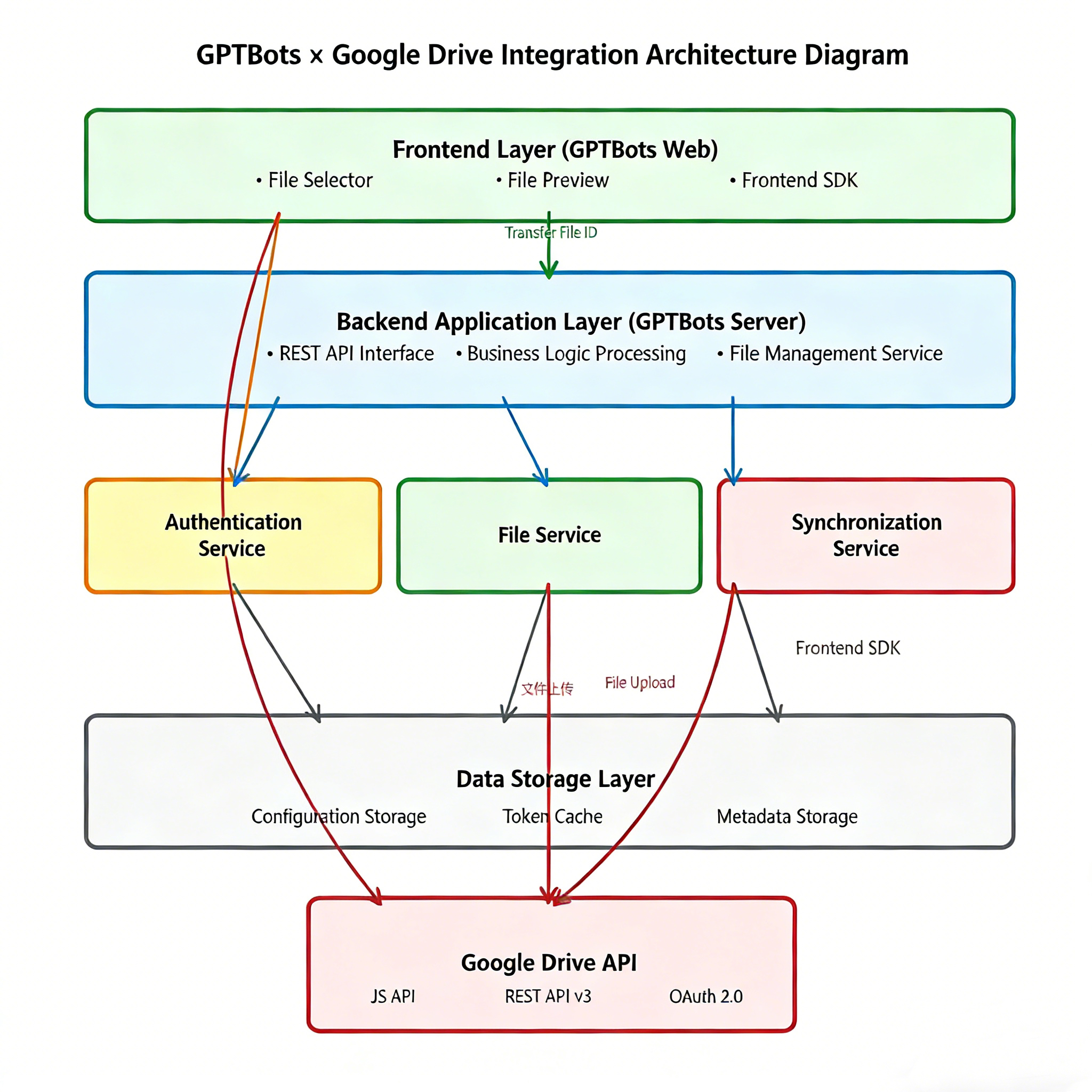
4.2 Architecture Description
The system adopts a layered architecture design, comprising the following layers:
- Frontend Layer: GPTBots web frontend, integrated with the Google Drive JS API, responsible for user authorization and file selection.
- Backend Application Layer: GPTBots server backend, providing REST API interfaces and handling business logic.
- Service Layer: Includes three core service modules: authentication service, file service, and synchronization service.
- Storage Layer: Stores configuration and metadata, and caches token information.
- API Layer: Google Drive API provides file management capabilities.
Key Technical Implementations
5.1 Frontend and Backend Interaction
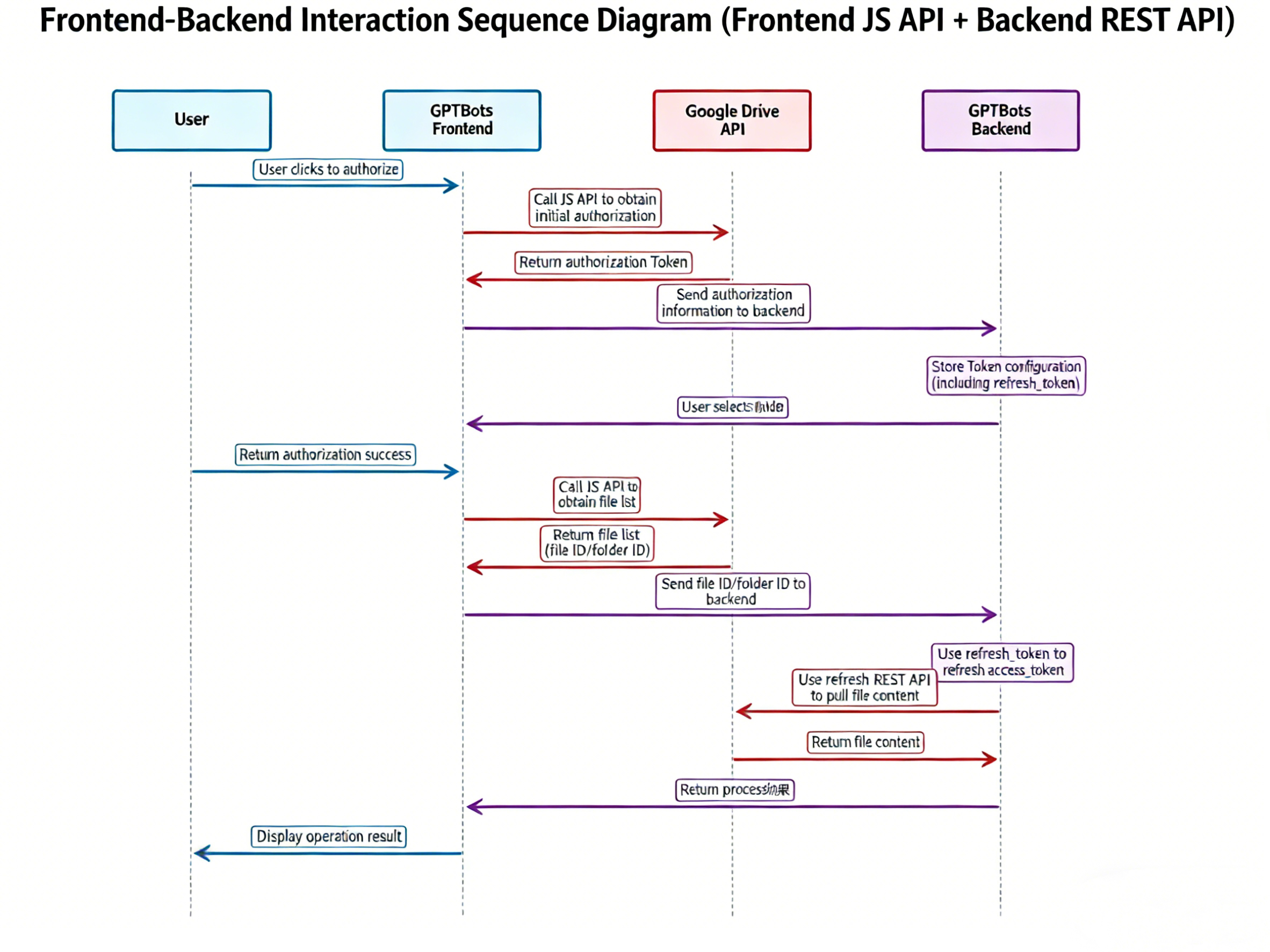
Frontend-Backend Interaction Process:
- The frontend loads the Google Drive JavaScript API and initializes gapi.client.
- The frontend uses the JS API to complete OAuth authorization and obtain the authorization token.
- The frontend retrieves the file list via the JS API, and the user selects the desired file(s).
- The frontend passes the file ID(s) to the backend API.
- The backend uses the refresh_token to refresh the access_token.
- The backend calls the Drive REST API to fetch the file content.
- The backend returns the processing result to the frontend.
5.2 File Upload
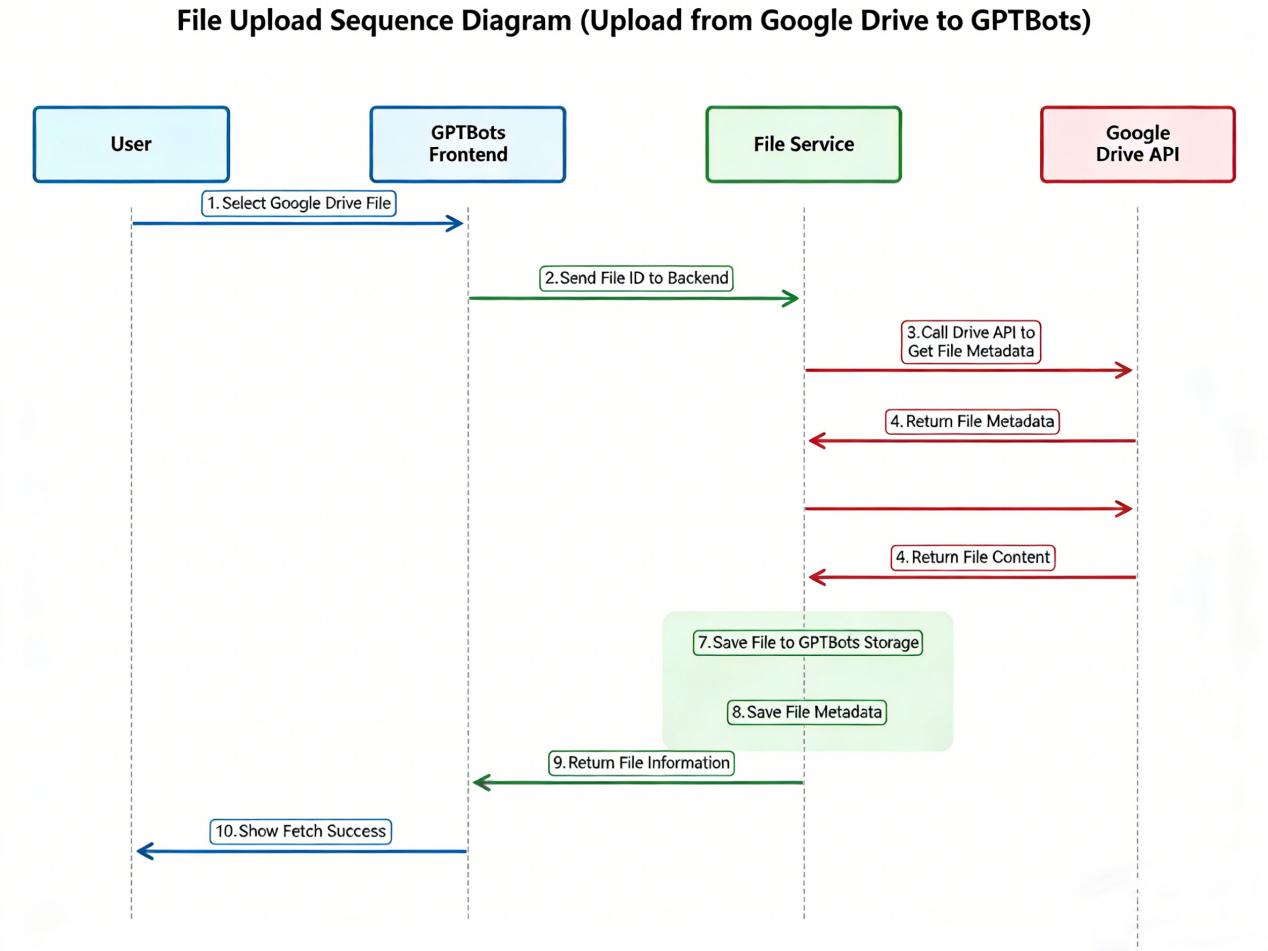
File Upload Process:
- The user selects a file from Google Drive via the GPTBots frontend.
- The frontend passes the file ID to the backend.
- The backend calls the Drive REST API to retrieve the file metadata.
- The backend calls the Drive REST API to download the file content.
- The backend saves the file to the GPTBots storage system.
- The file metadata is saved, and the file information is returned to the frontend.
5.2.1 Google Drive File Fetching Process
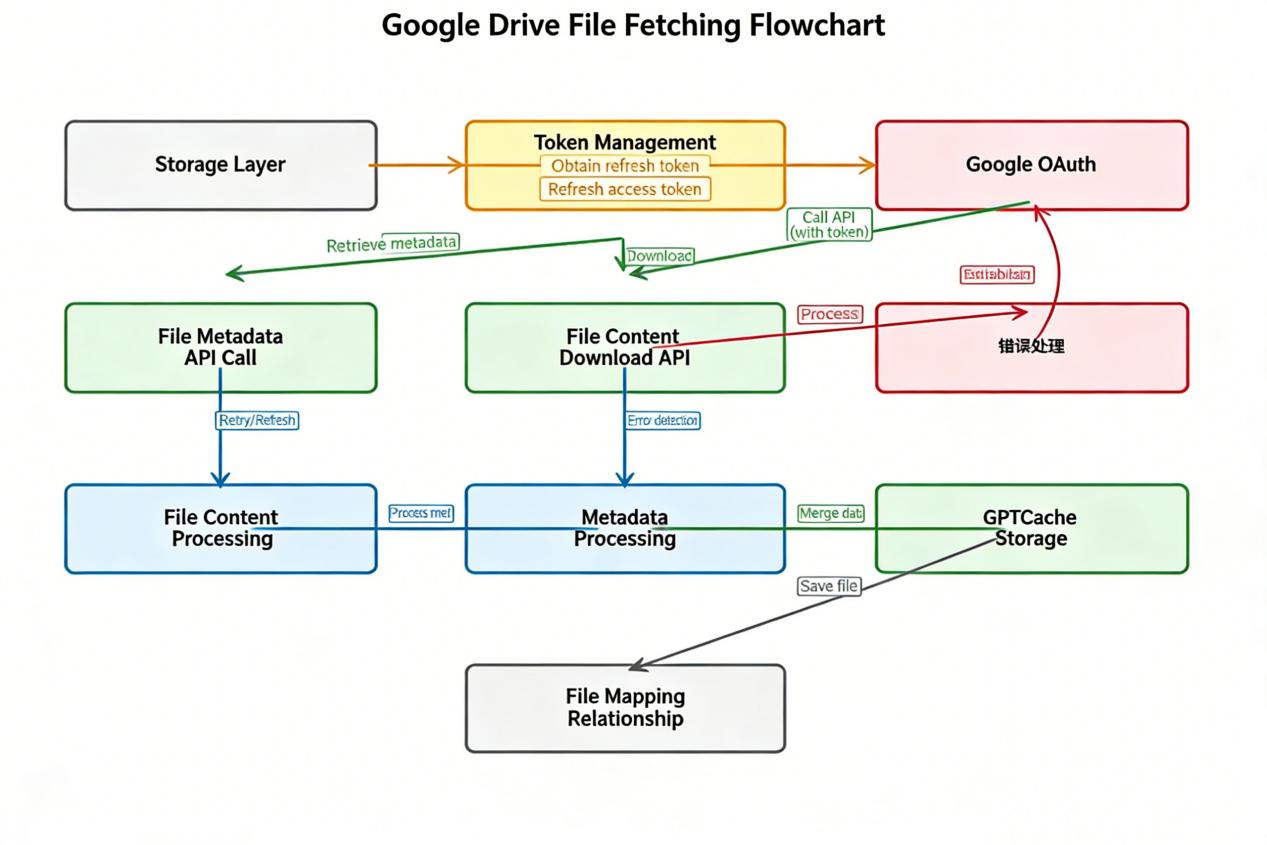
Detailed Process for Fetching Files via Google Drive REST API v3:
-
Token Acquisition and Refresh:
Retrieve the refresh_token from the storage layer and use it to call the Google OAuth 2.0 Token endpoint to obtain an access_token. If the access_token expires, automatically refresh it using the refresh_token to ensure API availability. -
Fetching File Metadata:
Use the endpoint GET https://www.googleapis.com/drive/v3/files/{fileId} to obtain file metadata, including file ID, name, size, MIME type, modification time, etc. The request must include the access_token in the Authorization header. -
Downloading File Content:
Use the endpoint GET https://www.googleapis.com/drive/v3/files/{fileId}?alt=media to download the file content. The request must include the access_token in the Authorization header, and file data is retrieved via WebClient’s reactive streaming processing. -
Error Handling:
Handle various API errors:
For 401 Unauthorized, refresh the token and retry.
For 403 Forbidden, return a user-friendly error message.
For 429 Too Many Requests, implement exponential backoff and retry strategy. -
Data Storage:
Save the downloaded file content to the GPTBots storage system, and store file metadata (including Google Drive file ID, original file name, file type, sync time, etc.), establishing a mapping between GPTBots files and Google Drive files.
5.3 Automatic Document Synchronization
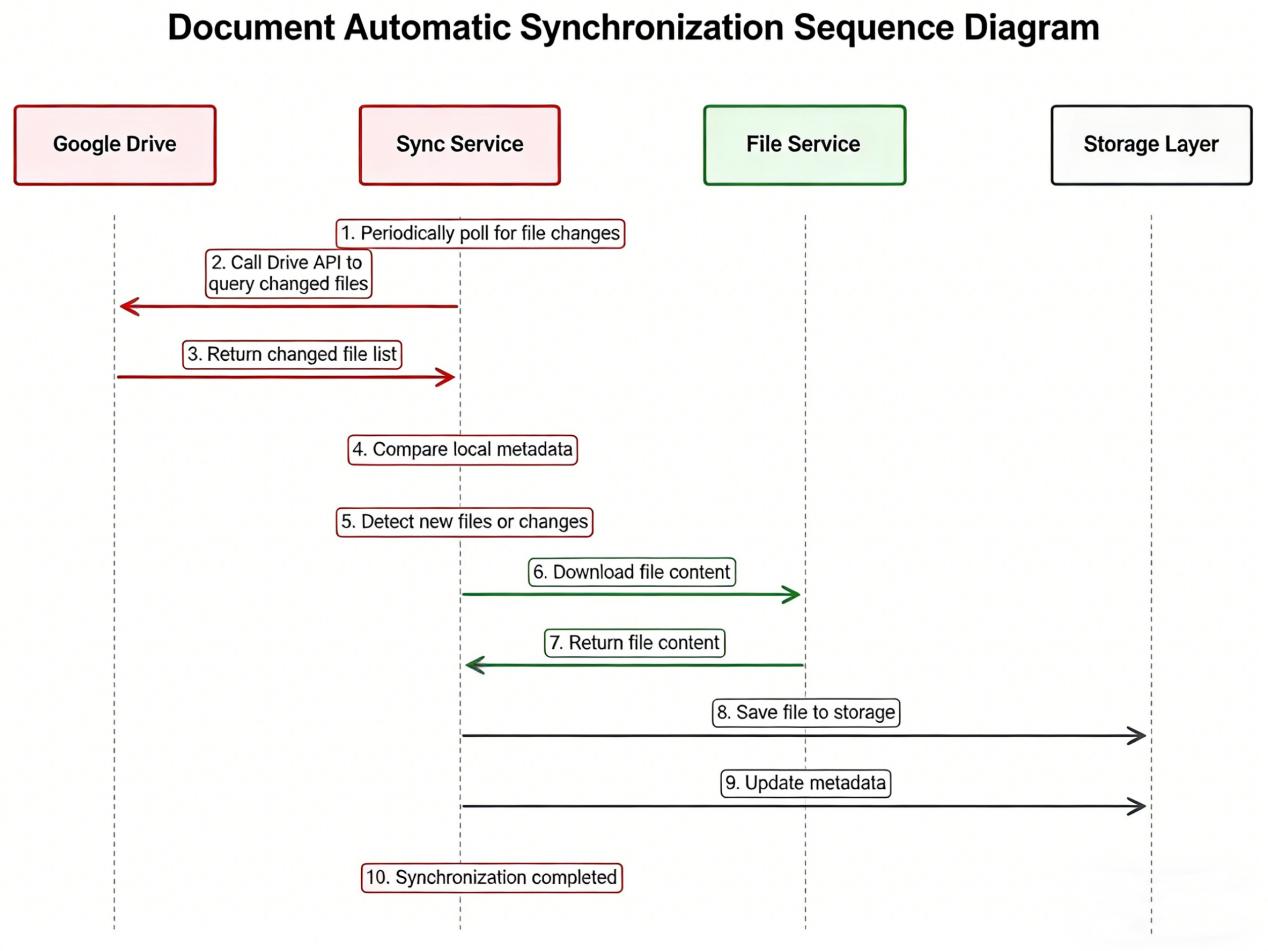
Document Auto-Synchronization Process:
- The synchronization service periodically polls for file changes in Google Drive.
- Calls the Drive API to query the list of changed files.
- Compares with locally stored metadata to identify new and modified files.
- Downloads the changed file content via the file service.
- Saves the files to the storage layer and updates file metadata.
- Supports incremental synchronization, syncing only changed parts to improve efficiency.
Results and Business Value
6.1 Technical Outcomes
- Seamless Integration: Users can access Google Drive files directly within the GPTBots platform.
- Secure and Reliable: Utilizes the OAuth 2.0 standard protocol to ensure secure authorization.
- Automatic Refresh: Token auto-refresh mechanism ensures continuous service availability.
- Auto-Sync of Changed Documents: Periodically syncs changes in Google Drive files, ensuring documents in GPTBots stay up-to-date with Google Drive.
- Easy Scalability: Modular design facilitates future feature expansion.
6.2 Business Value
- Enhanced User Experience: Users can work with Google Drive files directly in GPTBots without switching platforms.
- Expanded Functional Capabilities: GPTBots can process documents from Google Drive, extending the boundaries of its AI capabilities.
- Improved Work Efficiency: Integrated file management and AI processing boost user productivity.
- Broader User Base: Supports Google Drive users, expanding GPTBots’ user coverage.
Conclusion and Outlook
The integration of GPTBots × Google Drive fully demonstrates the value of deep integration between AI solution platforms and cloud storage services. Through core technologies such as OAuth 2.0 authentication, Google Drive API v3 integration, frontend-backend collaboration, and automatic document synchronization, seamless connectivity between the GPTBots platform and Google Drive has been achieved. This integration expands GPTBots’ document processing channels, allowing users to conveniently manage documents via the familiar Google Drive interface, which are then intelligently processed and analyzed by GPTBots’ AI capabilities. This results in an organic combination of cloud storage and AI-powered processing, greatly improving the efficiency and intelligence of document management.
Looking ahead, the GPTBots platform will continue to deepen its cloud storage integration capabilities, optimize document synchronization mechanisms, support intelligent processing of more file formats, and explore richer document analysis scenarios, providing enterprise users with more comprehensive document management and AI processing solutions.