
发送消息
通过本 API 可以向指定的 conversation_id 发送消息(message),并获取 Agent 生成的响应信息。API 支持提交文本、图片、音频和文档等作为消息内容 。
请求方式
POST
调用地址
https://api-${endpoint}.gptbots.ai/v2/conversation/message
调用验证
详情参见 API 概述的鉴权方式说明。
请求
请求示例
                      curl -X POST 'https://api-${endpoint}.gptbots.ai/v2/conversation/message' \
-H 'Authorization: Bearer ${API Key}' \
-H 'Content-Type: application/json' \
-d '{
    "conversation_id": "686e2646cb8ee942d9a62d79",
    "response_mode": "blocking",
    "messages": [
        {
            "role": "user",
            "content": [
                {
                    "type": "text",
                    "text": "I have uploaded 2 image files, please OCR and return 2 json records."
                },
                {
                    "type": "image",
                    "image": [
                        {
                            "base64_content": "<complete_base64_string>",
                            "format": "jpeg",
                            "name": "TAXI1"
                        },
                        {
                            "url": "https://gptbots.ai/example.png",
                            "format": "png",
                            "name": "TAXI2"
                        }
                    ]
                },
                {
                    "type": "audio",
                    "audio": [
                        {
                            "url": "https://gptbots.ai/example.mp3",
                            "format": "mp3",
                            "name": "example1 audio"
                        }
                    ]
                },
                {
                    "type": "document",
                    "document": [
                        {
                            "base64_content": "<complete_base64_string>",
                            "format": "pdf",
                            "name": "example pdf"
                        }
                    ]
                }
            ]
        }
    ],
    "conversation_config": {
        "long_term_memory": false,
        "short_term_memory": false,
        "knowledge": {
            "data_ids": [
                "58c70da0403cc812641b9356",
                "59c70da0403cc812641df35a"
            ],
            "group_ids": [
                "67c70da0403cc812641b93je",
                "69c70da0403cc812641df35f"
            ]
        },
        "custom_variables": {
            "var_current_url": "https://gptbots.ai/example",
            "var_session_id": "abcdef"
        },
        "corner_citation": true
    }
}'
注意:
image、audio、document均同时支持 base64 编码和 URL 链接两种方式,2选1即可。- Assistant 的 content 需要是 String 类型。
- 自建客服系统(Custom Helpdesk)模式下,坐席消息与人工接管期的用户消息通过
ai_response=false或role=human_agent提交,只归档不触发 AI,示例:{ "conversation_id": "686e2646cb8ee942d9a62d79", "response_mode": "blocking", "ai_response": false, "human_agent_info": { "name": "Alice", "email": "alice@example.com", "image_url": "https://gptbots.ai/avatar.png" }, "messages": [ { "role": "human_agent", "content": "您好,这里是人工客服,请问有什么可以帮您?" } ] }{ "conversation_id": "686e2646cb8ee942d9a62d79", "response_mode": "blocking", "ai_response": false, "human_agent_info": { "name": "Alice", "email": "alice@example.com", "image_url": "https://gptbots.ai/avatar.png" }, "messages": [ { "role": "human_agent", "content": "您好,这里是人工客服,请问有什么可以帮您?" } ] }此代码块在浮窗中显示 - 开发者可以仅提交最新用户消息,GPTBots默认会组装短期记忆和长期记忆。若开发者需要自定义短期记忆,可以参考下列示例自定义短期记忆。"messages": [ { "role": "user", "content": "Hello" //自定义短期记忆 }, { "role": "assistant", "content": "Hello! How can I assist you today?" //自定义短期记忆 }, { "role": "user", "content": "Hello" //最新用户问题 }]
                          "messages": [
        {
            "role": "user",
            "content": "Hello"                                //自定义短期记忆
        },
        {
            "role": "assistant",
            "content": "Hello! How can I assist you today?"   //自定义短期记忆
        },
                {
            "role": "user",
            "content": "Hello"                                //最新用户问题
        }]
此代码块在浮窗中显示 - 开发者在使用 LoopAgent 流式模式时,若需要agent 执行时的过程消息,可以入参
is_process_result字段进行声明。{ "conversation_id": "686e2646cb8ee942d9a62d79", "response_mode": "streaming", "is_process_result": true, "messages": [ { "role": "human_agent", "content": "您好,这里是人工客服,请问有什么可以帮您?" } ] }{ "conversation_id": "686e2646cb8ee942d9a62d79", "response_mode": "streaming", "is_process_result": true, "messages": [ { "role": "human_agent", "content": "您好,这里是人工客服,请问有什么可以帮您?" } ] }此代码块在浮窗中显示
请求头
| 字段 | 类型 | 描述 |
|---|---|---|
| Authorization | string | 使用Authorization: Bearer ${API Key}进行调用验证,请在 API 密钥页面获取密钥作为API Key。 |
| Content-Type | application/json | 数据类型,取值为 application/json。 |
请求参数
| 字段 | 类型 | 必填 | 描述 |
|---|---|---|---|
| conversation_id | string | 是 | 对话唯一标识符,必须传入需要继续对话的 conversation_id。 |
| response_mode | string | 是 | AI Agent 回复消息的响应和传递方式。 |
| messages | JSON Array | 是 | 对话消息内容,支持 user、assistant 和 human_agent 3 个角色来构造对话上下文。ai_response 影响。 |
| is_process_result | boolean | 否 | LoopAgent 是否输出过程信息。可为空,缺省为 false。false:以流式传递最终答案,无过程消息true:轮间叙述消息与推理过程逐字下发,最终答案也保持逐字增量 |
| ai_response | boolean | 否 | AI 是否响应本条消息。缺省为 true,即不传该字段时行为与既有调用完全一致。false:本次消息仅归档入库、AI 不响应,也不消耗 token 与积分,响应为轻量回执。true:AI 正常响应;在自建客服系统(Custom Helpdesk)模式下,显式传 true 还会将会话从人工接管状态交回 AI。false;否则等同于 true。 |
| human_agent_info | object | 否 | 坐席身份信息,仅在 messages 中含 role=human_agent 时有意义(顶层字段,一次请求对应一位坐席)。 |
| name | string | 否 | 坐席姓名。 |
| string | 否 | 坐席邮箱。 | |
| image_url | string | 否 | 坐席头像地址。 |
| conversation_config | object | 否 | 支持开发者在本次对话中临时调整 Agent 的功能范围,以应对特殊场景需要。 |
| short_term_memory | boolean | 否 | 短记忆开关,支持开启和或关闭短记忆,仅本次对话生效。 |
| long_term_memory | boolean | 否 | 长记忆开关,支持开启和或关闭长记忆,仅本次对话生效。 |
| knowledge | object | 否 | 知识检索范围,支持自定义知识检索范围,仅本次对话生效。group_ids和data_ids,两者同时有值时,在其并集知识范围内进行检索,两者均为空数组时则视为不检索任何知识;当未携带knowledge参数时以 Agent 默认配置的知识范围进行检索。group_ids:知识库 ID,可能包含多个知识文档。data_ids:知识库中的知识文档 ID |
| custom_variables | object | 否 | 自定义变量,支持开发者临时调整 Agent 中自定义变量的值,仅本次对话生效。 |
| thinking | boolean | 否 | 控制是否在流式中返回 Thinking 信息。 |
| tool_call | boolean | 否 | 控制是否在流式中返回工具调用信息。 |
| corner_citation | boolean | 否 | 参考知识来源的元数据返回开关,设置为 true 时,Agent 回复的文本内容中会包含引用角标标记(格式:$[1]$、$[2]$ 等),并在响应中返回 citations 字段包含详细的引用来源元数据信息。默认为 false。 |
注意:
Agent 输入和输出配置页面支持针对不同类型的消息选择不同的识别方案,所支持的文件类型和文件大小也各不相同,请根据实际情况调整 API 提交的数据。消息类型最大支持的格式如下:
- Text消息:string
- Audio消息:.mp3,.wav,
- Image消息:.jpg,.jpeg,.png,.gif,.webp
- Document消息:.pdf,.txt,.docx,.csv,.xlsx,.html,.json,.md,.tex,.ts,.xml等
响应
响应示例
                      {
    "create_time": 1679587005,
    "conversation_id": "657303a8a764d47094874bbe",
    "user_id": "65a4ccfc7ce58e728d5897e0",
    "anonymous_id": "device_abcdef123456",
    "message_id": "65a4ccfC7ce58e728d5897e0",
    "output": [
        {
            "from_component_branch": "1",
            "from_component_name": "组件名称",
            "content": {
                "text": "Hi, is there anything I can help you?",
                "audio": [
                    {
                        "audio": "http://gptbots.ai/example.mp3",
                        "transcript": "音频所转录的文字内容"
                    }
                ]
            }
        }
    ],
    "usage": {
        "tokens": {
           "total_tokens": 29,  //prompt + completion
            "prompt_tokens": 19, //prompt
            "prompt_tokens_details": {
                "audio_tokens": 0,
                "text_tokens":0
            },
            "completion_tokens": 10, //completion
            "completion_tokens_details": {
                "reasoning_tokens": 0,
                "audio_tokens": 0,
                "text_tokens": 0
            }
        },
        "credits": {
            "total_credits":0.0,  //prompt + completion
            "text_input_credits": 0.0,
            "text_output_credits": 0.0,
            "audio_input_credits": 0.0,
            "audio_output_credits": 0.0
        }
    },
    "human_trigger": true,
    "citations": [
        {
            "index": "1",
            "name": null,
            "type": "attachment",
            "content": "引用内容的文本片段",
            "segment_id": "b405464c-bbab-4a86-8",
            "segment_index": 1,
            "position": "",
            "timestamp_millis": 1772712445224,
            "data_id": "2328972389327892",
            "bot_id": "69a64bf0e01fd8172ca9826e",
            "attachment": {
                "id": "2328972389327892",
                "url": "https://gptbots.qa.jpushoa.com/gfs/api/media/ailab/bot/chat/file/69a80c3cf303e87b81dfb127/20260305200722sus8a5.png",
                "name": "example.png",
                "type": "png"
            },
            "component_id": null
        }
    ]
}
转人工触发时的响应示例
自建客服系统(Custom Helpdesk)模式下,当本轮回复触发了转人工时,human_trigger 为 true;若同时存在交接备注,则额外返回 handoff 对象(无备注时该字段不出现)。
                      {
    "create_time": 1679587005,
    "conversation_id": "657303a8a764d47094874bbe",
    "user_id": "65a4ccfc7ce58e728d5897e0",
    "anonymous_id": "device_abcdef123456",
    "message_id": "65a4ccfC7ce58e728d5897e0",
    "output": [
        {
            "from_component_branch": null,
            "from_component_name": "AI Model-1",
            "content": {
                "text": "正在为您转接人工客服,请稍候。",
                "audio": null
            }
        }
    ],
    "usage": {
        "tokens": {
            "total_tokens": 29,
            "prompt_tokens": 19,
            "prompt_tokens_details": {
                "audio_tokens": 0,
                "text_tokens": 19
            },
            "completion_tokens": 10,
            "completion_tokens_details": {
                "reasoning_tokens": 0,
                "audio_tokens": 0,
                "text_tokens": 10
            }
        },
        "credits": {
            "total_credits": 0.0,
            "text_input_credits": 0.0,
            "text_output_credits": 0.0,
            "audio_input_credits": 0.0,
            "audio_output_credits": 0.0
        }
    },
    "human_trigger": true,
    "handoff": {
        "note": "转接原因:用户连续两次表达对退款流程不满,要求人工处理。\n会话摘要:用户于 3 月 2 日下单,申请退款后未收到退款通知,已确认订单号 20260302-8891。"
    }
}
引用标记格式说明
当请求中设置了 corner_citation: true 时,Agent 回复的文本内容中会包含引用角标标记,格式为 $[索引]$,例如:
$[1]$表示引用来源 1$[2]$表示引用来源 2$[1]$可以出现在文本的任意位置,表示该位置的内容引用了对应的来源
在响应中,citations 数组中的每个元素对应一个引用来源,index 字段的值对应文本中的角标索引。开发者可以根据角标标记和 citations 数组来展示引用来源信息。
示例:
- 文本内容:
"Here is a detailed explanation$[1]$: The order amount is $325.00$[1]$." - 对应的
citations数组中index为"1"的元素即为该角标的引用来源信息。
成功响应(阻塞)
⚠️ blocking 响应模式下,接入 LiveChat、Intercom 等第三方人工客服系统时人工接管服务不可用(坐席消息为异步下发,需 webhook 模式接收)。
使用**自建客服系统(Custom Helpdesk)**时不受此限制:转人工信号通过响应体的human_trigger/handoff返回,坐席消息由开发者自行通过本接口以role=human_agent写入。
| 字段 | 类型 | 描述 |
|---|---|---|
| user_id | string | 开发者绑定的用户 ID,未绑定用户时为 null。 |
| anonymous_id | string | 匿名用户(设备)ID。 |
| conversation_id | string | 是 |
| message_id | string | 一条对话中,某条消息的唯一标识符。 |
| create_time | long | 回复的这条消息产生的时间戳。 |
| output | JSON Array | Agent 回复内容。 |
| from_component_branch | string | FlowAgent 分支。 |
| from_component_name | string | FlowAgent 上游组件名称。 |
| content | object | AI Agent 回复的消息内容,当前包含了text和 audio 2 个类型的消息。 |
| human_trigger | boolean | 本次回复是否触发了转人工。未触发时为 false。 |
| handoff | object | 转人工交接信息,仅 human_trigger 为 true 且存在交接备注时出现。 |
| note | string | 转接备注(转接原因 + 会话摘要),最长 2000 字符。 |
| ai_response | boolean | 仅归档请求(ai_response=false 或含 role=human_agent)的回执中回显,用于确认该消息已被识别为「仅归档」。 |
| sender_role | string | 仅归档请求的回执中回显,取值 human_agent 或 user,用于确认归档消息的角色。 |
| usage | object | 使用消耗。 |
| tokens | JSON Array | 本次对话该 Agent 所消耗的总 tokens。 |
| total_tokens | integer | 本次对话 input + output 所消耗的总 tokens。 |
| prompt_tokens | integer | 本次对话 input 所消耗的总 tokens。 |
| completion_tokens | integer | 本次对话 output 所消耗的总 tokens。 |
| prompt_tokens_details | object | 本次对话 input Token 消耗明细。 |
| completion_tokens_details | object | 本次对话 output Token 消耗明细。 |
| credits | object | 本次对话该 Agent 所消耗的总积分。。 |
| text_input_credits | double | 本次对话 input text message 所消耗的积分。 |
| text_output_credits | double | 本次对话 output text message 所消耗的积分。 |
| audio_input_credits | double | 本次对话 input audio message 所消耗的积分。 |
| audio_output_credits | double | 本次对话 input audio message 所消耗的积分。 |
| citations | JSON Array | 否 |
| index | string | 引用角标索引,对应文本内容中的角标标记(如 $[1]$、$[2]$)。 |
| name | string | 引用来源名称,可能为知识库文档名称或其他来源名称。 |
| type | string | 引用类型,可能的值:attachment:附件类型,表示引用来源是用户在对话中上传的附件(如图片、文档等)doc:文档类型,表示引用来源是知识库中的文档tool:工具类型,表示引用来源是工具调用结果 |
| content | string | 被引用的内容文本片段。 |
| segment_id | string | 内容片段 ID。 |
| segment_index | integer | 内容片段索引。 |
| position | string | 引用位置信息。 |
| timestamp_millis | long | 时间戳(毫秒)。 |
| data_id | string | 知识库文档 ID(如果引用来源是知识库)。 |
| bot_id | string | 智能体 ID。 |
| attachment | object | 附件信息(如果引用来源是附件)。 |
| id | string | 附件 ID。 |
| url | string | 附件访问 URL。 |
| name | string | 附件文件名。 |
| type | string | 附件类型(如 png、pdf 等)。 |
| component_id | string | 组件 ID。 |
成功响应(流式)
⚠️ streaming 响应模式下,接入 LiveChat、Intercom 等第三方人工客服系统时人工接管服务不可用(坐席消息为异步下发,需 webhook 模式接收)。
使用**自建客服系统(Custom Helpdesk)**时不受此限制:转人工触发以code:36 HumanTrigger帧下发,交接备注紧随其后以code:107 HumanHandoffNote帧下发。
| 字段 | 类型 | 描述 |
|---|---|---|
| code | int | 消息的类型编码,3-文本类型、10-Flowagent 输出、0-结束标识、4-消耗数据、39-语音消息、工具调用请求-5、工具调用响应-6、思考-41、83-关联附件信息、20-引用信息、36-转人工触发、107-转人工交接备注。 |
| message | string | 消息类型,取值:Text、FlowOutput、End、CorrelateAttachment、Citation、HumanTrigger、HumanHandoffNote。 |
| data | object | 回复内容。 |
- Text message 流式数据分多次返回:
                      {"code":11,"message":"MessageInfo","data":{"message_id":"6785dba0f06d872bff9ee347"}}
{"code":3,"message":"Text","data":"我"}
{"code":3,"message":"Text","data":"可以"}
{"code":3,"message":"Text","data":"帮"}
{"code":3,"message":"Text","data":"助"}
{"code":3,"message":"Text","data":"你"}
{"code":3,"message":"Text","data":"的"}
{"code":3,"message":"Text","data":"吗"}
{"code":3,"message":"Text","data":"?"}
{"code":10,"message":"FlowOutput","data":[{"content":"你好","branch":null,"from_component_name": "User Input"}]}
{"code":4,"message":"Cost","data":{"prompt_tokens":4922,"completion_tokens":68,"total_tokens":4990,"prompt_tokens_details":{"audio_tokens":0,"text_tokens":4922},"completion_tokens_details":{"reasoning_tokens":0,"audio_tokens":0,"text_tokens":68}}}
{"code":0,"message":"End","data":null}
- audio message 流式数据分多次返回:
                      {"code":11,"message":"MessageInfo","data":{"message_id":"67b857b6be1f2906861a5e75"}}
{"code":39,"message":"Audio","data":{"audioAnswer":"","transcript":"你好"}}
{"code":39,"message":"Audio","data":{"audioAnswer":"","transcript":",请"}}
{"code":39,"message":"Audio","data":{"audioAnswer":"","transcript":"问"}}
{"code":39,"message":"Audio","data":{"audioAnswer":"","transcript":"有什么"}}
{"code":39,"message":"Audio","data":{"audioAnswer":"EQAUAA0...IA3bi","transcript":""}}
{"code":39,"message":"Audio","data":{"audioAnswer":"EQAUAA0...IA3bi","transcript":""}}
{"code":39,"message":"Audio","data":{"audioAnswer":"EQAUAA0...IA3bi","transcript":""}}
{"code":10,"message":"FlowOutput","data":[{"content":" Audio:https://gptbots.ai/example.wav,Transcript:(Hello! How can I assist you today?)","audioDatas":[{"transcript":"Hello! How can I assist you today?","url":"https://gptbots.ai/example.wav","seconds":3}],"from_component_name":"AI Model-1"}],"componentId":12}{"code":4,"message":"Cost","data":{"prompt_tokens":4922,"completion_tokens":68,"total_tokens":4990,"prompt_tokens_details":{"audio_tokens":0,"text_tokens":4922},"completion_tokens_details":{"reasoning_tokens":0,"audio_tokens":0,"text_tokens":68}}}
{"code":0,"message":"End","data":null}
- 当请求中设置了
corner_citation: true时,流式响应中会返回关联附件信息和引用信息:
关联附件信息(CorrelateAttachment):
{"code":83,"message":"CorrelateAttachment","data":[{"dataId":"69b1580c1c34273cb83caa24","dataName":"20260310175133jdj5gy.mp4","dataType":"mp4","url":"https://gptbots.qa.jpushoa.com/gfs/api/media/ailab/bot/chat/file/69aa7d15014f3d626657ac70/20260311195437gmc4dr.mp4","content":"想要收听更多付费精品节目请将微信176143665又到了传统的金山银色换工作的高峰期在互联网寒冬下抓住机会就显得尤为重要了他作为安卓工程师我们应该从哪些方面去准备呢例如不太熟悉的技能要不要写在简历上要复习哪些安卓组件的知识刷算法题目有没有用可能在面试前你都会仔细考虑这些问题下面就请你返回文稿我会结合我的经验和理解帮你梳理一下关于简历面试算法方面需要准备的内容","segmentId":"9c92b533-f457-4840-9","segmentIndex":1,"dimensions":0,"timestampMillis":1773230092549,"position":"","componentId":null,"showDocCorrelation":null,"nodeId":null}]}
引用信息(Citation):
{"code":20,"message":"Citation","data":[{"citation":{"index":"1","name":null,"type":"attachment","tool":null,"doc":null,"attachment":{"id":"69b1580c1c34273cb83caa24","url":"https://gptbots.qa.jpushoa.com/gfs/api/media/ailab/bot/chat/file/69aa7d15014f3d626657ac70/20260311195437gmc4dr.mp4","name":"20260310175133jdj5gy.mp4","type":"mp4","content":"想要收听更多付费精品节目请将微信176143665又到了传统的金山银色换工作的高峰期在互联网寒冬下抓住机会就显得尤为重要了他作为安卓工程师我们应该从哪些方面去准备呢例如不太熟悉的技能要不要写在简历上要复习哪些安卓组件的知识刷算法题目有没有用可能在面试前你都会仔细考虑这些问题下面就请你返回文稿我会结合我的经验和理解帮你梳理一下关于简历面试算法方面需要准备的内容"},"segmentIndex":1,"timestampMillis":1773230092549,"position":"","segmentId":"9c92b533-f457-4840-9","botId":"697b097da21cf757465bcd0a","dataId":"69b1580c1c34273cb83caa24","toolId":null,"content":"想要收听更多付费精品节目请将微信176143665又到了传统的金山银色换工作的高峰期在互联网寒冬下抓住机会就显得尤为重要了他作为安卓工程师我们应该从哪些方面去准备呢例如不太熟悉的技能要不要写在简历上要复习哪些安卓组件的知识刷算法题目有没有用可能在面试前你都会仔细考虑这些问题下面就请你返回文稿我会结合我的经验和理解帮你梳理一下关于简历面试算法方面需要准备的内容"}}]}
说明:
code: 83, message: "CorrelateAttachment"表示关联附件信息,包含附件的基本信息和内容片段。code: 20, message: "Citation"表示引用信息,包含完整的引用来源详情,与阻塞响应中的citations字段结构一致。引用信息中的
type字段可能的值:attachment(附件)、doc(文档)、tool(工具)。当
type为attachment时,attachment字段包含附件详情;当type为doc时,doc字段包含文档详情;当type为tool时,tool字段包含工具详情。自建客服系统(Custom Helpdesk)模式下触发转人工时,会在
End帧之前依次下发转人工触发帧和交接备注帧:
                      {"code":3,"message":"Text","data":"正在为您转接人工客服,请稍候。"}
{"code":36,"message":"HumanTrigger","data":"HumanTrigger"}
{"code":107,"message":"HumanHandoffNote","data":{"note":"转接原因:用户连续两次表达对退款流程不满,要求人工处理。\n会话摘要:用户于 3 月 2 日下单,申请退款后未收到退款通知,已确认订单号 20260302-8891。"}}
{"code":0,"message":"End","data":null}
说明:
code: 36, message: "HumanTrigger"表示本轮回复触发了转人工,data为固定标识字符串。code: 107, message: "HumanHandoffNote"表示交接备注,其data结构与阻塞响应中的handoff字段一致({"note": "..."})。HumanHandoffNote帧仅在存在交接备注时下发;无备注时只有HumanTrigger帧,不会出现空的107帧。- 两帧恒在
End(code: 0)帧之前下发。
成功响应(webhook)
开发者在「集成-API」完成配置 webhook 地址后,GPTBots系统将向 Webhook 地址发送「Agent回复」和「人工客服回复」的消息。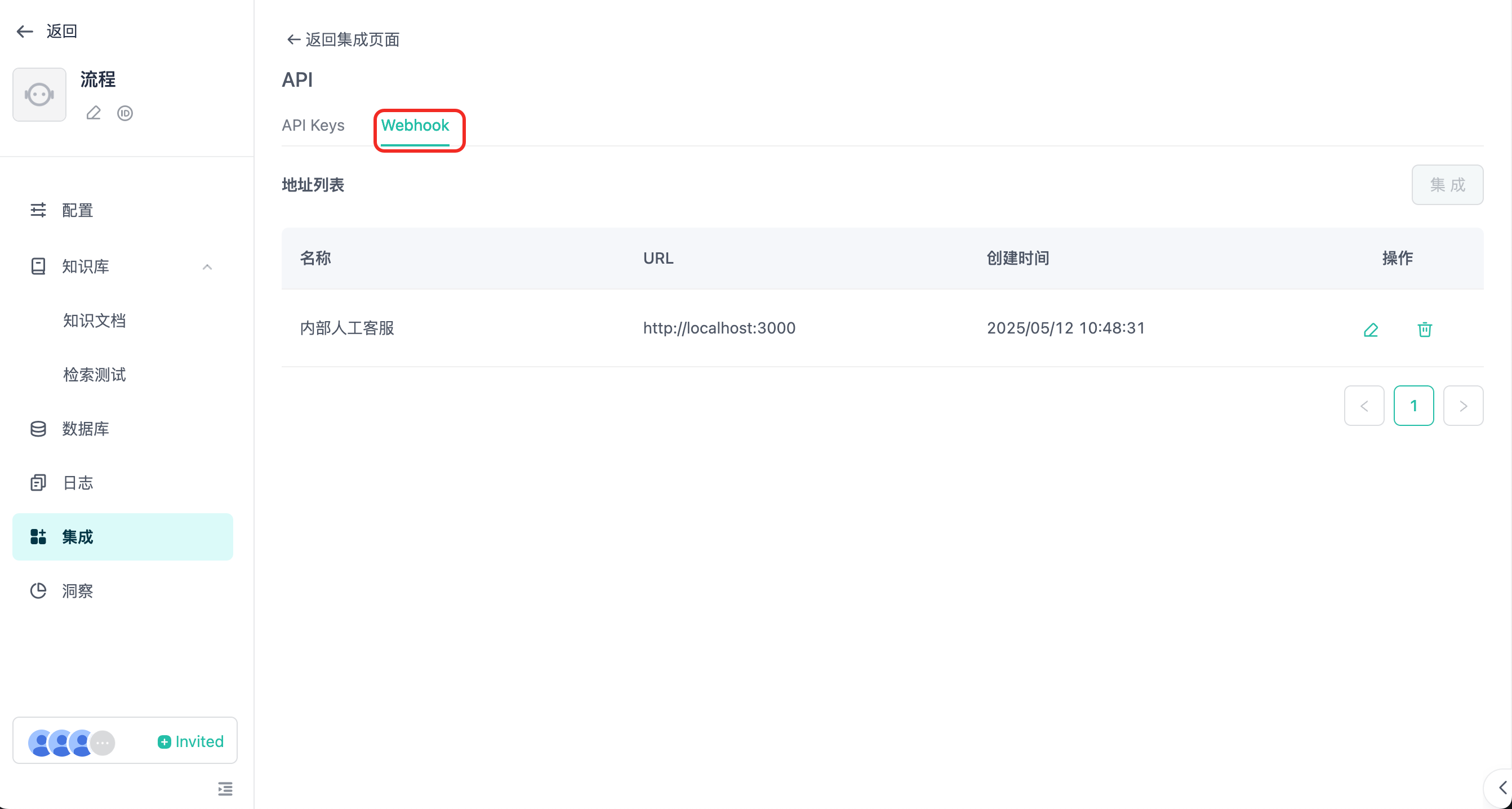
Webhook 消息详见 Webhook接收消息 和人工接管服务。
⚠️ API模式下,如果启用人工接管服务,则必须使用webhook响应模式才能接收到人工客服回复的消息
失败响应
| 字段 | 类型 | 描述 |
|---|---|---|
| code | int | 错误码。 |
| message | string | 错误详情。 |
失败示例
                      {
  "code": 40000,
  "message": "参数错误",
  "errors": [
    {
      "error_code": 40000,
      "error_message": "Message user role type must have file or content."
    }
  ],
  "data": {
    "create_time": 1679587005,
    "conversation_id": "657303a8a764d47094874bbe",
    "user_id": "65a4ccfc7ce58e728d5897e0",
    "anonymous_id": "device_abcdef123456",
    "message_id": "65a4ccfC7ce58e728d5897e0",
    "output": [
      {
        "from_component_branch": "1",
        "from_component_name": "Component Name",
        "content": {
          "text": "已根据可识别的内容为你解答……",
          "audio": null
        }
      }
    ],
    "usage": {
      "tokens": {
        "total_tokens": 29,
        "prompt_tokens": 19,
        "prompt_tokens_details": {
          "audio_tokens": 0,
          "text_tokens": 0
        },
        "completion_tokens": 10,
        "completion_tokens_details": {
          "reasoning_tokens": 0,
          "audio_tokens": 0,
          "text_tokens": 0
        }
      },
      "credits": {
        "total_credits": 0,
        "text_input_credits": 0,
        "text_output_credits": 0,
        "audio_input_credits": 0,
        "audio_output_credits": 0
      }
    }
  }
}
错误码
| Code | Message |
|---|---|
| 40000 | 参数错误 |
| 40127 | 开发者鉴权失败 |
| 40356 | 会话不存在 |
| 40358 | 会话ID与智能体或用户不匹配 |
| 40364 | 该 智能体 未使用支持图片模态的 大模型 |
| 50000 | 系统内部错误 |
| 20040 | 超过问题长度限制 |
| 20022 | 积分不足 |
| 20055 | 禁止使用api功能,请确保API开关已经打开 |