
Send Message
Use this API to send messages to a specified conversation_id and receive responses generated by the Agent. The API supports various message content types including text, images, audio, and documents.
Request Method
POST
Endpoint
https://api-${endpoint}.gptbots.ai/v2/conversation/message
Authentication
Refer to API Overview for authentication instructions.
Request
Request Example
                      curl -X POST 'https://api-${endpoint}.gptbots.ai/v2/conversation/message' \
-H 'Authorization: Bearer ${API Key}' \
-H 'Content-Type: application/json' \
-d '{
    "conversation_id": "686e2646cb8ee942d9a62d79",
    "response_mode": "blocking",
    "messages": [
        {
            "role": "user",
            "content": [
                {
                    "type": "text",
                    "text": "I have uploaded 2 image files, please OCR and return 2 json records."
                },
                {
                    "type": "image",
                    "image": [
                        {
                            "base64_content": "<complete_base64_string>",
                            "format": "jpeg",
                            "name": "TAXI1"
                        },
                        {
                            "url": "https://gptbots.ai/example.png",
                            "format": "png",
                            "name": "TAXI2"
                        }
                    ]
                },
                {
                    "type": "audio",
                    "audio": [
                        {
                            "url": "https://gptbots.ai/example.mp3",
                            "format": "mp3",
                            "name": "example1 audio"
                        }
                    ]
                },
                {
                    "type": "document",
                    "document": [
                        {
                            "base64_content": "<complete_base64_string>",
                            "format": "pdf",
                            "name": "example pdf"
                        }
                    ]
                }
            ]
        }
    ],
    "conversation_config": {
        "long_term_memory": false,
        "short_term_memory": false,
        "knowledge": {
            "data_ids": [
                "58c70da0403cc812641b9356",
                "59c70da0403cc812641df35a"
            ],
            "group_ids": [
                "67c70da0403cc812641b93je",
                "69c70da0403cc812641df35f"
            ]
        },
        "custom_variables": {
            "var_current_url": "https://gptbots.ai/example",
            "var_session_id": "abcdef"
        }
    }
}'
Important Notes:
- For
image,audio, anddocumentcontent types, you can use either base64 encoding or URL links - both formats are supported. - Assistant content must be string type.
- In Custom Helpdesk (自建客服系统) mode, agent messages and user messages received during human takeover are submitted with
ai_response=falseorrole=human_agent; they are archived only and do NOT trigger the AI. Example:{ "conversation_id": "686e2646cb8ee942d9a62d79", "response_mode": "blocking", "ai_response": false, "human_agent_info": { "name": "Alice", "email": "alice@example.com", "image_url": "https://gptbots.ai/avatar.png" }, "messages": [ { "role": "human_agent", "content": "Hello, this is a human agent — how can I help you?" } ] }{ "conversation_id": "686e2646cb8ee942d9a62d79", "response_mode": "blocking", "ai_response": false, "human_agent_info": { "name": "Alice", "email": "alice@example.com", "image_url": "https://gptbots.ai/avatar.png" }, "messages": [ { "role": "human_agent", "content": "Hello, this is a human agent — how can I help you?" } ] }This code block in the floating window - Developers only need to send the latest user message, as GPTBots handles short-term and long-term memory by default. If you need to customize the short-term memory context, refer to the example below:"messages": [ { "role": "user", "content": "Hello" //Custom short-term memory }, { "role": "assistant", "content": "Hello! How can I assist you today?" //Custom short-term memory }, { "role": "user", "content": "Hello" //Latest user message }]
                          "messages": [
        {
            "role": "user",
            "content": "Hello"                                //Custom short-term memory
        },
        {
            "role": "assistant",
            "content": "Hello! How can I assist you today?"   //Custom short-term memory
        },
        {
            "role": "user",
            "content": "Hello"                                //Latest user message
        }]
This code block in the floating window - When using LoopAgent in streaming mode, if you need the process messages emitted while the agent is running, you can declare the
is_process_resultfield in the request parameters.{ "conversation_id": "686e2646cb8ee942d9a62d79", "response_mode": "streaming", "is_process_result": true, "messages": [ { "role": "human_agent", "content": "Hello, this is a human agent — how can I help you?" } ] }{ "conversation_id": "686e2646cb8ee942d9a62d79", "response_mode": "streaming", "is_process_result": true, "messages": [ { "role": "human_agent", "content": "Hello, this is a human agent — how can I help you?" } ] }This code block in the floating window
Request Headers
| Field | Type | Description |
|---|---|---|
| Authorization | Bearer ${API Key} | Use Authorization: Bearer ${API Key} for authentication. Get API key from API Key page. |
| Content-Type | application/json | Data type, must be application/json. |
Request Parameters
| Field | Type | Required | Description |
|---|---|---|---|
| conversation_id | string | Yes | Unique identifier for the conversation. Must provide the conversation_id to continue the conversation. |
| response_mode | string | Yes | Agent response mode: |
| messages | JSON Array | Yes | Message content, supports the 3 roles user, assistant, and human_agent to construct conversation context.ai_response. |
| is_process_result | boolean | No | Whether LoopAgent outputs process information. Can be empty, defaults to false.false: only the final answer is streamed, with no process messages.true: the narration messages between rounds and the reasoning process are delivered token by token, and the final answer also stays token-by-token incremental. |
| ai_response | boolean | No | Whether the AI responds to this message. Defaults to true — omitting the field behaves exactly like existing calls.false: the message is archived only; the AI does not respond, consuming no tokens or credits, and the response is a lightweight receipt.true: the AI responds normally; in Custom Helpdesk mode, explicitly passing true also hands the conversation back to the AI from human takeover.false; otherwise equivalent to true. |
| human_agent_info | object | No | Human-agent identity info; only meaningful when messages contains role=human_agent (top-level field, one agent per request). |
| name | string | No | Agent name. |
| string | No | Agent email. | |
| image_url | string | No | Agent avatar URL. |
| conversation_config | object | No | Allows developers to temporarily adjust the Agent's functional scope for this conversation to meet special requirements. |
| short_term_memory | boolean | No | Short-term memory switch. Enable or disable short-term memory for this conversation only. |
| long_term_memory | boolean | No | Long-term memory switch. Enable or disable long-term memory for this conversation only. |
| knowledge | object | No | Knowledge retrieval scope. Customize the knowledge retrieval range for this conversation only. When both group_ids and data_ids are provided, retrieval is performed within the union of their knowledge bases. If both are empty arrays, no knowledge is retrieved. If the knowledge parameter is omitted, the Agent's default knowledge configuration is used.group_ids: Knowledge base IDs, which may contain multiple knowledge documents.data_ids: Knowledge document IDs within the knowledge base. |
| custom_variables | object | No | Custom variables. Allows developers to temporarily adjust the values of custom variables in the Agent for this conversation only. |
| thinking | boolean | No | Controls whether to return Thinking information in streaming. |
| tool_call | boolean | No | Controls whether to return tool call information in streaming. |
Note:
Agent input and output configuration pages support different recognition schemes for different message types. Supported file types and sizes vary. Adjust API submission data accordingly. Maximum supported message formats:
- Text message: string
- Audio message: .mp3, .wav, .acc
- Image message: .jpg, .jpeg, .png, .gif, .webp
- Document message: .pdf, .txt, .docx, .csv, .xlsx, .html, .json, .md, .tex, .ts, .xml, etc.
Response
Response Example
                      {
    "create_time": 1679587005,
    "conversation_id": "657303a8a764d47094874bbe",
    "user_id": "65a4ccfc7ce58e728d5897e0",
    "anonymous_id": "device_abcdef123456",
    "message_id": "65a4ccfC7ce58e728d5897e0",
    "output": [
        {
            "from_component_branch": "1",
            "from_component_name": "Component Name",
            "content": {
                "text": "Hi, is there anything I can help you?",
                "audio": [
                    {
                        "audio": "http://gptbots.ai/example.mp3",
                        "transcript": "Transcribed audio content"
                    }
                ]
            }
        }
    ],
    "usage": {
        "tokens": {
            "total_tokens": 29,
            "prompt_tokens": 19,
            "prompt_tokens_details": {
                "audio_tokens": 0,
                "text_tokens": 0
            },
            "completion_tokens": 10,
            "completion_tokens_details": {
                "reasoning_tokens": 0,
                "audio_tokens": 0,
                "text_tokens": 0
            }
        },
        "credits": {
            "total_credits": 0.0,
            "text_input_credits": 0.0,
            "text_output_credits": 0.0,
            "audio_input_credits": 0.0,
            "audio_output_credits": 0.0
        }
    },
    "human_trigger": true
}
Response example when human handoff is triggered
In Custom Helpdesk mode, when this reply triggers a handoff to a human, human_trigger is true; if a handoff note also exists, a handoff object is additionally returned (this field is absent when there is no note).
                      {
    "create_time": 1679587005,
    "conversation_id": "657303a8a764d47094874bbe",
    "user_id": "65a4ccfc7ce58e728d5897e0",
    "anonymous_id": "device_abcdef123456",
    "message_id": "65a4ccfC7ce58e728d5897e0",
    "output": [
        {
            "from_component_branch": null,
            "from_component_name": "AI Model-1",
            "content": {
                "text": "Transferring you to a human agent, please wait a moment.",
                "audio": null
            }
        }
    ],
    "usage": {
        "tokens": {
            "total_tokens": 29,
            "prompt_tokens": 19,
            "prompt_tokens_details": {
                "audio_tokens": 0,
                "text_tokens": 19
            },
            "completion_tokens": 10,
            "completion_tokens_details": {
                "reasoning_tokens": 0,
                "audio_tokens": 0,
                "text_tokens": 10
            }
        },
        "credits": {
            "total_credits": 0.0,
            "text_input_credits": 0.0,
            "text_output_credits": 0.0,
            "audio_input_credits": 0.0,
            "audio_output_credits": 0.0
        }
    },
    "human_trigger": true,
    "handoff": {
        "note": "Handoff reason: The user expressed dissatisfaction with the refund process twice in a row and requested human handling.\nConversation summary: The user placed an order on March 2, did not receive a refund notification after requesting a refund, and has confirmed order number 20260302-8891."
    }
}
Successful Response (Blocking)
⚠️ In blocking mode, human takeover is unavailable when integrating third-party human-agent systems such as LiveChat or Intercom (agent messages are delivered asynchronously and require webhook mode).
This restriction does NOT apply when using Custom Helpdesk: the handoff signal is returned viahuman_trigger/handoffin the response body, and agent messages are written by the developer through this same API usingrole=human_agent.
| Field | Type | Description |
|---|---|---|
| user_id | string | The user ID bound by the developer; null when no user is bound. |
| anonymous_id | string | Anonymous user (device) ID. |
| conversation_id | string | Yes |
| message_id | string | Unique identifier for a message within a conversation. |
| create_time | long | Timestamp when this response message was generated. |
| output | JSON Array | Agent response content. |
| from_component_branch | string | FlowAgent branch. |
| from_component_name | string | Upstream component name in FlowAgent. |
| content | object | Message content replied by AI Agent, currently includes two types of messages: text and audio. |
| human_trigger | boolean | Whether this reply triggered a human handoff. false when not triggered. |
| handoff | object | Human-handoff info; present only when human_trigger is true and a handoff note exists. |
| note | string | Handoff note (handoff reason + conversation summary), up to 2000 characters. |
| ai_response | boolean | Echoed back in the receipt of archive-only requests (ai_response=false or containing role=human_agent) to confirm the message was recognized as 'archive-only'. |
| sender_role | string | Echoed back in the receipt of archive-only requests; value is human_agent or user, to confirm the role of the archived message. |
| usage | object | Resource consumption details. |
| tokens | JSON Array | Total tokens consumed by the Agent in this conversation. |
| total_tokens | integer | Total tokens consumed for both input and output in this conversation. |
| prompt_tokens | integer | Total tokens consumed for input in this conversation. |
| completion_tokens | integer | Total tokens consumed for output in this conversation. |
| prompt_tokens_details | object | Detailed token consumption breakdown for input. |
| completion_tokens_details | object | Detailed token consumption breakdown for output. |
| credits | object | Total credits consumed by the Agent in this conversation. |
| text_input_credits | double | Credits consumed for input text messages in this conversation. |
| text_output_credits | double | Credits consumed for output text messages in this conversation. |
| audio_input_credits | double | Credits consumed for input audio messages in this conversation. |
| audio_output_credits | double | Credits consumed for output audio messages in this conversation. |
Successful Response (Streaming)
⚠️ In streaming mode, human takeover is unavailable when integrating third-party human-agent systems such as LiveChat or Intercom (agent messages are delivered asynchronously and require webhook mode).
This restriction does NOT apply when using Custom Helpdesk: the handoff trigger is delivered as acode:36 HumanTriggerframe, and the handoff note follows immediately as acode:107 HumanHandoffNoteframe.
| Field | Type | Description |
|---|---|---|
| code | int | Message type code: 3-Text, 10-FlowAgent output, 0-End, 4-Usage data, 39-Audio message, Tool Call Request-5, Tool Call Response-6, Thinking-41, 36-Human-handoff trigger, 107-Human-handoff note. |
| message | string | Message type: Text, FlowOutput, End, HumanTrigger, HumanHandoffNote. |
| data | object | Response content. |
- Text message streaming example:
                      {"code":11,"message":"MessageInfo","data":{"message_id":"6785dba0f06d872bff9ee347"}}
{"code":3,"message":"Text","data":"How "}
{"code":3,"message":"Text","data":"can "}
{"code":3,"message":"Text","data":"I "}
{"code":3,"message":"Text","data":"help "}
{"code":3,"message":"Text","data":"you?"}
{"code":0,"message":"End","data":null}
- Audio message streaming example:
                      {"code":11,"message":"MessageInfo","data":{"message_id":"67b857b6be1f2906861a5e75"}}
{"code":39,"message":"Audio","data":{"audioAnswer":"","transcript":"Hello"}}
{"code":39,"message":"Audio","data":{"audioAnswer":"EQAUAA0...IA3bi","transcript":""}}
{"code":0,"message":"End","data":null}
- In Custom Helpdesk mode, when a human handoff is triggered, the handoff-trigger frame and the handoff-note frame are delivered in order, before the
Endframe:
                      {"code":3,"message":"Text","data":"Transferring you to a human agent, please wait a moment."}
{"code":36,"message":"HumanTrigger","data":"HumanTrigger"}
{"code":107,"message":"HumanHandoffNote","data":{"note":"Handoff reason: The user expressed dissatisfaction with the refund process twice in a row and requested human handling.\nConversation summary: The user placed an order on March 2, did not receive a refund notification after requesting a refund, and has confirmed order number 20260302-8891."}}
{"code":0,"message":"End","data":null}
Notes:
code: 36, message: "HumanTrigger"means this reply triggered a human handoff;datais a fixed identifier string.code: 107, message: "HumanHandoffNote"is the handoff note; itsdatastructure matches thehandofffield in the blocking response ({"note": "..."}).- The
HumanHandoffNoteframe is delivered only when a handoff note exists; with no note there is only theHumanTriggerframe — there is no empty107frame. - Both frames are always delivered before the
End(code: 0) frame.
Successful Response (Webhook)
After configuring the webhook URL in the "Integration-API" section, the GPTBots system will send "Agent reply" and "human customer service reply" messages to the webhook URL.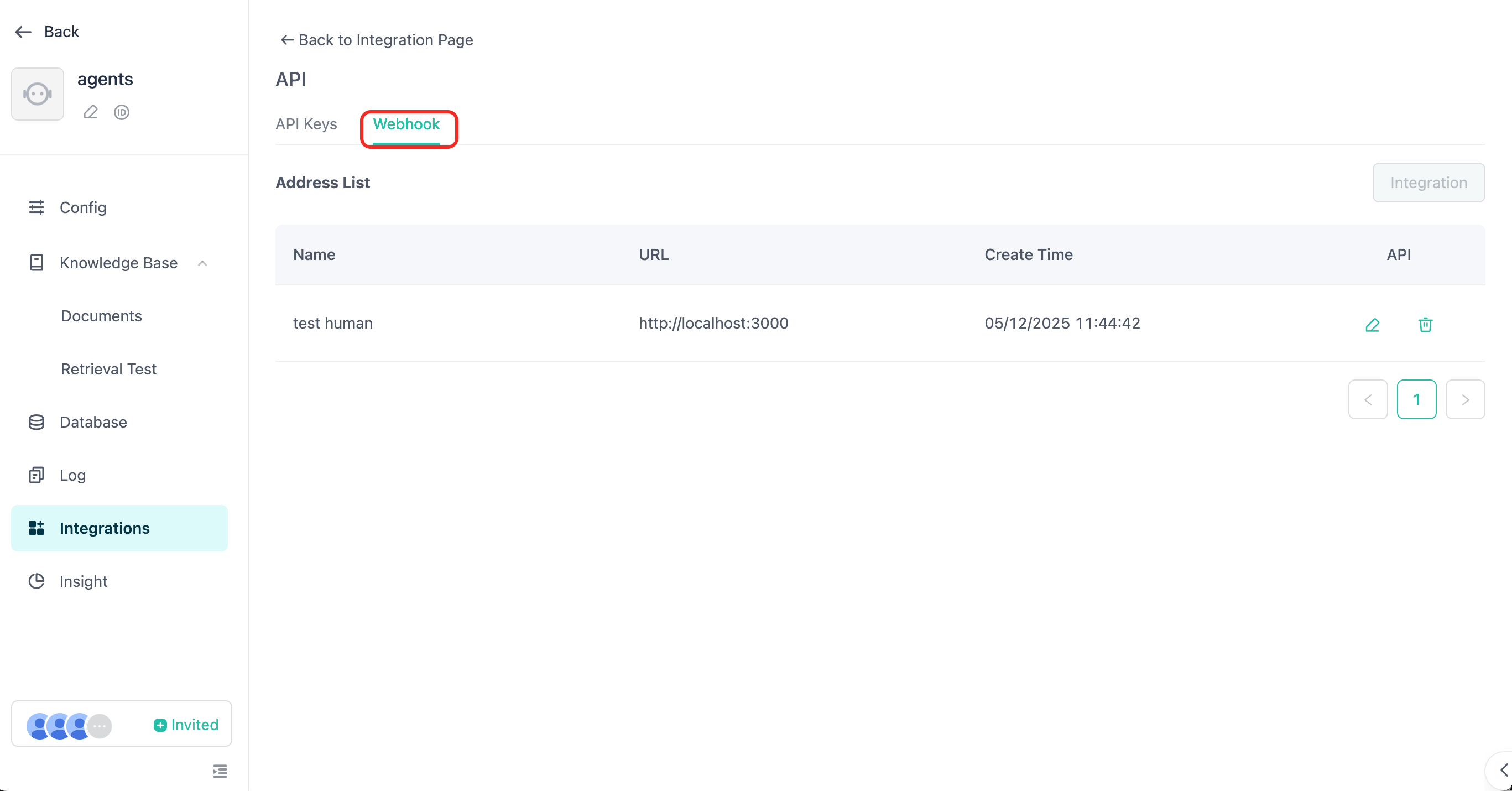
For detailed information about webhook messages, please refer to Webhook receives messages and human handoff service.
⚠️ In API mode, if the human handoff service is enabled, you must use the webhook response mode to receive the messages replied by human customer service.
Error Response
| Field | Type | Description |
|---|---|---|
| code | int | Error code. |
| message | string | Error details. |
Failure Example
                      {
  "code": 40000,
  "message": "Invalid parameters",
  "errors": [
    {
      "error_code": 40000,
      "error_message": "Message user role type must have file or content."
    }
  ],
  "data": {
    "create_time": 1679587005,
    "conversation_id": "657303a8a764d47094874bbe",
    "user_id": "65a4ccfc7ce58e728d5897e0",
    "anonymous_id": "device_abcdef123456",
    "message_id": "65a4ccfC7ce58e728d5897e0",
    "output": [
      {
        "from_component_branch": "1",
        "from_component_name": "Component Name",
        "content": {
          "text": "Answered based on the recognizable content...",
          "audio": null
        }
      }
    ],
    "usage": {
      "tokens": {
        "total_tokens": 29,
        "prompt_tokens": 19,
        "prompt_tokens_details": {
          "audio_tokens": 0,
          "text_tokens": 0
        },
        "completion_tokens": 10,
        "completion_tokens_details": {
          "reasoning_tokens": 0,
          "audio_tokens": 0,
          "text_tokens": 0
        }
      },
      "credits": {
        "total_credits": 0,
        "text_input_credits": 0,
        "text_output_credits": 0,
        "audio_input_credits": 0,
        "audio_output_credits": 0
      }
    }
  }
}
Error Codes
| Code | Message |
|---|---|
| 40000 | Invalid parameters |
| 40127 | Developer authentication failed |
| 40356 | Conversation does not exist |
| 40358 | Conversation ID mismatch |
| 40364 | Agent does not support image modality |
| 50000 | Internal system error |
| 20040 | Exceeded question length limit |
| 20022 | Insufficient credits |
| 20055 | API usage forbidden, ensure API switch is enabled |