
發送訊息
使用此 API 可向指定的 conversation_id 發送訊息,並接收 Agent 產生的回覆。API 支援多種訊息內容類型,包括文字、圖片、音頻及文件。
請求方法
POST
Endpoint
https://api-${endpoint}.gptbots.ai/v2/conversation/message
認證
請參考 API 概覽 取得認證說明。
請求
請求範例
                      curl -X POST 'https://api-${endpoint}.gptbots.ai/v2/conversation/message' \
-H 'Authorization: Bearer ${API Key}' \
-H 'Content-Type: application/json' \
-d '{
    "conversation_id": "686e2646cb8ee942d9a62d79",
    "response_mode": "blocking",
    "messages": [
        {
            "role": "user",
            "content": [
                {
                    "type": "text",
                    "text": "我已上傳了兩個圖片檔案,請進行 OCR 並回傳兩筆 JSON 記錄。"
                },
                {
                    "type": "image",
                    "image": [
                        {
                            "base64_content": "<complete_base64_string>",
                            "format": "jpeg",
                            "name": "TAXI1"
                        },
                        {
                            "url": "https://gptbots.ai/example.png",
                            "format": "png",
                            "name": "TAXI2"
                        }
                    ]
                },
                {
                    "type": "audio",
                    "audio": [
                        {
                            "url": "https://gptbots.ai/example.mp3",
                            "format": "mp3",
                            "name": "example1 audio"
                        }
                    ]
                },
                {
                    "type": "document",
                    "document": [
                        {
                            "base64_content": "<complete_base64_string>",
                            "format": "pdf",
                            "name": "example pdf"
                        }
                    ]
                }
            ]
        }
    ],
    "conversation_config": {
        "long_term_memory": false,
        "short_term_memory": false,
        "knowledge": {
            "data_ids": [
                "58c70da0403cc812641b9356",
                "59c70da0403cc812641df35a"
            ],
            "group_ids": [
                "67c70da0403cc812641b93je",
                "69c70da0403cc812641df35f"
            ]
        },
        "custom_variables": {
            "var_current_url": "https://gptbots.ai/example",
            "var_session_id": "abcdef"
        }
    }
}'
重要說明:
- 對於
image、audio和document類型的內容,可以使用 base64 編碼或 URL 連結,兩種格式皆支援。 - 在**自建客服系統(Custom Helpdesk)**模式下,人工接管期間收到的坐席訊息與使用者訊息,皆以
ai_response=false或role=human_agent提交;這些訊息僅歸檔入庫,不會觸發 AI。範例:{ "conversation_id": "686e2646cb8ee942d9a62d79", "response_mode": "blocking", "ai_response": false, "human_agent_info": { "name": "Alice", "email": "alice@example.com", "image_url": "https://gptbots.ai/avatar.png" }, "messages": [ { "role": "human_agent", "content": "您好,這裡是人工客服,請問有什麼可以幫您?" } ] }{ "conversation_id": "686e2646cb8ee942d9a62d79", "response_mode": "blocking", "ai_response": false, "human_agent_info": { "name": "Alice", "email": "alice@example.com", "image_url": "https://gptbots.ai/avatar.png" }, "messages": [ { "role": "human_agent", "content": "您好,這裡是人工客服,請問有什麼可以幫您?" } ] }此代碼塊在浮窗中顯示 - 開發者僅需發送最新的使用者訊息,GPTBots 會自動處理短期記錄及長期記錄。如需自訂短期記錄上下文,請參考以下範例:"messages": [ { "role": "user", "content": "Hello" //自訂短期記錄 }, { "role": "assistant", "content": "Hello! How can I assist you today?" //自訂短期記錄 }, { "role": "user", "content": "Hello" //最新使用者訊息 }]
                          "messages": [
        {
            "role": "user",
            "content": "Hello"                                //自訂短期記錄
        },
        {
            "role": "assistant",
            "content": "Hello! How can I assist you today?"   //自訂短期記錄
        },
        {
            "role": "user",
            "content": "Hello"                                //最新使用者訊息
        }]
此代碼塊在浮窗中顯示 - 開發者在使用 LoopAgent 串流模式時,若需要 agent 執行時的過程訊息,可以透過入參
is_process_result欄位進行宣告。{ "conversation_id": "686e2646cb8ee942d9a62d79", "response_mode": "streaming", "is_process_result": true, "messages": [ { "role": "human_agent", "content": "您好,這裡是人工客服,請問有什麼可以幫您?" } ] }{ "conversation_id": "686e2646cb8ee942d9a62d79", "response_mode": "streaming", "is_process_result": true, "messages": [ { "role": "human_agent", "content": "您好,這裡是人工客服,請問有什麼可以幫您?" } ] }此代碼塊在浮窗中顯示
請求標頭
| 欄位 | 類型 | 描述 |
|---|---|---|
| Authorization | Bearer ${API Key} | 請使用 Authorization: Bearer ${API Key} 來完成認證。API 金鑰可於 API Key 頁面取得。 |
| Content-Type | application/json | 資料類型,必須為 application/json。 |
請求參數
| 欄位 | 類型 | 必填 | 描述 |
|---|---|---|---|
| conversation_id | string | 是 | 對話唯一識別碼。必須提供 conversation_id 以繼續對話。 |
| response_mode | string | 是 | Agent 回覆模式: |
| messages | JSON Array | 是 | 訊息內容,支援 user、assistant 與 human_agent 3 個角色以建立對話上下文。ai_response 影響。 |
| is_process_result | boolean | 否 | LoopAgent 是否輸出過程資訊。可為空,預設為 false。false:以串流傳遞最終答案,無過程訊息true:輪間敘述訊息與推理過程逐字下發,最終答案也保持逐字增量 |
| ai_response | boolean | 否 | AI 是否回覆本條訊息。預設為 true,即不傳該欄位時行為與既有呼叫完全一致。false:本次訊息僅歸檔入庫、AI 不回覆,也不消耗 token 與點數,回應為輕量回執。true:AI 正常回覆;在自建客服系統(Custom Helpdesk)模式下,顯式傳 true 還會將對話從人工接管狀態交回 AI。false;否則等同於 true。 |
| human_agent_info | object | 否 | 坐席身分資訊,僅在 messages 中含 role=human_agent 時有意義(頂層欄位,一次請求對應一位坐席)。 |
| name | string | 否 | 坐席姓名。 |
| string | 否 | 坐席信箱。 | |
| image_url | string | 否 | 坐席頭像位址。 |
| conversation_config | object | 否 | 允許開發者臨時調整本次對話的 Agent 功能範圍以滿足特殊需求。 |
| short_term_memory | boolean | 否 | 短期記錄開關。僅針對本次對話啟用或停用短期記錄。 |
| long_term_memory | boolean | 否 | 長期記錄開關。僅針對本次對話啟用或停用長期記錄。 |
| knowledge | object | 否 | 知識檢索範圍。僅針對本次對話自訂知識檢索範圍。若同時提供 group_ids 與 data_ids,則檢索範圍為其知識庫聯集。若兩者皆為空陣列,則不檢索知識。若省略 knowledge 參數,則使用 Agent 預設知識設定。group_ids:知識庫 ID,可能包含多份知識文件。data_ids:知識庫內的知識文件 ID。 |
| custom_variables | object | 否 | 自訂變數。允許開發者臨時調整本次對話中 Agent 的自訂變數值。 |
注意:
Agent 輸入與輸出設定頁支援不同訊息類型的識別方式。支援的檔案類型與大小各異,請依需求調整 API 提交資料。最大支援訊息格式:
- 文字訊息:string
- 音頻訊息:.mp3, .wav, .acc
- 圖片訊息:.jpg, .jpeg, .png, .gif, .webp
- 文件訊息:.pdf, .txt, .docx, .csv, .xlsx, .html, .json, .md, .tex, .ts, .xml 等
回應
回應範例
                      {
    "create_time": 1679587005,
    "conversation_id": "657303a8a764d47094874bbe",
    "user_id": "65a4ccfc7ce58e728d5897e0",
    "anonymous_id": "device_abcdef123456",
    "message_id": "65a4ccfC7ce58e728d5897e0",
    "output": [
        {
            "from_component_branch": "1",
            "from_component_name": "Component Name",
            "content": {
                "text": "您好,有什麼需要我幫忙的嗎?",
                "audio": [
                    {
                        "audio": "http://gptbots.ai/example.mp3",
                        "transcript": "轉錄的音頻內容"
                    }
                ]
            }
        }
    ],
    "usage": {
        "tokens": {
            "total_tokens": 29,
            "prompt_tokens": 19,
            "prompt_tokens_details": {
                "audio_tokens": 0,
                "text_tokens": 0
            },
            "completion_tokens": 10,
            "completion_tokens_details": {
                "reasoning_tokens": 0,
                "audio_tokens": 0,
                "text_tokens": 0
            }
        },
        "credits": {
            "total_credits": 0.0,
            "text_input_credits": 0.0,
            "text_output_credits": 0.0,
            "audio_input_credits": 0.0,
            "audio_output_credits": 0.0
        }
    },
    "human_trigger": true
}
轉人工觸發時的回應範例
自建客服系統(Custom Helpdesk)模式下,當本輪回覆觸發了轉人工時,human_trigger 為 true;若同時存在交接備註,則額外回傳 handoff 物件(無備註時該欄位不出現)。
                      {
    "create_time": 1679587005,
    "conversation_id": "657303a8a764d47094874bbe",
    "user_id": "65a4ccfc7ce58e728d5897e0",
    "anonymous_id": "device_abcdef123456",
    "message_id": "65a4ccfC7ce58e728d5897e0",
    "output": [
        {
            "from_component_branch": null,
            "from_component_name": "AI Model-1",
            "content": {
                "text": "正在為您轉接人工客服,請稍候。",
                "audio": null
            }
        }
    ],
    "usage": {
        "tokens": {
            "total_tokens": 29,
            "prompt_tokens": 19,
            "prompt_tokens_details": {
                "audio_tokens": 0,
                "text_tokens": 19
            },
            "completion_tokens": 10,
            "completion_tokens_details": {
                "reasoning_tokens": 0,
                "audio_tokens": 0,
                "text_tokens": 10
            }
        },
        "credits": {
            "total_credits": 0.0,
            "text_input_credits": 0.0,
            "text_output_credits": 0.0,
            "audio_input_credits": 0.0,
            "audio_output_credits": 0.0
        }
    },
    "human_trigger": true,
    "handoff": {
        "note": "轉接原因:使用者連續兩次表達對退款流程不滿,要求人工處理。\n對話摘要:使用者於 3 月 2 日下單,申請退款後未收到退款通知,已確認訂單號 20260302-8891。"
    }
}
成功回應(blocking)
⚠️ blocking 回覆模式下,接入 LiveChat、Intercom 等第三方人工客服系統時人工接管服務不可用(坐席訊息為非同步下發,需 webhook 模式接收)。
使用**自建客服系統(Custom Helpdesk)**時不受此限制:轉人工訊號透過回應體的human_trigger/handoff回傳,坐席訊息由開發者自行透過本 API 以role=human_agent寫入。
| 欄位 | 類型 | 描述 |
|---|---|---|
| user_id | string | 開發者綁定的使用者 ID,未綁定使用者時為 null。 |
| anonymous_id | string | 匿名使用者(裝置)ID。 |
| conversation_id | string | 對話識別碼,傳入 conversation_id 以繼續對話。 |
| message_id | string | 對話中訊息的唯一識別碼。 |
| create_time | long | 此回覆訊息產生的時間戳。 |
| output | JSON Array | Agent 回覆內容。 |
| from_component_branch | string | FlowAgent 分支。 |
| from_component_name | string | FlowAgent 上游元件名稱。 |
| content | object | AI Agent 回覆的訊息內容,目前包含兩種類型:text 及 audio。 |
| human_trigger | boolean | 本次回覆是否觸發了轉人工。未觸發時為 false。 |
| handoff | object | 轉人工交接資訊,僅 human_trigger 為 true 且存在交接備註時出現。 |
| note | string | 轉接備註(轉接原因 + 對話摘要),最長 2000 字元。 |
| ai_response | boolean | 僅歸檔請求(ai_response=false 或含 role=human_agent)的回執中回顯,用於確認該訊息已被識別為「僅歸檔」。 |
| sender_role | string | 僅歸檔請求的回執中回顯,取值 human_agent 或 user,用於確認歸檔訊息的角色。 |
| usage | object | 資源消耗詳細資訊。 |
| tokens | JSON Array | 本次對話中 Agent 消耗的總 token 數。 |
| total_tokens | integer | 本次對話輸入與輸出消耗的總 token 數。 |
| prompt_tokens | integer | 本次對話輸入消耗的總 token 數。 |
| completion_tokens | integer | 本次對話輸出消耗的總 token 數。 |
| prompt_tokens_details | object | 輸入 token 消耗詳細分解。 |
| completion_tokens_details | object | 輸出 token 消耗詳細分解。 |
| credits | object | 本次對話中 Agent 消耗的總點數。 |
| text_input_credits | double | 本次對話輸入文字訊息消耗的點數。 |
| text_output_credits | double | 本次對話輸出文字訊息消耗的點數。 |
| audio_input_credits | double | 本次對話輸入音頻訊息消耗的點數。 |
| audio_output_credits | double | 本次對話輸出音頻訊息消耗的點數。 |
成功回應(streaming)
⚠️ streaming 回覆模式下,接入 LiveChat、Intercom 等第三方人工客服系統時人工接管服務不可用(坐席訊息為非同步下發,需 webhook 模式接收)。
使用**自建客服系統(Custom Helpdesk)**時不受此限制:轉人工觸發以code:36 HumanTrigger幀下發,交接備註緊隨其後以code:107 HumanHandoffNote幀下發。
| 欄位 | 類型 | 描述 |
|---|---|---|
| code | int | 訊息型態代碼:3-文字,10-FlowAgent 輸出,0-結束,4-使用數據,39-音頻訊息,36-轉人工觸發,107-轉人工交接備註。 |
| message | string | 訊息型態:文字、FlowOutput、結束、HumanTrigger、HumanHandoffNote。 |
| data | object | 回覆內容。 |
- 文字訊息串流範例:
                      {"code":11,"message":"MessageInfo","data":{"message_id":"6785dba0f06d872bff9ee347"}}
{"code":3,"message":"Text","data":"How "}
{"code":3,"message":"Text","data":"can "}
{"code":3,"message":"Text","data":"I "}
{"code":3,"message":"Text","data":"help "}
{"code":3,"message":"Text","data":"you?"}
{"code":0,"message":"End","data":null}
- 音頻訊息串流範例:
                      {"code":11,"message":"MessageInfo","data":{"message_id":"67b857b6be1f2906861a5e75"}}
{"code":39,"message":"Audio","data":{"audioAnswer":"","transcript":"Hello"}}
{"code":39,"message":"Audio","data":{"audioAnswer":"EQAUAA0...IA3bi","transcript":""}}
{"code":0,"message":"End","data":null}
- 自建客服系統(Custom Helpdesk)模式下觸發轉人工時,會在
End幀之前依次下發轉人工觸發幀與交接備註幀:
                      {"code":3,"message":"Text","data":"正在為您轉接人工客服,請稍候。"}
{"code":36,"message":"HumanTrigger","data":"HumanTrigger"}
{"code":107,"message":"HumanHandoffNote","data":{"note":"轉接原因:使用者連續兩次表達對退款流程不滿,要求人工處理。\n對話摘要:使用者於 3 月 2 日下單,申請退款後未收到退款通知,已確認訂單號 20260302-8891。"}}
{"code":0,"message":"End","data":null}
說明:
code: 36, message: "HumanTrigger"表示本輪回覆觸發了轉人工,data為固定標識字串。code: 107, message: "HumanHandoffNote"表示交接備註,其data結構與 blocking 回應中的handoff欄位一致({"note": "..."})。HumanHandoffNote幀僅在存在交接備註時下發;無備註時只有HumanTrigger幀,不會出現空的107幀。- 兩幀恆在
End(code: 0)幀之前下發。
成功回應(webhook)
開發者在「整合-API」完成設定 webhook 位址後,GPTBots 系統將向 Webhook 位址傳送「Agent 回覆」與「人工客服回覆」的訊息。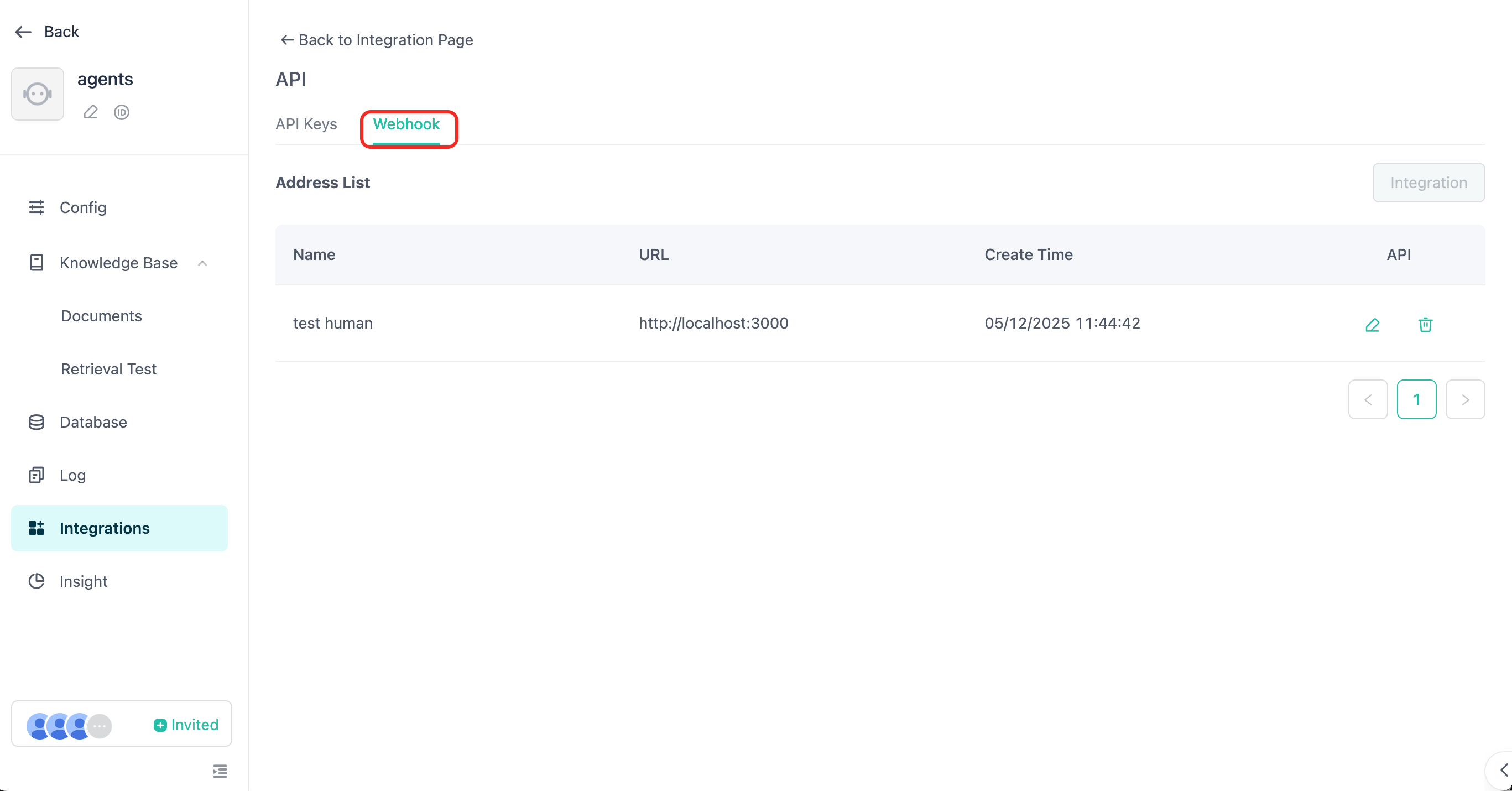
有關 webhook 訊息的詳細說明,請參考 Webhook 訊息接收 及 人工服務。
⚠️ API 模式下,如果啟用人工服務,則必須使用 webhook 回應模式才能接收到人工客服回覆的訊息
錯誤回應
| 欄位 | 類型 | 描述 |
|---|---|---|
| code | int | 錯誤代碼。 |
| message | string | 錯誤詳情。 |
失敗範例
                      {
  "code": 40000,
  "message": "無效參數",
  "errors": [
    {
      "error_code": 40000,
      "error_message": "Message user role type must have file or content."
    }
  ],
  "data": {
    "create_time": 1679587005,
    "conversation_id": "657303a8a764d47094874bbe",
    "user_id": "65a4ccfc7ce58e728d5897e0",
    "anonymous_id": "device_abcdef123456",
    "message_id": "65a4ccfC7ce58e728d5897e0",
    "output": [
      {
        "from_component_branch": "1",
        "from_component_name": "Component Name",
        "content": {
          "text": "已根據可識別的內容為你解答……",
          "audio": null
        }
      }
    ],
    "usage": {
      "tokens": {
        "total_tokens": 29,
        "prompt_tokens": 19,
        "prompt_tokens_details": {
          "audio_tokens": 0,
          "text_tokens": 0
        },
        "completion_tokens": 10,
        "completion_tokens_details": {
          "reasoning_tokens": 0,
          "audio_tokens": 0,
          "text_tokens": 0
        }
      },
      "credits": {
        "total_credits": 0,
        "text_input_credits": 0,
        "text_output_credits": 0,
        "audio_input_credits": 0,
        "audio_output_credits": 0
      }
    }
  }
}
錯誤代碼
| 代碼 | 訊息 |
|---|---|
| 40000 | 無效參數 |
| 40127 | 開發者認證失敗 |
| 40356 | 對話不存在 |
| 40358 | 對話識別碼不符 |
| 40364 | Agent 不支援圖片模式 |
| 50000 | 系統內部錯誤 |
| 20040 | 超出問題長度限制 |
| 20022 | 點數不足 |
| 20055 | 禁止使用 API,請確認 API 開關已啟用 |